Showing posts with label application. Show all posts
Showing posts with label application. Show all posts
Wednesday, November 30, 2016
How to get paid Andriod application free
How to get paid Andriod application free

1. File sharing Websites:-
The best way to download Android games and applications for free is through file sharing websites. The files to be downloaded on those websites was done by Android users who download or buy paid applications and upload them in file sharing websites. The best popular file sharing websites are:www.4shared.com
www.mediafire.com
www.filecrop.com
www.sharemobile.ro
Out of all the File Sharing Websites, I recommend 4shared, Its simply the best and most popular with loads of cool Applications and Games.
Steps To Download Paid Applications From Those Websites
1. Just log on to any of the above listed websites
2. Type the application name you want to download for free in their search bar and
3. Add the extension of .apk e.g For example, if you want to download ADWLauncher EX (A paid app in Google play Store), type Adw launcher ex .apk and press enter. The results will then be viewed.
From the results, click the latest uploaded file and download it. Once the .apk file is downloaded, transfer it to your phone with a USB cable and install it on your phone.
Note: You can also download 4shared application from the market instead of searching applications on the web, you can use it directly to download any files.
2. BlackMart Alpha App:-
BlackMart Alpha is an Android application itself, used for downloading paid applications for free. You need to search for BlackMart Alpha in the above mentioned file sharing sites, Search results will appear, Locate and Download this application, Transfer and install it on your Smart phone. After installation, open the BlackMart Alpha application, It has the same design like that of the Android Market App on your Smart phone. A list of applications will appear in it.You can also use the search option to search and download a paid application for Free with BlackMart Alpha. The price of the specified or searched application will strike out. Click on download and install it directly to your Smart phone for free.
Note: Dont update any application you downloaded from BlackMart Alpha as there are chances that it might corrupt that application.
3. Paying for Application in Android Market:-
The last tip, which is most reliable and the best way to download the paid application is by paying for an application in the Android market. To use this option you should have a good file explorer application like ASTRO File Manager and ES File Explorer. Install ES File Explorer or ASTRO File Manager If you dont have it yet on your Phone, Go to Android market and purchase any application.Within 15 minutes of the trial period you can get the full refund if you cancel the order.
The application gets downloaded to your Smart phone. Open ES file explorer, Click on Options >> Manager >> App Manager.
Go to list of installed applications and click on the application you just purchased and click on the backup. The application backup will be made in the backup folder of your SD card.
Once the backup is made, cancel the order from the Google Play Store and install it from the backup folder again. Your money will be refunded after you cancel the order. So these are the Surest Way I have been using to download any Paid Applications for free. Enjoy!
Go to link Download

Sunday, November 27, 2016
HOW TO SET SHORTCUT KEY TO OPEN ANY APPLICATION IN START MENUE
HOW TO SET SHORTCUT KEY TO OPEN ANY APPLICATION IN START MENUE
Do you know that you can set shortcut to open any application in start menu. if not then read this post carefully. we can open any application in start menu or on desktop by pressing the shortcut key.

DONT FORGET TO SHARE WITH YOUR FRIENDS BY JUST 1 CLICK ON THE BELOW LINKS
Setting Shortcut Key To Any Application
- Now i am setting shortcut of ms office
- Click on the start menu and select the application which you want to set the shortcut. I an selecting the MS OFFICE now.
- Right click on the ms office and open its properties
- Now I want to set the shortcut as CTRL + SHIFT + P to MS office.
- In the properties window press CTRL + SHIFT + P and press apply button to save settings
- Now you can open your application by pressing your shortcut
DONT FORGET TO SHARE WITH YOUR FRIENDS BY JUST 1 CLICK ON THE BELOW LINKS
Go to link Download
Friday, November 18, 2016
How to Make Voice Calls Using Facebook Application
How to Make Voice Calls Using Facebook Application
Facebook social network is the largest networks on the Internet, and used by more than billion users, most of users have list of friends close to them and communicate with them on a permanent basis, but the user needs sometimes to communicate voice with his friends, so he resorts to applications such as Viper and others.

The thing which no one know it that there is a service to make voice calls through the Facebook application itself, and also the Facebook Messenger application for Android and iOS.
How to make voice calls using Facebook application:
1- Go to the person you want to call him from chat list.
2- Press the button i located in top.
3- Press the Call button.

If the button is not enabled, the reason is the person you want to call him is not on the site in the same time.
Go to link Download
Tuesday, November 15, 2016
How To Fix GTAIV PC Seculauncher failed to start application 2000 Error
How To Fix GTAIV PC Seculauncher failed to start application 2000 Error
GTAIV Was working fine on my 32-Bit XP harddrive, but once I tryed 64-Bit, all hell broke loose. So if youre getting the error "Seculauncher: Failed to start application [2000], this may help you.
Step 1: Install GTAIV and get the error stated above.
Step 2: Navigate to Control panel > Add/Remove Programs.
Step 3: Locate Microsoft Visual C++ 2005 Redistributable, more importantly, ones that say something with x64 on end. Apparently this game runs on 32-bit? Im not completely sure, but 32-bit installer comes in the downloaded package once GTAIV is installed.
Step 4: Uninstall any Visual C++ 2005 Redistributable items listed in Add/Remove programs.
Step 5: Navigate to the GTAIV main folder, and locate the installers folder. (In my case its Program files > Steam > Steamapps >Common > Grand theft auto iv > installers. People using a disk it would be to right click on your DVD/CD drive in My computer, click explore, and find the folder named "Redistributable"
Step 6: Find "vcredist_x86.exe"
Step 7: Run this installer, complete the installation.
Step 8: Check Add/Remove programs to see that the new 2005 C++ was installed.
Step 9: Attempt to load GTAIV once more, through Social club Play button. This is as far as I got before I got a new error, the above got rid of my seculaunch error though.
Step 10: If youre receiving a new error titled "GTAIV FATAL ERROR: RMN40", continue these steps, if not, play the game (Hopefully this worked for you, I could NOT find a solution until I tryed this reccomended by "theunknownsd" on gtaforums.com. He was the one who I found the above solution from, but I figured I would re-do these steps and post them as many places as I could to help other people in the same place I was.
Step 11: If you did get the "GTAIV FATAL ERROR: RMN40" after doing the above, right click on LaunchGTAIV.exe in the main GTAIV folder, and GTAIV.exe in the main GTAIV folder, and make sure that under the Compatibility tab that "run this program in compatibility mode for:" is not checked on all of the launchers. At this point, I got a NEW error once I solved that one, so if you had the RMN40 error, and unchecking compatibility mode fixed it, you may have now received the error "GTAIV FATAL ERROR: WS10", if so continue reading.
Step 12: If you got the "GTAIV FATAL ERROR: WS10", check Add/Remove programs to make sure you have "Microsoft Games for Windows Live Redistributable installed, if you do and you still get the error, uninstall the program at this time.
Step 13: Navigate to Program files > Steam > Steamapps >Common > Grand theft auto iv > installers >xliveredist.msi (Or the redistributable folder when exploring the CD for people using a CD.
Step 14: WS10 error supposibly has to do with windows live, so you want to uninstall and reinstall if you already had it, or install it from the folders in step 13 if you didnt have it at all. After uninstalling run xliveredist.msi (Or if your just now installing) and complete the setup.
Step 15: If you still get the WS10 error, download the following GTAIV Patch (Normally downloaded through social club, but at the time it wouldnt let me login to social club, this way is probably faster anyway) http://files.filefront.com/GTAIV+PC+.../fileinfo.html
Step 16: Unzip the GTAIV_PC_Patch folder, and run the Setup.exe
Step 17: Hopefully now, when you launch GTA through social club, it will load up with no errors. In my case, all of the above got me up and going, there needs to be a hardfix patch for all this BS but I took the time to write this up since I was so mad over it.
Step 1: Install GTAIV and get the error stated above.
Step 2: Navigate to Control panel > Add/Remove Programs.
Step 3: Locate Microsoft Visual C++ 2005 Redistributable, more importantly, ones that say something with x64 on end. Apparently this game runs on 32-bit? Im not completely sure, but 32-bit installer comes in the downloaded package once GTAIV is installed.
Step 4: Uninstall any Visual C++ 2005 Redistributable items listed in Add/Remove programs.
Step 5: Navigate to the GTAIV main folder, and locate the installers folder. (In my case its Program files > Steam > Steamapps >Common > Grand theft auto iv > installers. People using a disk it would be to right click on your DVD/CD drive in My computer, click explore, and find the folder named "Redistributable"
Step 6: Find "vcredist_x86.exe"
Step 7: Run this installer, complete the installation.
Step 8: Check Add/Remove programs to see that the new 2005 C++ was installed.
Step 9: Attempt to load GTAIV once more, through Social club Play button. This is as far as I got before I got a new error, the above got rid of my seculaunch error though.
Step 10: If youre receiving a new error titled "GTAIV FATAL ERROR: RMN40", continue these steps, if not, play the game (Hopefully this worked for you, I could NOT find a solution until I tryed this reccomended by "theunknownsd" on gtaforums.com. He was the one who I found the above solution from, but I figured I would re-do these steps and post them as many places as I could to help other people in the same place I was.
Step 11: If you did get the "GTAIV FATAL ERROR: RMN40" after doing the above, right click on LaunchGTAIV.exe in the main GTAIV folder, and GTAIV.exe in the main GTAIV folder, and make sure that under the Compatibility tab that "run this program in compatibility mode for:" is not checked on all of the launchers. At this point, I got a NEW error once I solved that one, so if you had the RMN40 error, and unchecking compatibility mode fixed it, you may have now received the error "GTAIV FATAL ERROR: WS10", if so continue reading.
Step 12: If you got the "GTAIV FATAL ERROR: WS10", check Add/Remove programs to make sure you have "Microsoft Games for Windows Live Redistributable installed, if you do and you still get the error, uninstall the program at this time.
Step 13: Navigate to Program files > Steam > Steamapps >Common > Grand theft auto iv > installers >xliveredist.msi (Or the redistributable folder when exploring the CD for people using a CD.
Step 14: WS10 error supposibly has to do with windows live, so you want to uninstall and reinstall if you already had it, or install it from the folders in step 13 if you didnt have it at all. After uninstalling run xliveredist.msi (Or if your just now installing) and complete the setup.
Step 15: If you still get the WS10 error, download the following GTAIV Patch (Normally downloaded through social club, but at the time it wouldnt let me login to social club, this way is probably faster anyway) http://files.filefront.com/GTAIV+PC+.../fileinfo.html
Step 16: Unzip the GTAIV_PC_Patch folder, and run the Setup.exe
Step 17: Hopefully now, when you launch GTA through social club, it will load up with no errors. In my case, all of the above got me up and going, there needs to be a hardfix patch for all this BS but I took the time to write this up since I was so mad over it.
Go to link Download
Saturday, October 29, 2016
How To Download On The Blog BlackBerry World Application
How To Download On The Blog BlackBerry World Application
If you feel confused to download applications, games, themes, etc.. Here I will give you a way how to download, please follow the steps below:
+ Surely you log into the BlackBerry World Application to blog url (http://id-blackberry-app.blogspot.com) and choose what you want there.
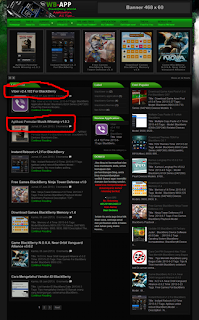
+Here I give you some links to download, such as:
- Click the image download (using PC),
- Direct download from your BlackBerry device with a click "Download here from your BlackBerry browser".
- download by scanning QRcode using your BlackBerry device, see picture below.
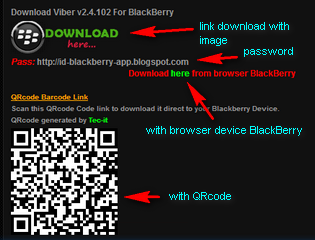
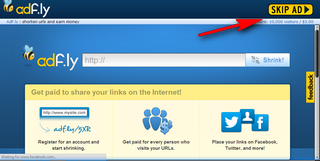
+After you select the download link (here I explain the download link with a picture) you will be taken to a new page following images are like, wait 5 seconds, SKIP AD.
+Enter the password, the password I put below the download link to the image.
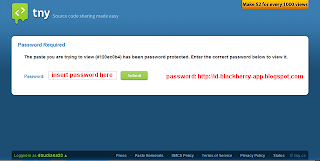
+After you enter the password you will see several links to download again, see picture.
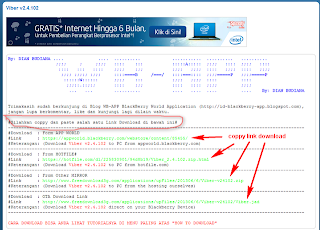
+Please select one of the main link the download at will you, coppy and paste those links in new tab on browser your. see picture.

Have a post about how to download applications, games, themes, etc on the blog BlackBerry World Application (WB-App) can assist you in downloading. Thx, janganlupa leave your comment. Regards WB-App ...
Download here steps in Indonesia language...
Go to link Download
Wednesday, September 28, 2016
How to activate Coreldraw application for free
How to activate Coreldraw application for free
Do you like capturing images and editing them, or do you like bring out your imagination into drawing, Can you imagine a picture and draw it out, and are you also a fan of editing images and uploading them to the net. Have you also tried different application used in editing images and improving them for a better quality? Do you also know the fundamentals of image editing? Well if you want t learn how to edit images coreldraw is the perfect guild that can teach you how to edit image to your taste. If you are looking for coreldraw serial key there are a lot of way to get them. Here is one of the ways of getting coreldraw serial key + activation key and installation key. People search it on YouTube some go to websites but if you can pay for the DVD then you will find its key on the back of its cover and if you have downloaded it from torrent or internet than you can try using this Coreldraw KeyGen to get unlimited amount of working activation code + coreldraw serial key + installation key®
Go to link Download
Subscribe to:
Posts (Atom)