Showing posts with label what. Show all posts
Showing posts with label what. Show all posts
Wednesday, November 30, 2016
How to direct Google on what to do with your account in the afterlife
How to direct Google on what to do with your account in the afterlife
As written earlier in my post decide what happens to your google account after you die. This is a new tool by google and here is how it is used.
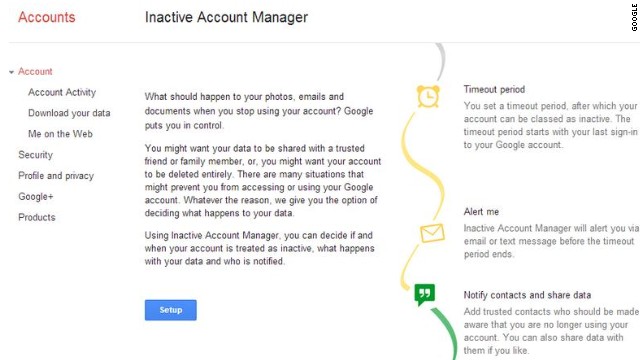
Its simple to set up: choose a timeout period—three, six, nine, or twelve months of inactivity—and from there you can direct Google on what to do with your Gmail messages, Blogger posts, Contacts, Google+ account, Google Voice, and YouTube accounts. (Basically, any Google services youve used in the past.)
After that time period of inactivity, Google will send out a text message and e-mail the secondary address you provide. If you dont respond, it will assume ... well, the worst.
"We hope that this new feature will enable you to plan your digital afterlife," Google concluded in the blog post.
If you have intentions of allowing a friend or family member to have access to that data, you can set up the service to notify up to 10 people that your account has been inactive for the time youve specified.
Google will then ask for verification details for the listed people, like a phone number and e-mail address. When youre ready, you can send out an e-mail to those people youve entrusted with your data should anything happen to you.
If youre interested in setting this up, you can head to Googles Inactive Account Manager from your Google profile.
Go to link Download

Saturday, August 27, 2016
How To Know What Version Of SW Your Phone Has And Imel Number
How To Know What Version Of SW Your Phone Has And Imel Number
Hello friends i hope you are still enjoying your MTN free bonus credit, well it so interesting as we use it to call our love ones and relations.
Today we shall be looking on how to know the version of SW your phone has and the Imel number.
Below is a secret code for your phone, with these codes, you can without any problem check Imel, software version, reset to default language or deactivate Sim lock. {Only in some models} some of the codes that you got below can be typed without Sim card in cell phone and some with Sim card in phone. Please be careful with some codes you may permanently block your phone.
BlACKBERRY: Imel number *#06#
Software version *#30#
NOKIA: Imel number *#06#
Software version *#0000#
production and expiry date *#92702689#
SAMSUNG : Imel number *#06#, *#0228#
Software version *#9999# or *#0837#
Net Monitor *#0324#
Changing LCD contrast *#0523#
Memory information *#0377#
Reset memory {Sim lock removing} *2767*3855#
Battery State *9998*228#
Reset Custom memory *2767*2878#
Alarm beeper *998*289#
Vibrate test *#9987*842#
SONY ERICSSON: Imel number *#06#
Software version *#8377466#
TECNO: Imel number *#06#
SUN 78
CHINA PHONE: Imel number *#06#
Software version *#43#
We Love Comments!
Go to link Download
Subscribe to:
Posts (Atom)