Showing posts with label message. Show all posts
Showing posts with label message. Show all posts
Thursday, November 10, 2016
How to Create a Broadcast Message to All BlackBerry BBM Contact
How to Create a Broadcast Message to All BlackBerry BBM Contact
How to Create a Broadcast Message to All BlackBerry BBM Contact - Broadcast BBM is BlackBerry Messenger is one of the facilities that can be used to send messages to all or marked on BlackBerry contacts. Using this facility, you can easily do the business promotion of goods, services or just give the word to others in a short time.

In BC facility use BBM message, we hope that you will not use for the element of negative or hoax news. Provide motivational messages, words of wisdom, or promotion of goods, you can do all the BBM broadcast. For those of you who can not use or are still confused how to broadcast BBM in BlackBerry, following a short way that you can directly practitioner.
How to Broadcast BBM:
In BC facility use BBM message, we hope that you will not use for the element of negative or hoax news. Provide motivational messages, words of wisdom, or promotion of goods, you can do all the BBM broadcast. For those of you who can not use or are still confused how to broadcast BBM in BlackBerry, following a short way that you can directly practitioner.
How to Broadcast BBM:
- Please open the application "BlackBerry Messenger" (BBM)
- After opening BBM, click the BlackBerry logo on your BB to go into the options menu. (remember put in chat instead of BP)
- Look for a menu called "New Broadcast Message" and select the menu.
- Please enter a subject that you want to spread (Broadcast) in the Message column.
- Choose a category (group) contact BlackBerry, if you want to send a broadcast to all (all) contacts / friends on BB or only to a certain category that you created.
- After entering the subject and select a contact, click Send
- Then the subject you want to deploy (Broadcast) has been successfully sent to all the contacts that you have previously selected.
The steps above will be very useful when you use to start selling using a BlackBerry. Good luck, and do not forget to use the facility wisely BBM broadcast message which if the benefit of others or your own.
Go to link Download

Thursday, October 20, 2016
How to fix “Text Message Memory Full” error in Android device
How to fix “Text Message Memory Full” error in Android device
As we all know most of the middle end Smartphone has limited internal memory. Whether it is an audio, videos, contact as well as messages are stored in phone memory. You need not worry about media files and contact which can be movable to expandable memory. But even after changing the storage settings in storage space to external device.
 |
| Text Message Memory Full |
Most of the middle end Smartphone users facing “text message memory full” error. Message storage is set to phone memory where apps and contacts are saved.
Add/remove Applications:
 |
| Uninstall unwanted apps |
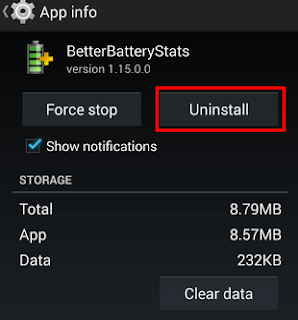
Uninstall unwanted apps or games from Smartphone in app manager under settings. To do so, access settings>application manager>uninstall applications or move to external storage. By removing some apps will free up space for message storage.
Apps to SD card:
 |
| move apps to SD |
Some mobile application allow changing their storage such as UC browser, power Cam, Xender etc. To do so, access setting>application manager>app info>move to SD (transfers all application data to SD card) on other hand we can also use application to move apps from phone memory to external storage. We recommend the best application is App2SD on Google play store.
Delete image/videos:
 |
| remove media files |
Remove unwanted image and videos from gallery. Also check whether any unwanted multimedia message stored in message applications. You can remove by tap and hold media files (which you want to delete) to disclose delete options.
recommended post: 10 mobile apps which earn you real cash
This is easy guide to fix “text message full” error in Smartphone/tablet. Do you have any better ideas, share us through comment.
[Via]
[Via]
Go to link Download
Thursday, September 29, 2016
How To Send Message From Your Phone To E mail
How To Send Message From Your Phone To E mail
Go to message box, text the e-mail address of the person give a space followed by your message, then send to 3333. Charges is N15 per sms.
E.g johneze83@yahoo.com- how are you. Send to 3333.
We Love Comments!
Go to link Download
Subscribe to:
Posts (Atom)