Showing posts with label messages. Show all posts
Showing posts with label messages. Show all posts
Thursday, November 10, 2016
How to send Direct messages to multiple twitter users
How to send Direct messages to multiple twitter users

Direct Messages are private tweets that are only visibleto the sender and the recipient . When you send a Twitter DM to another user, the tweet shows up in his Twitter Inbox while a copy of that message gets saved into your Sent Items just like regular email.Twitter lets you send direct messages to any other Twitter user provided he or she is following you. The other big limitation is that you can only send one DM at a time.
There are many tools to check spam , backup twitter but Up-till now neither Twitter’s web interface nor any of their their desktop or mobile clients support multiple DMs but you can use this online app - TweetGuru to message multiple Twitter users with one go.
Just authenticate the app with your Twitter account and type the usernames of Twitterers you want to message and hit Send Multiple Message .
Link : http://tweetguru.net/
Note : Maximum number of people you can DM is 12 at a time.
Go to link Download

Friday, October 14, 2016
How To add bold italics and strikethroughs to your WhatsApp messages
How To add bold italics and strikethroughs to your WhatsApp messages

WhatsApp, the most popular chatting service, will now let you add the new options of bold, italics and strikethrough to your everyday WhatsApp chat in its latest update.
Tweet
1. For bold, add asterisks to either side of your text, e.g. *bold*
2. For italics, add underscores to either side of the specific word or words, e.g. _italics_
3. For strikethrough, add a tilde (~) to either side of the word or words, e.g. ~strikethrough~
It’s also possible to can surround a word with all three of the characters and have each of the formatting options apply to a word, such as _*bolditalics*_.
These new stylings can also be entered in the WhatsApp web client — which launched last year — but the formatting will only show up in the app-based version of chats.
Go to link Download
Sunday, September 25, 2016
How To Block SMS and PIN Messages on Blackberry
How To Block SMS and PIN Messages on Blackberry
So how do these people can not send more messages to the Blackberry PIN orSMS us? Without using any application, the Blackberry has a Firewall securityfeatures, which we can prevent SMS, PIN or Email Messages into the Blackberry,so we will not interfere with or SMS messages are not important.
To enable the firewall feature is easy enough menu entry Options - Security -Firewall or Option - Security - Firewall, then give the checklist to Enable.

On the menu select whether Block Incoming Messages Text Messaging (SMS),PIN, or Personal Email Email Enterprise. So you can still receive SMS or PIN messages from people you know, do not forget to turn Exceptions menu, and givethe checklist on contact. So that later, you can still receive SMS from people who are in contact or contact phonebook and fuel.
Another way that we will not be disturbed by unwanted messages, is to use theApplication to Block SMS as an application for Blackberry Do not Disturb Me or if you do not want to call also can use applications such as Call Block forBlackBerry.
Go to link Download
Sunday, September 11, 2016
How to read Whatsapp messages without blue tick
How to read Whatsapp messages without blue tick
Whatsapp blue tick is a heck of a problem, right? Have you ever received a message on Whatsapp which you wanted to read so much but did not want to let the person know that you had read it. Have you ever cursed the Whatsapp blue tick ? So I have been researching about it lately for some reason and the most common solution I came across was Airplane mode or Flight mode. But I checked it by myself and to my surprise it doesn’t work at all. Even if you watch the message in Airplane mode and close Whatsapp completely before turning off Airplane mode, as soon as you connect to Internet, the sender sees the Whatsapp blue tick, hence not useful. So here’s my solution
1. Go to Playstore and update your Whatsapp
2. Now come back to Whatsapp and go to settings>Account>Privacy
3. Uncheck the “Read receipts” option and you are all done..
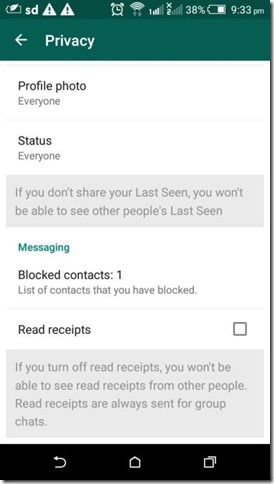
1. Go to Playstore and update your Whatsapp
2. Now come back to Whatsapp and go to settings>Account>Privacy
3. Uncheck the “Read receipts” option and you are all done..
Now even if you read any messages on Whatsapp , your sender won’t see any Whatsapp blue tick. The problem with this process is, its a two way process. So you will also not be allowed to see the blue tick. If that is not the solution you want, here’s one more solution for you. [post_ad]With this solution you will be able to see the Whatsapp message without showing the blue tick to your sender but you can see the blue tick as soon as someone reads your whatsapp message. You can also check How to get WhatsApp on your tablet
Just simply download another app from PlayStore, there are many apps , some of them are
Shh, No Last seen or Read
Blue tick, last seen hider
So just download any of this app, activate and follow instruction and you are all set.
Keep Whatsapping, secretly.
Blue tick, last seen hider
So just download any of this app, activate and follow instruction and you are all set.
Keep Whatsapping, secretly.
Don’t forget to Share it with your friends via Facebook & Google+ and Twitter, And if you like the article How to read Whatsapp messages without blue tick and you may even Subscribe for New post, to get directly in your mail inbox.
Go to link Download
Subscribe to:
Posts (Atom)