Showing posts with label charge. Show all posts
Showing posts with label charge. Show all posts
Sunday, September 25, 2016
How to Charge Battery Smartphone or Tablet Quickly and Effectively
How to Charge Battery Smartphone or Tablet Quickly and Effectively
How to Charge Battery Smartphone or Tablet Quickly and Effectively - You may have experienced a less pleasant events related to the smartphone battery life, for example, at that time you had a shower then wear neat and ready to go out with friends or family. But you just realized that the battery life of your smartphone running out after you pick it up.
If youve experienced it, you are certainly not the only person who has experienced the unpleasant incident. Well, if one day youre in a situation like that again, then there are several ways that you can use to charge your smartphone or tablet battery quickly and effectively.
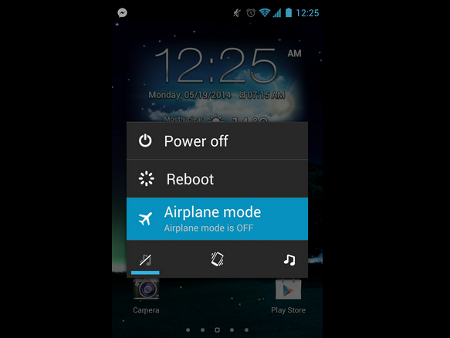
1. Switching to Airplane mode or Turn off the smartphone
One way that this may not be a new way. What is clear, in stand-by condition smartphones or tablets still consumes battery power even a little. But by switching to Airplane mode, battery power consumption will be reduced so that more can be faster charging. But charging will be faster if you turn off the smartphone or tablet.
2. Do not charge through the USB port of computer
Smartphone or tablet is equipped with a charger. The charger can charge the battery faster than the USB port on the computer. That is because the USB port has an output (0.5 to 0.9 Amperes) with much less power than using the original charger (2 Ampere).
3. Use the USB port on a Mac (for iPhone and iPad)
If there is no power outlet (electrical socket), then you can use the USB port on a Mac computer to charge your iPhone or iPad. Latest Mac computers can instantly recognize the iDevice is connected and will increase up to 1.1 Amperes putput.
4. Use software to Improves USB output port
Again, most of the computers USB port has an output of 0.5 to 0.9 Amperes, but there are some exceptions. For example, ASUS has named Ai Charger application that is designed to increase output on a compatible motherboard. Gygabite also has a similar tool called On / Off Charge.
5. Use ChargerDr
ChargerDr a USB charge booster that can increase the power output of the USB port. ChargerDr only priced at $ 20.
6. How to Charge Battery Smartphone or Tablet Quickly and Effectively
The final way that you can do to speed up battery charging using a smartphone or tablet is a micro USB cable forked. The USB cable can charge your smartphone or tablet two times faster than alkaline.
Go to link Download

Sunday, September 18, 2016
How to get back retrieve your 2go password free of charge when you Forget it
How to get back retrieve your 2go password free of charge when you Forget it
Don Zikk0 M????? ? BlackBerry pin » 215F5BDC
2go Username » Biz2Get
Share all of this †o ur friends!
Just follow this steps:
===> go to 2go.com.ng
===> Click on Get Help
===> After that click on "forget my my password or pin
===> You will be prompted to enter your phone number,so enter the
phone number you use to register for 2go but in an international
format.eg if your number is 08136788902,you will enter
2348136788902.
===> After that you will receive your 2go username and password on
your phone. Hope this helps
Add me on 2go: username is: Biz2Get
Go to link Download
Saturday, September 17, 2016
How to fix a phone that wont charge properly
How to fix a phone that wont charge properly
On the off chance that your battery isnt charging appropriately, dont instantly expect your telephone charger or your battery is broken. In light of individual experience, the issue – and arrangement – may be much more straightforward than youd might suspect. On the off chance that your telephone or tablet isnt charging legitimately or by any means, investigate these 10 approaches to settle a telephone that wont charge.
The most effective method to spare battery life on Android
The most effective method to charge your Android telephone battery quicker
Why a telephone doesnt charge
The issue happens in different degrees. Either your telephone wont charge at all when it is connected to, or it will just charge gradually (at times scarcely quicker than it is releasing). Its an extremely basic grievance, so here are a couple of arrangements.
Most charging issues are identified with your USB link or charger, or even the port itself.
1. Do-It-Without anyone elses help USB port fix
The snappiest, least demanding, and regularly best arrangement, is to do a little DIY repair on your genuine equipment. The issue is frequently that the metallic surfaces inside the USB port and the microUSB charger are not reaching, either through an assembling imperfection or as a result of the nonstop stopping and unplugging of the charging link.
You should do nothing more than close down your gadget, uproot the battery if conceivable and use something little, for example, a toothpick, to lever up the little tab inside the USB port on your cell phone or tablet. Do as such deliberately and tenderly, then reinsert your battery and fitting it in once more. Nine times out of 10 this is all that is required.

Check the "tab" inside your gadgets USB port – the link may not be reaching legitimately.
2. Uproot build up, confection and tidy
Do you keep your telephone in the pocket of your pants? Provided that this is true, build up could be the guilty party: weve forgotten about the quantity of times the explanation behind temperamental USB charging ended up being build up from the pocket of our Levis.
Weve seen telephones with accusing ports gagged of chocolate after they were tossed in a tote close by a bundle of desserts. A container of packed air can victory the culpable aggravations and recover your USB association with typical.

Clear any gunk that may be stopping up your telephones ports.
3. Switch links
The flimsiest piece of a charger is the link, not the connector that attachments into the divider attachment. Apple clients are especially defenseless here on the grounds that Apples exclusive (and costly) Lightning links seem to have a future of around 15 minutes. In any case, all links have an extreme life, and unending flexing and twisting can take its toll. Substituting an irregular USB link for the one that accompanied your telephone is another alternate route to an unenjoyable charging knowledge.
The least demanding approach to analyze a broken link is to attempt an alternate one and check whether that works appropriately with your gadget. On the off chance that it does, you know the first link was at shortcoming. On the off chance that it doesnt, that is another potential miscreant weve discounted.

Links are effectively harmed. Apple Lightning ones particularly so.
4. Analyze a dodgy connector
On the off chance that the link doesnt appear to be the issue, check the divider attachment connector – particularly in the event that its one where the charging link can be uprooted. Weve experienced issues in different chargers where the USB port turns into somewhat free after interminably connecting to and unplugging the link.
Likewise check whether the same charger/link mix takes a shot at an alternate gadget, in light of the fact that this will offer you some assistance with eliminating the likelihood that it is your gadget at shortcoming, as opposed to the link or charger. You ought to additionally ensure there isnt an issue with your divider attachment.
motorola snappy charger 6
Ensure there isnt an issue with the connector.
5. Keep in mind – security first
Try not to charge your telephone close water or in unreasonably hot or sticky conditions. Try not to cheat your gadget; charging overnight when your battery just needs a few hours is a terrible thought, and can prompt a battery blasting or harming your telephone. While your telephone has a cut-off switch for your battery, here and there this doesnt work (you may recall each one of those blasting battery stories in 2013). Its ideal to be sheltered than too bad. On the other hand charred.
In case youre supplanting a charger or link, be watchful: the web is loaded down with reports of shoddy outsider chargers that went blast amidst the night or transformed cell phones into toast. Similarly as with any electrical hardware, ensure that anything you purchase consents to all the significant security norms.
To give you a thought of the amount of vitality is put away in your battery, look at this video (yet dont attempt it at home).
6. Supplant the battery
Batteries dont keep going forever, and following a few years they begin to battle to hold a charge. The all the more frequently you release and energize them, the sooner theyll need supplanting. In the event that your batterys busted after only six months, its most likely broken and you ought to make a guarantee claim for a free substitution, yet in the event that the batterys more established than two years, its presumably drawing nearer the end of its lifespan.
Some blemished batteries are anything but difficult to spot in light of the fact that they begin to lump or release liquid. In the event that not at all like that is evident all things considered, evacuate your gadgets spread and assess the battery (in the event that you can; a few gadgets have fixed battery compartments).
On the off chance that the spread doesnt fall off, you could have a go at laying the gadget on its back and turning it. A swelling battery will twist the case – you wont not have the capacity to see this lump, but rather it may be sufficient to permit your telephone to turn. In the event that you think your battery may be swollen or spilling, get your telephone to a repair shop and purchase a legitimate substitution.
On the off chance that you are going to supplant your battery, attempt to buy an official one.
7. Charge from the right source
Charging from a divider attachment will dependably be quicker than charging by means of PC or tablet, in light of the fact that PCs USB ports dont convey all that much power. A divider attachment can convey twice as much power as a USB port, and quick chargers it can convey as much as five times the force – which implies much, much speedier charging. So if your telephone is charging gradually and youre associated with a portable workstation: theres your issue.
On the off chance that your divider charger doesnt have all the earmarks of being conveying the merchandise, watch that its suitable for your gadget. A charger from another telephone wont not convey the appropriate measure of juice — for instance, a charger for a Bluetooth headset wont put out as much power as one planned particularly for cell phones. On account of late top of the line telephones, you may have a telephone that backings quick charging yet a charger that doesnt convey it. Perused the fine-print.
android usb cell phone pc 2
Your desktop or tablet cant charge your Android as quick as a divider attachment.
8. Upgrade or move back
Programming redesigns and new Android variants can wreak devastation with your battery life, particularly while overhauling an old gadget to current programming. More up to date gadgets are frequently enhanced to exploit the most recent programming, though a two-year-old gadget can battle when it gets overhauled.
In the event that this happens to you and you cant investigate the issue, consider moving the gadget back to a prior Android adaptation, however be cautioned this conveys security dangers. (The most recent programming variants are constantly prescribed to keep your gadget ensured, keeping in mind the danger of keeping your cell phone on a more established form is regularly immaterial, its significant.)
So also, once in a while gadget battery life can be essentially enhanced by an upgrade, so on the off chance that you think you may be path behind on your Android programming adaptation, head to Settings > About telephone to check for an overhaul.
Stay up with the latest (or move back to a past variant if truly vital).
9. Switch it off
Utilizing battery-escalated applications/highlights while you are charging your gadget will influence how rapidly it picks up battery life. On the off chance that you are charging while Skyping some person at 100 percent brilliance, the gadget will normally take more time to accuse than it would of its screen, Wi-Fi and 4G killed.
Switch the gadget to off-line mode, or off totally, when you are charging in the event that you need to see the quickest vitality infusion. Consider it making your gadget take a force rest.
10. Align your battery
Infrequently, the battery level your gadget "considers" it has, is not the same as what it really is. The impact of this is your telephone may work in an unexpected way, including constraining execution before it needs to or taking an hour to bite through the last two percent of battery.
Weve effectively composed a broad aide on the best way to align your cell phone battery, so I wont retype it all here, however this is a thing to attempt before totally jettisoning your outdated force pack.
As a last resort, twofold watch that you have the force point exchanged on. That is the first thing they will inquire as to whether you call your producer for help, which may should be your next step if none of these arrangements have
Go to link Download
Friday, September 2, 2016
How To Charge Your Battery Using Hidden Battery Power
How To Charge Your Battery Using Hidden Battery Power

Imagine your mobile battery is very low. To activate, Press the keys *3370# your mobile will restart with this reserve and the instrument will show a 50% increase in battery. This reserve will get charged when you charge your mobile next time.
We Love Comments!
Go to link Download
Subscribe to:
Posts (Atom)