Showing posts with label quickly. Show all posts
Showing posts with label quickly. Show all posts
Wednesday, November 23, 2016
how do a blog quickly indexed by google
how do a blog quickly indexed by google
The Verification steps to Google for a blog quickly indexed by google, are as follows :
Add your URL to Google
visit http://www.google.com/addurl/
Then fill the form provided :
Then fill the form provided :
Url column > Fill in the URL of your blog.
Comments > Fill in the keywords related to your blog
Caphca box > Fill an empty box with a letter of verification are available.
Click the button Add URL.
Done.
Adding and Verification Blog to Google Webmaster Tools
The most fundamental of the google webmaster tools is adding blogs and verification. The advantage is, your article will be quickly indexed by Google. to Add and Verify your blog to Google Webmaster Tools, please follow the steps below:
1. visit the Google Webmaster Tools.
2. Login with your account.
3. Click Add Site.
4. Enter the URL of your blog, Example: http://lingua-mysite.blogspot.com/
5. Click Continue.
6. Verify ownership, click Add a meta tag to your sites home page.
7. Copy the meta tag to your home page.
Comments > Fill in the keywords related to your blog
Caphca box > Fill an empty box with a letter of verification are available.
Click the button Add URL.
Done.
Adding and Verification Blog to Google Webmaster Tools
The most fundamental of the google webmaster tools is adding blogs and verification. The advantage is, your article will be quickly indexed by Google. to Add and Verify your blog to Google Webmaster Tools, please follow the steps below:
1. visit the Google Webmaster Tools.
2. Login with your account.
3. Click Add Site.
4. Enter the URL of your blog, Example: http://lingua-mysite.blogspot.com/
5. Click Continue.
6. Verify ownership, click Add a meta tag to your sites home page.
7. Copy the meta tag to your home page.
- Login to your Blogger
- click Design
- click Edit HTML.
- Place the meta tag code that you get, under the code < head > , then
9. Return to webmaster tools page Verify ownership.
10. Click Verify.
11. Done ... and now you can start to optimize your blog with Google Webmaster Tools.
Next step that you have to do,please Submit your blog to Google Sitemap.
11. Done ... and now you can start to optimize your blog with Google Webmaster Tools.
Next step that you have to do,please Submit your blog to Google Sitemap.
Go to link Download

Tuesday, October 11, 2016
How to get your post indexed by Google quickly
How to get your post indexed by Google quickly
As a Blogger, what comes to our mind firstly in getting in the frontpage of Google, Google is reliable and famous as a Search Engine. 
Google Search, commonly referred to as Google Web Search or just Google, is a web search engine owned by Google Inc. It is the most-used search engine on the World Wide Web, handling more than three billion searches each day. As of February 2015 it is the most used search engine in the US with 64.5% market share.
Source: Wikipedia
How to Get Your Post Indexed On Google Quickly, Just After Publishing it. (1-2min)
This method is not new to some bloggers, but new to newbie bloggers.
Steps:
- Create your post and publish
- Immediately after publishing, view the url (Uniform Resource Locator)
- Copy the post url
- Now visit google webmaster tools. It should display like the image below
- Paste the post url directly into the space box
- Click Submit Request

A minute after, visit Google Homepage, on the search box, type your post title and click the option with Google Search.
If that post have been indexed by google, then the post should appear in google search, being the first.
Its highly recommended that you do this every time you publish a new post
Don’t forget to drop your comment using the comment box below, thanks for coming, thanks for reading. Kindly share with fellow bloggers if you love this article.
Source: BestManBlog Go to link Download
Sunday, September 25, 2016
How to Charge Battery Smartphone or Tablet Quickly and Effectively
How to Charge Battery Smartphone or Tablet Quickly and Effectively
How to Charge Battery Smartphone or Tablet Quickly and Effectively - You may have experienced a less pleasant events related to the smartphone battery life, for example, at that time you had a shower then wear neat and ready to go out with friends or family. But you just realized that the battery life of your smartphone running out after you pick it up.
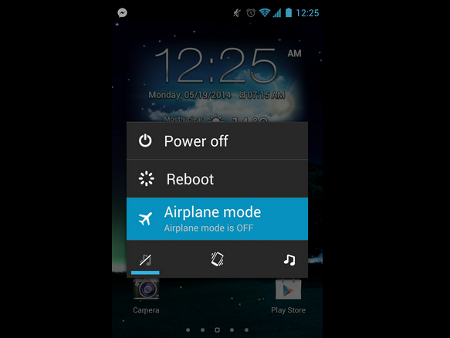
If youve experienced it, you are certainly not the only person who has experienced the unpleasant incident. Well, if one day youre in a situation like that again, then there are several ways that you can use to charge your smartphone or tablet battery quickly and effectively.
1. Switching to Airplane mode or Turn off the smartphone
One way that this may not be a new way. What is clear, in stand-by condition smartphones or tablets still consumes battery power even a little. But by switching to Airplane mode, battery power consumption will be reduced so that more can be faster charging. But charging will be faster if you turn off the smartphone or tablet.
2. Do not charge through the USB port of computer
Smartphone or tablet is equipped with a charger. The charger can charge the battery faster than the USB port on the computer. That is because the USB port has an output (0.5 to 0.9 Amperes) with much less power than using the original charger (2 Ampere).
3. Use the USB port on a Mac (for iPhone and iPad)
If there is no power outlet (electrical socket), then you can use the USB port on a Mac computer to charge your iPhone or iPad. Latest Mac computers can instantly recognize the iDevice is connected and will increase up to 1.1 Amperes putput.
4. Use software to Improves USB output port
Again, most of the computers USB port has an output of 0.5 to 0.9 Amperes, but there are some exceptions. For example, ASUS has named Ai Charger application that is designed to increase output on a compatible motherboard. Gygabite also has a similar tool called On / Off Charge.
5. Use ChargerDr
ChargerDr a USB charge booster that can increase the power output of the USB port. ChargerDr only priced at $ 20.
6. How to Charge Battery Smartphone or Tablet Quickly and Effectively
The final way that you can do to speed up battery charging using a smartphone or tablet is a micro USB cable forked. The USB cable can charge your smartphone or tablet two times faster than alkaline.
Go to link Download
Subscribe to:
Posts (Atom)