Showing posts with label game. Show all posts
Showing posts with label game. Show all posts
Sunday, November 27, 2016
How to check whether a game will run on your computer or not
How to check whether a game will run on your computer or not

step 1Visit the website
First you need to visit this site, see the left side that says "Find out if you can run that game on your PC"? click the button underneath it that says "Can YOU run it?"
First you need to visit this site, see the left side that says "Find out if you can run that game on your PC"? click the button underneath it that says "Can YOU run it?"
step 2Test your computer
Now to test your computer for compatibility. From the drop-down list, select the game that you wish to run. After you selected your game, click the "Can you RUN it" button. This will take you to a new page.
Now to test your computer for compatibility. From the drop-down list, select the game that you wish to run. After you selected your game, click the "Can you RUN it" button. This will take you to a new page.
step 3Analyzing data and results
This next page will analyze the data, if you are a Windows Vista user then UAC(User Account Control) will pop up and ask for permission, click yes as this is not harmful. Now your results will appear...It appears that I failed...:(
This next page will analyze the data, if you are a Windows Vista user then UAC(User Account Control) will pop up and ask for permission, click yes as this is not harmful. Now your results will appear...It appears that I failed...:(
step 4Finish
Well now you know how to check to see if you can run your game without having to drive all the way to the Local Generic Superstore near you, buy the game, wait 45 minutes to install it, find out that it wont run, and then run back to the store to return it. So I hope that I helped, and saved you the hassle of the return.
Well now you know how to check to see if you can run your game without having to drive all the way to the Local Generic Superstore near you, buy the game, wait 45 minutes to install it, find out that it wont run, and then run back to the store to return it. So I hope that I helped, and saved you the hassle of the return.
Go to link Download

Thursday, October 20, 2016
Hot apps 2016 Hill Climb Racing Game
Hot apps 2016 Hill Climb Racing Game

you are a frequent user of smart phone, you may find out that most popular games on mobile market are designed to be simple, easy-to-play but easily keeps people obsessed in. Thats because mobile games, unlike the PC ones, target on fragmented time which means that game must be simple enough to be learnt.
The basic scenario of the game is climbing as much unique hills as you can by tackling upcoming obstacles. You can get points and bonuses via various of ways. With coins you get, you can upgrade you car to a better one and reach higher distances. You also need to pay attention to the fuel in case it runs out. Sounds easy? Thats the point to keep players running again and again. Also the process designed is outstanding in leading players, which prevent them being probably confused.

Lastly lets see what it is said to be some of the key monetization strategies that have made Hill Climb Racing successful include:
1. Easy game play, anyone can play it and don¡¯t need to spend time learning the game
2. Rock solid, no crashes, excellent user reviews
3. Realistic and fluid physics engine
4. Constant advancement through the use of coins, and clear goals on ¡®what do I buy next¡¯?
hat do I buy next¡¯?

It is obvious that Hill Climb Racing features easiness, fluent playing experience(which might be the most significant factor for a game), close to real life and a great design in game economic system. These are main elements that help Hill Climb Racing stand out and gain popularity.
No matter you are a game lover or not, you should never miss Hill Climb Racing. You dont need to afraid the complecated operation or the large story within in common RPG on PC, all you need to do is to download it from any apps store like 9apps and start racing
Go to link Download
Monday, September 19, 2016
How to Block Game Requests On Facebook
How to Block Game Requests On Facebook
As we all know that Facebook is one of the greatest online networking. Now its become our necessary in daily routine to use Facebook for chatting or sharing status or pics with friends and family. We also play games on Facebook. But more than social site, Facebook becomes a marketplace for advertisers and companies. So they try to make its products popular through Facebook. It become easy to grow any business app on Facebook to make popular their brand or product name. Just like all the gaming companies have introduce games for different platform like android and iOS, but almost all of them also introduce their games on Facebook. Because it will be simple for each to play diversion alongside Facebook. You can also check How to See Most Recent Facebook Posts on its iOS, Android Apps
Beside all these most irritating thing which every Facebook user face is games or other app requests on send by their friends or automatically from app. Just like many different apps like calculate love percentage, who visit your profile and games like candy crush, teen Patti and many more. Normally every games provide few extra points or features for sending invitation to Facebook friends. As this is best marketing strategy for them to increase popularity. For gaming lovers this may be not an issue but for normal person who don’t want to play game on Facebook. Then it is better to get rid from all these notification and block game invites on Facebook. But for those who love to play games on Facebook. You can also check How To Trace Your Facebook Profile Visitors
1) First of click on the top right side settings icon in your profile.
2) Then click on the settings option.
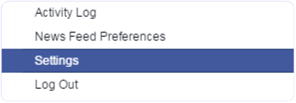 3) After that click on the option of blocking available on the left side panel of settings page.
 4) facebook-blocking-settings
5) In Blocking Page there are many options available which are required to block different functionality.
If is useful if you want to block any particular friend. Once you block that person then you will not receive further invitation of request and apps from that person. So if you want to block multiple [post_ad]person who send invitation then you need to add his or her name in the block user box. You can also check Facebook hidden Messenger tips and tricks,
In case multiple friends are sending you same game or app request then there is an option for block app. Simply type the name of that app in the block app box and you have done.
If case you don’t want to follow explained method or you want to try another way which may be find easy as compare to above.
1) First of open Games App center.
2) Then click on the activity option available on the top menu.
 3) facebook-app-center-activity-invite-game-requests
4) Now you will be able to see all the pending invites from your friends. [post_ad]
5) Simply click on the Cross “X” or Ignore All button appear on the app request.
 7} Click to block app or game request and confirm it.
So above explained are the two different ways to block app request or game invites on Facebook. Follow any of the above given method you like most and find easy. In case you face any kind or issue, don’t feel any kind of hesitation to leave your comments. and Don’t forget to Share it with your friends if you like it and you may even Subscribe for New post, to get directly in your mail inbox.
Beside all these most irritating thing which every Facebook user face is games or other app requests on send by their friends or automatically from app. Just like many different apps like calculate love percentage, who visit your profile and games like candy crush, teen Patti and many more. Normally every games provide few extra points or features for sending invitation to Facebook friends. As this is best marketing strategy for them to increase popularity. For gaming lovers this may be not an issue but for normal person who don’t want to play game on Facebook. Then it is better to get rid from all these notification and block game invites on Facebook. But for those who love to play games on Facebook. You can also check How To Trace Your Facebook Profile Visitors
How To Block Game Invites On Facebook.
There are two different ways to block game invites on Facebook. I will explain both of them to you. Follow any of the method which like or find easy to do.
Settings Block Game Request On Facebook.
1) First of click on the top right side settings icon in your profile.
2) Then click on the settings option.
3) After that click on the option of blocking available on the left side panel of settings page. 4) facebook-blocking-settings5) In Blocking Page there are many options available which are required to block different functionality.
#1 Block Games Invites On Facebook.
If is useful if you want to block any particular friend. Once you block that person then you will not receive further invitation of request and apps from that person. So if you want to block multiple [post_ad]person who send invitation then you need to add his or her name in the block user box. You can also check Facebook hidden Messenger tips and tricks,
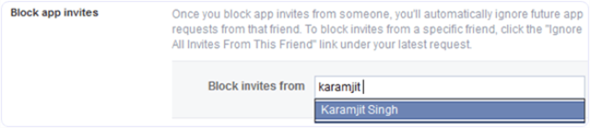
#2 Block Apps Invites On Facebook.
In case multiple friends are sending you same game or app request then there is an option for block app. Simply type the name of that app in the block app box and you have done.

Method 2nd:- Block Games Invites On Facebook.
If case you don’t want to follow explained method or you want to try another way which may be find easy as compare to above.
1) First of open Games App center.
2) Then click on the activity option available on the top menu.
3) facebook-app-center-activity-invite-game-requests4) Now you will be able to see all the pending invites from your friends. [post_ad]
5) Simply click on the Cross “X” or Ignore All button appear on the app request.
7} Click to block app or game request and confirm it.So above explained are the two different ways to block app request or game invites on Facebook. Follow any of the above given method you like most and find easy. In case you face any kind or issue, don’t feel any kind of hesitation to leave your comments. and Don’t forget to Share it with your friends if you like it and you may even Subscribe for New post, to get directly in your mail inbox.
Go to link Download
Saturday, August 27, 2016
How To Play The Hidden Football Game On Facebook Messenger
How To Play The Hidden Football Game On Facebook Messenger

If you’ve played Messenger Basketball, you’ll already be having an idea of how things work.
If you haven’t, it’s dead simple. Just follow the steps mentioned ahead:
How To Play Facebook Messenger’s New Football Game?
Before trying to play Messenger’s football game, make sure that your app is updated.
Open a chat with a friend or some group. Now, find the football emoji and send it. If you can’t find one, copy this one and send it — ?

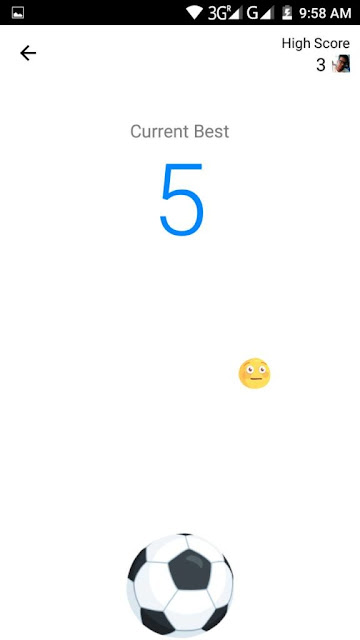
Tap the football emoji you just sent in the chat and the game starts. Unlike the usual football game, instead of aiming for the goal, here you’ll need to keep tapping the ball to keep it in the air.
As you score 10 points, the game gets harder and full of distractions.
Go to link Download
Subscribe to:
Posts (Atom)