Sunday, November 20, 2016
How to root Nokia X and get access to Play Store and Google Now
How to root Nokia X and get access to Play Store and Google Now


Go to link Download

Thursday, November 17, 2016
HOW TO PLAY GAMEBOY ADVANCE GAMES ON ANDRIOD DEVICE
HOW TO PLAY GAMEBOY ADVANCE GAMES ON ANDRIOD DEVICE
Ok, Buddy! i wont take much of your time because i know you just want me to go straight to the reason you are reading this right now. Lets proceed!

HOW TO PLAY GAMEBOY ADVANCE GAMES ON ANDRIOD DEVICE
1. You will need to Install a Gameboy Advance Emulator on your Andriod Device via Google Play Store. You can do this by Opening your Play Store & Search for "VGBA" or click Here to get to the Page where your Can download and Install it.
Note:- The Emulator is not Free, Its Cost $4.99 {N820} for a Lifetime, You can download & Re-Install for Free on other Andriod Device and you can easily Purchase things on Play Store with your GTBank ATM Card.
2. After Purchasing & Installing the VGBA Emulator Successfully on your Device, The next thing is to Download Free Gameboy Games on your Device and Start enjoying it.
3. To Download Cool Gameboy Advance Games Roms, Visit www.freeroms.com or www.coolrom.com and Click on Gameboy Advance.
4. The Games are in .Zip Format, Just Download as many as Possible into a Specific Folder on your Phone, Then Open the VGBA App, Locate any of the Downloaded Games and Click on the, The Emulator will Unpack the Game and the Game will Start.

» For Cool Games, Below is a Link to Download Some Lovely Gameboy Advance Games to Enjoy on your Andriod Device.
1.Download Road Rash Here
2. Download Mario Kart Super Circuit Here
3. Download Super Mario Advance Here
4. Download Crash Bandicoot Nitro Kart Here
5. Download Mortal Combat Here
6. Download Winning Eleven Soccer Here
NOW, ITS YOUR TURN TO CONTRIBUTE:
I just showed you how you can play Gameboy Anvance games on your Andriod device, so let me know if you like this tutorial and if by chance you have any contribution please dont hesitate to add your thoughts using the comment box below and you can join us on Facebook for more juicy updates and tutorials.Go to link Download
Thursday, November 10, 2016
How To Play YouTube Video in Background On Your Smartphone
How To Play YouTube Video in Background On Your Smartphone

People using YouTube love to hear music even if they turn off the screen or in the background on your smartphone. At present YouTube hasn’t released such feature to it’s app in Android or iOS.
In this tutorial we will teach you how to play YouTube video in the background on your smartphone or off screen, follow the steps given below.
Android User
- Download and install Mozilla browser on your Android device.
- Open YouTube website in Mozilla browser.
- Go to settings page and click “Desktop”. You will be redirected to desktop site of YouTube.
- Now you can play any video and use other apps or turn off the screen, the music will be playing.
iOS User
- Open YouTube website in “Safari”.
- Enter the music you wanna listen, open the video in full screen.
- Next press “Home” button.
- Now at bottom swipe up and bring the control panel and tap the play button.
Go to link Download
Monday, October 31, 2016
How to stop automatic updates in Google Play store
How to stop automatic updates in Google Play store

It is very important for the proper functioning and performance of your phone or tablet, simply dispongas your applications up to date, but do not worry about the updates off , the can be done manually. There is an easy way to disable automatic updates on your Android phone. If you are ready, follow these small steps:
- Open the app Play Store
- Press the menu button and select option Settings .
- Then you will see different options, press on Update automatically and mark the No update applications automatically and finally we will have ready for our device does not receive automatic updates.
- Well, following this small tutorial we could eliminate the automatic updates of Google Play to their default all devices.
Go to link Download
Sunday, October 23, 2016
How To Get Android Paid Apps From Google Play Store On BlackBerry 10
How To Get Android Paid Apps From Google Play Store On BlackBerry 10

- The latest Snap .BAR file, which can be obtained from the developer’s website here (if you need help sideloading this onto your BlackBerry 10 device follow this incredible guide)
- BlueStacks (App Player that lets you run mobile apps fast and fullscreen on Windows and Mac.) – Windows version could be downloaded here, Mac version here
- Google Account


 To purchase click on the dollar amount as shown on the image above.
 After clicking on buy it will ask you to enter your Google Account information, along with payment info. Once purchase has completed open up Snap on your BlackBerry 10 device and search for the app you purchased, in this case I will search for Tapatalk Pro:

 There you have it you can now download your already purchased paid app onto your BlackBerry 10 device through Snap, if you try to download a paid app from Snap that you have not yet paid for using the above method through BlueStacks you will get hit with a message like this:
 If you have any questions feel free to drop a comment below and we would be glad to walk you through purchasing apps. You can always purchase directly from Google Play Store website and testing your luck then downloading your paid apps using Snap, but without an App Player like BlueStacks you may run into problems
Go to link Download
Friday, October 21, 2016
How to Can Play Youtube Videos Automatically Twice with iYoutubeReplay
How to Can Play Youtube Videos Automatically Twice with iYoutubeReplay
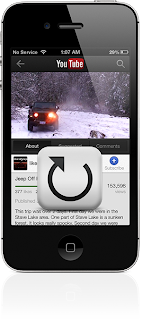
After you install this jailbreak tweak, then when you have finished watching a video on Youtube a free Google application, then the video will be played back (on my birthday). You can exit (exit) of the video that was repeated by just doing a tap on the back button, or simply close the application.
This tweak the concept is very clear, and useful for you who want to watch a funny video you found for the second time. It is also good if you feel the need to look back at the video there is a scene where you want to believe. Whats more to music videos, music lovers would want more than one listen to his music without the need to press the play button again repeatedly.
After this tweak is installed, then you will get a preferences panel on the application settings that you can enable or disable this tweak.
This tweak updated version is being drafted as I write this post, which allows you to enable or disable this tweak directly from Youtube application without the need to get out of it and use the Settings application.
If you want to try to keasikan iYoutubeReplay watch Youtube videos, so you can meet this tweak in Cydia under BigBoss closet. And this is the detail of tweaks iYoutubeReplay.
- Price: Free.
- Version: 1.0-1.
- Requirements for use: Googles YouTube application.
- Repository: BigBoss.
- Developers: Osama Mohammed.
Go to link Download
Saturday, October 15, 2016
How to Play a YouTube Audio in the Background iOS 7 1
How to Play a YouTube Audio in the Background iOS 7 1
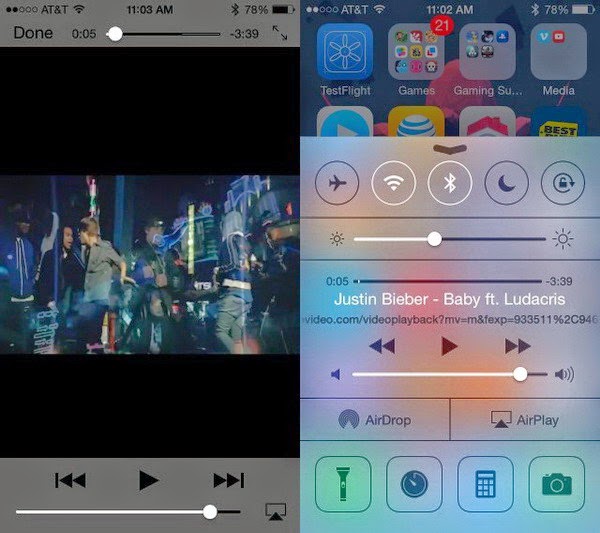
Firstly, you need to download an application called Jassmine . This application is available at the App Store (free) and function play Youtube videos. The second way is still to use Safari to open the site Youtube.com. Nah, when the video was played, please press the Home button on the iPhone. This will automatically close Safari or Jasmine, and songs you play will stop. Subsequently, swipe up to bring up the Control Center. Tap the triangular Play button in the middle. The way to play existing audio in the playlist. In this case your playlist contains a Youtube video that you have previously cut, either in Safari or Jasmine. Try to swipe down the Control Center then you are used to the audio will still be heard until the end of the song. Unfortunately this method can not be used to play the entire playlist but only per song. If you want to play audio from YouTube videos, please turn more videos you want in Safari or Jasmine.
Go to link Download
Wednesday, October 12, 2016
How to Play Rummy Online and Earn Money Rs 1000
How to Play Rummy Online and Earn Money Rs 1000
Stop playing rummy on real time for free.Here is a big opportunity for all those masters of rummy to earn money online for free .Do you think you are the best when it comes to rummy among your friends ? Then you do have a great chance of winning cash prizes of RS 10000 or even more.The best part of this is you don’t even want to spend a dime for it.Let’s gamble.

How to Play Rummy Online and Earn Money
[post_ad]I’m good at playing rummy among my friends and it has become a habit and so i started to play it online when i get some free time.Then on a beautiful day i saw this opportunity of playing it for cash without spending anything from my side and again out of my habit i started to make a article for you.
Register a free account on ace2three website and activate your account from your mail.
Log into the website and you will be taken to their home page.
Click on the “Play now” button and wait for the server to load in the new window.
You must be by default taken to the “Lobby” section of the website.
Click on the “Tournaments” tab and select “Regular tournaments” tab.
You would see a list of tournaments with the cash prize and the date on which the tournament is beginning. Don’t worry we have tournaments everyday.
Go to link Download
Friday, September 30, 2016
How To Root And Get Access To Google Play Store On Nokia X2 Dual Sim RM 1013
How To Root And Get Access To Google Play Store On Nokia X2 Dual Sim RM 1013

I got Rooted for my Nokia X2 and successfully install the supersu. Everything is attached below. Cheers!
- Download & sideload the towelroot apk
- Run it and tap on "make it rain" to root
- Download & sideload the Supersu
- Run it > continue > Normal and reboot your device
- Download and extract This File
- Copy the folder to your device / sdcard
- Install any Root Explorer app, we only need to use this to copy files
- Go to copied folder, copy all the files
- Go to /system/app and paste them there
- Reboot your device
- Enjoy!
Go to link Download
Friday, September 16, 2016
HOW TO REMOVE AND CLEAR GOOGLE PLAY HISTORY IN LG V10
HOW TO REMOVE AND CLEAR GOOGLE PLAY HISTORY IN LG V10
How to take away & clear history in Google Play Store on LG V10:
Turn on your LG V10
Go to the Google Play Store
Wipe from the left to the center of the screen
Press the menu item “Settings”
Then choose on the ”Clear native Search History” choice
Select on Menu item and every one your past search history can become deleted.
After you follow the steps on top of, all of your search history within the Google Play Store are deleted on your LG V10.
Go to link Download
Wednesday, September 14, 2016
How to Fix Google Play Store Error 498 –Using 5 Ways
How to Fix Google Play Store Error 498 –Using 5 Ways
CAUSES OF ERROR 498 IN PLAY STORE
There are Few things that causes this Error on your Smartphone while you try to download any app from Google Play store.
The Most common issue is the Size of Device’s Cache Partition. You will get Error 498 in play store if you try to download apps that are larger in size then your Device’s Cache partition. For Eg: Your Cache partition is of 30M and you try to download an app with Size 35M then you might get this error. Usually Play store have issues when downloading apps that are large in size.

Another Reason is Google Servers from where you are trying to download the apps might be under maintenance. So if you are downloading an App and you get Play store erro 498 message then Server may be the issue. Just wait and try to download it again. So these were just Couple of Possible Reasons for a User to get this Error in Google Play store, Now let us see Some Possible Ways to Fix it.
5 WAYS TO FIX GOOGLE PLAY STORE ERROR 498
METHOD 1: CLEARING CACHE
Most Common Reason you might be facing this Error is because of Cache, so i will start the Methods list by Recommending you to Clearing the Cache.
To do So, Just navigate to Settings > Applications > Manage Applications > Select Google Play store > Clear Data & Clear Cache.
Now Try and download the App if Cache was the problem and clearing it solved the Issue for you. One more reason of listing this method on top is this worked for me and i was able to download the game easily after clearing the Cache. Though the Solution for all might not be the same so try below methods too.
METHOD 2: USE WIFI TO DOWNLOAD.
Many a times your Internet Service Provider(ISP) Creates this Problem of Error 498 and many other Errors. so Try and get access to Wifi somehow and try to download the app thats giving you the Error.
METHOD 3: ADDING NEW PLAY STORE ACCOUNT.
You will need to Add a new Play store account inorder to fix this Error. Go to Settings > Accounts > Add New Account > Click on Google > Next > Enter email > Done.
After setting up new Play store account try to download the same app and see if this have Solved your Problem.
· Read Also: How to Protect Your System Information :computer Security Tricks
· Read Also: 11 tricks to keep it healthy and glowing Skin
METHOD 4: CONNECTING WITH COMPUTER:
One of my Friend reported that he fixed Error 498 by installing apps from Computer to Smartphone. You just need to connect your Smartphone to Computer Using USB Cable. then goto Google Play Store using your Favourite Browser on your Computer. [post_ad]Then Search for the App which was getting error on your Smartphone. Click on the Preferred Result that you get, next On the App page you will see Install button. Click it to Download that app On your Smartphone. No it will not Install on your Computer. it will Install on your Smartphone. Just make sure your Smartphone is Connected or else you will not See Install Button.
· Read Also: Tech Zone News: Samsung Galaxy S7 Android update
· Read Also: How to Find your Smartphone using Android Device Manger
· Read Also: How to Convert any word document Webpage to PDF
METHOD 5: UNINSTALL & REINSTALL GOOGLE PLAY STORE:
If your Phone is Rooted then You might just want to Uninstall and Then Reinstall Google Play store so that to make sure that you actually get rid of Error 498 in Google Play Store. If any of the above Listed methods don’t work for you then go for this one and you will fix it for sure. I hope this helps you to get rid of this error and you can again download your favourite app from play store just like before.
If these Helps then please don’t forget to spend few seconds and Comment below which Method solved the Issue for you. Or If you have any other way to get rid of this error message in play store then feel free to share it in Comments below.
Don’t forget to Share it with your friends via Facebook & Google+ and Twitter, And if you like the article How to Fix Google Play Store Error 498 and you may even Subscribe for New post, to get directly in your mail inbox.
Go to link Download
Friday, September 9, 2016
How to fix Error 498 on Google Play Store Solutions
How to fix Error 498 on Google Play Store Solutions

One is the Error 498,which does not give many clues about its origin. Is summarized as " Error 498 has occurred while was communicating with the server." To resolve this error there are several ways, you have to keep trying until something works for you.
Method 1: Removing temporary data
Go to Settings (or options) >> Applications- Select "All" tab
Find Google Play Store
- Remove Data
- Clear Cache
Give back and now seeks Google Play Services
- Remove Data
- Clear Cache
Reboot your phone and try again to download your application
Method 2: Removing Gmail account
Go to Settings >> Accounts >> Google- Delete your Google account
- Reboot your device
Login to Settings >> Accounts >> Google
- Make your account again
Try again to download your application
Method 3: Using the Factory Reset
If neither of the first 2 methods worked, you can try to make a Factory Reset .This is done as follows:
Login to Settings >> Backup and Restore
- Factory Reset
- Reset Device
Expect Android do its work, the phone will reboot.
Return to start
If any of these three methods will be served (or some other method), leave it in the comments.
Go to link Download
Saturday, September 3, 2016
How to Install and Download Latest Google play store free download
How to Install and Download Latest Google play store free download

This is the official free downloading link, you can just click the below download button, and install the latest version Google Play store.
Go to link Download
Wednesday, August 31, 2016
How to clear recommendation history in Google Play Music
How to clear recommendation history in Google Play Music
If you head into the settings page of the desktop Google Play Music site then you’ll see a new option that rolled out today called “delete recommendation history” that will do just that and allows you to remove the history used to give you recommendations and customise radio. It’s worth noting that this will not remove ratings and play counts on individual tracks.
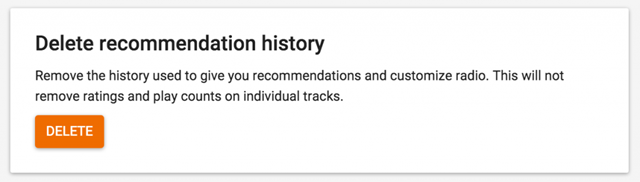
How to delete recommendation history -
Scroll down to the bottom of the page
Hit delete and confirm the deletion on the warning screen that pops up.
This will clear your recommendation history used to suggest tracks you might like based on your listening history, perfect for if you’ve been sharing an account and someone has been listening to Taylor Swift and you’re recommendations are all messed up!
Don’t forget to Share it with your friends via Facebook & Google+ and Twitter, And if you like the article How to clear recommendation history in Google Play Music and you may even Subscribe for New post, to get directly in your mail inbox.[post_ad]
Go to link Download
Saturday, August 27, 2016
How To Play The Hidden Football Game On Facebook Messenger
How To Play The Hidden Football Game On Facebook Messenger

If you’ve played Messenger Basketball, you’ll already be having an idea of how things work.
If you haven’t, it’s dead simple. Just follow the steps mentioned ahead:
How To Play Facebook Messenger’s New Football Game?
Before trying to play Messenger’s football game, make sure that your app is updated.
Open a chat with a friend or some group. Now, find the football emoji and send it. If you can’t find one, copy this one and send it — ?

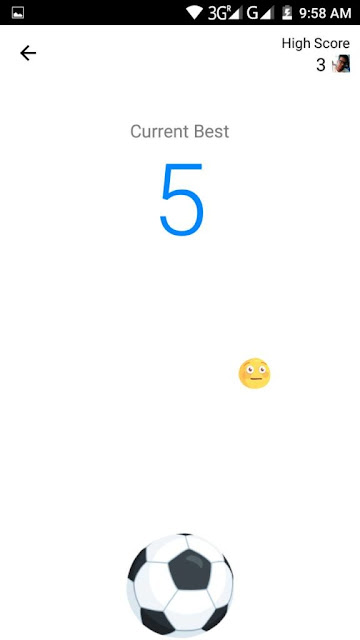
Tap the football emoji you just sent in the chat and the game starts. Unlike the usual football game, instead of aiming for the goal, here you’ll need to keep tapping the ball to keep it in the air.
As you score 10 points, the game gets harder and full of distractions.
Go to link Download
Friday, August 26, 2016
How to play PS4 on PC
How to play PS4 on PC
The PlayStation 4 is, ostensibly, the most prominent gaming stage accessible right now, yet it needs highlights that its opponents, to be specific Xbox, highlight. A late expansion to the Xbox One component rundown is the capacity to play your Xbox One recreations by means of your PC in Windows 10, on account of the recently upgraded Xbox application. Where is Sonys proportional? While an official Remote Play application could be some way away, a designer has made an (informal) approach to do as such. Here, we demonstrate to you proper methodologies to set up and introduce Remote PC Play to play your PS4 diversions on your PC. Perused next: Best PS4 recreations of 2015
The most effective method to play PS4 on PC: Remote Play PC
The Xbox application for Windows 10 is a phenomenal application, as it gives you a chance to stream gameplay from your Xbox One to your PC with for all intents and purposes no slack (the length of its on the same system), invalidating issues when the TV is being utilized and you need to amusement your life away. Those of us that claim a PS4 and a PS Vita have some involvement with this, because of the Remote Play highlight of the PS4 – one that can likewise be utilized over a web association, however its not prescribed by the organization. While that is incredible, it means you require a PS Vita to do as such, and, lets be realistic, its not awesome attempting to utilize the Vitas touchscreen back controls set up of R2 and L2.
What PS4 gamers need is a comparable to the Xbox application for Windows 10, keeping in mind Sony has affirmed that an official Remote Play application is en route for PC and Mac sooner or later, were not exactly beyond any doubt to what extent until its discharged. Enter Remote PC Play. Engineer Twisted has been dealing with the application on and off for around a year now, and has at last discharged Remote PC Play for Windows, permitting clients to unite with their PS4 and diversion by means of their PCs. Really cool, isnt that so?
Because of appeal, the designer is offering little measure of units at once. Itll set you back £6.50, however the code can work with 5 PCs and, as we would see it, is unquestionably justified regardless of the cash. You can go to the site and purchase from here, then take after our instructional exercise on the most proficient method to set the product up and amusement by means of your PC.
The most effective method to play PS4 on PC
The set-up procedure isnt as direct as it is when gushing Xbox One gameplay by means of the Xbox application in Windows 10, yet despite everything it does the occupation. The how-to is involved four segments;
Establishment and actuation
Register the PS4
Join with PS4
Associating over the Internet
Its significant that the introductory setup must be performed with both the PC and PS4 on the same system – it cant be set up remotely over the Internet.
Step by step instructions to play PS4 on PC: Installation and actuation
1) Download and introduce the application. Download and introduce Remote PC Play from here. Its significant that Windows 10 clients may go over a "Windows secured your PC" caution when attempting to open Remote PC Play interestingly – this is on account of the product is new, and Windows doesnt yet remember it as having a notoriety. Simply click alright to release the flag, and the application ought to open.
2) Activate the application. On the off chance that you havent yet, enact your duplicate of the application by entering the permit key gave in your receipt email. Once initiated, the application ought to show a message affirming the enactment was fruitful, and will then close.
3) Re-open the application. Re-open the application and you ought to have the capacity to proceed with the setup process without being provoked for an enactment code.
Step by step instructions to play PS4 on PC: Registering your PS4 for Remote Play
1) Head to the Remote Play Connect menu. On your PlayStation 4, head to Settings > Remote Play Connection Settings > Add Device and make note of the number showed on screen.
2) Enter information on the application. In the Remote PC Play application, enter the number in the PIN field and enter the online ID of the record of which youre presently marked into on your PS4. This is case touchy, so its likely worth making a beeline for the PSN Account Settings site and duplicating and sticking the Online ID to ensure its done appropriately.
3) Complete enlistment. Snap "Register" and following a few moments, a message ought to be shown educating you that the PS4 has been enlisted. When this shows up, essentially click OK to proceed.
Instructions to play PS4 on PC: Connecting to your PS4
1) Decide on system for association. There are two approaches to join with your PS4 when utilizing Remote PC Play; Direct Connect, or Search and Connect. In case youre not very sure with systems and port sending, select the "Hunt and Connect" alternative. In the event that you know the Public IP location of your PS4 (which can be found by going to com on your PS4), basically enter it in the top field and snap Direct Connect – note that the PS4 must be completely fueled on to utilize Remote Play through an immediate association, however is the required association sort to play your PS4 over the Internet.
2) Configure your controller. Dissimilar to with Xboxs official Xbox application, Remote PC Play obliges you to physically design your controller, whether it be console and mouse or a controller, however this just must be done once. Basically click Settings > Controller, select your controller sort from the dropdown and guide the catches one by one. When youre set, just close the window and your settings will be spared.
3) Game away. In the event that youve effectively taken after our guidelines, you ought to see a video stream showed in the focal point of the application window. To control your PS4 and begin playing, just ensure the primary window is chosen and diversion away!
Step by step instructions to play PS4 on PC: Connecting over the Internet
1) Set up Port Forward. To join with your PS4 over the Internet, you have to first port forward on your home (or wherever your PS4 is) switch. In case youre uncertain of how to port forward on your switch, you can gaze upward your make and model here for guidelines. In your switch settings, open the accompanying ports; UDP 987, TCP 9295 and UDP 9296.
2) Turn on your PS4. Ensure your PS4 is turned on, as wake up is not yet upheld with remote associations.
3) Enter Public IP and interface. In the Remote PC Play application, enter your PS4s open IP address (which can be found by going to whatismyip.com from the PS4 program) and snap Direct Connect. On the off chance that all goes well, you ought to be associated with your PS4 and have the capacity to play over the
Go to link Download