Showing posts with label home. Show all posts
Showing posts with label home. Show all posts
Thursday, November 24, 2016
How to move or rearrange iPhone home screen app icons anywhere without jail breaking
How to move or rearrange iPhone home screen app icons anywhere without jail breaking
Apple’s iOS operating system is bit difficult to customize than Android. Generally, Apple users can arrange applications. But customization can be done without having blank page ore gaps between apps. For further options, it can be possible only through jailbreak.
First of all thanks for Gabriel Whaley, William Stoy and Eric Aragon for developing a fully modify home screen without jailbreak. With the help of their simple web application, any iPhone user can easily adjust home screen layout. This feature supported only from iPhone 5 as well as later released Smartphone’s-except iPad and iPad touch.
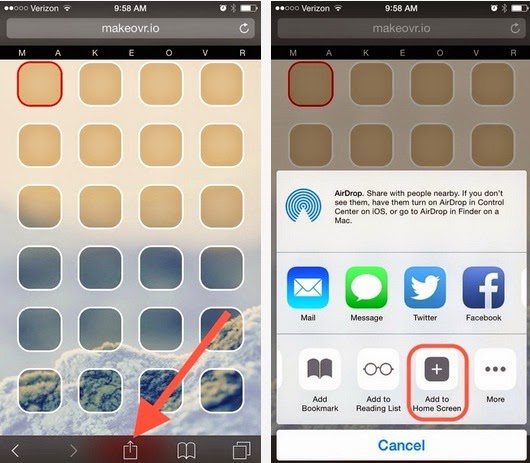
To begin with, access makover.iothrough safari browser in your Smartphone. The website leads with step-by-step method. In which you need to select wallpaper provided by makeover or use own wallpaper.
 |
| Makover web application |
If you don’t want to use makeover wallpaper, apply your own walls and just tap/ hold any app icon’s to edit. Now move any app icon to new blank page and capture a screen shot by pressing (sleep + home buttons).
 |
| iPhone home screen edit mode |
Rearrange app icon’s can be only after uploading screenshot. Now users can create invisible placeholders in-between apps via web application (makeover). Once modifying your own home screen, share your own home screen in social or upload by tapping add to home screen option.
 |
| customized apple home screen |
Also read : how to download YouTube videos directly in iPhone and iPad?
Finally, this is how to rearrange apple app icons with gap in-between. If you don’t like it! Remove placeholders using delete options. Feel free to share this tips on socially and connect with us for more updates on Apple.
Go to link Download

Monday, October 3, 2016
How to bring the Old Instagram App Icon Back on Your Home Screen
How to bring the Old Instagram App Icon Back on Your Home Screen
Instagram latest update brought some changes and features to the app, among these changes is the app icon. The new app icon is more colorful than the previous version, there is no doubt about it. Of course, as is the case with just about any change that gets any kind of publicity, not everyone has been happy with the new icon. For the folks out there who can’t stand it, and don’t mind tricking the system a little bit, there’s a way to get the old icon back.
 A developer by the name of Juan Ramirez has put together a relatively quick trick to get the old icon back. You’ll need to visit this website from your iPhone, and then find the “Tap Here” link that’s near the bottom of the page. Once you’re on the new page, select the “Share” icon on the bottom of Safari and save the website to your home screen.
As you’ve probably already guessed, this will make it so there’s a dedicated website saved as a home screen icon, which, when tapped, will open up the Instagram website. When you open that site from your iPhone it will automatically launch the Instagram app, so you jump right into it.
Once you’ve saved the site to your home screen, just go ahead and hide the new Instagram icon in a folder, and then you won’t have to look at it again directly any longer. If you get notifications from Instagram, you’ll still see the icon in that case, but you won’t have to look at it every time you want to launch the app, at least.
What do you think of the new app’s icon?
As you’ve probably already guessed, this will make it so there’s a dedicated website saved as a home screen icon, which, when tapped, will open up the Instagram website. When you open that site from your iPhone it will automatically launch the Instagram app, so you jump right into it.
Once you’ve saved the site to your home screen, just go ahead and hide the new Instagram icon in a folder, and then you won’t have to look at it again directly any longer. If you get notifications from Instagram, you’ll still see the icon in that case, but you won’t have to look at it every time you want to launch the app, at least.
What do you think of the new app’s icon?
Go to link Download
Saturday, September 24, 2016
How to fix wireless home networking connectivity issues
How to fix wireless home networking connectivity issues
