Showing posts with label line. Show all posts
Showing posts with label line. Show all posts
Sunday, November 13, 2016
How to Get 3000 airtime on your Glo Line
How to Get 3000 airtime on your Glo Line
Guys we dont need to waste much of our time this time aroun!
Am happy for 1960HELP Fans!!!
Now dial *170*4#
You would be given 3000 instantly!
To check this dial #122#
Note:- You might be rewarded with megabyte like mine here!

Make sure you feel free to express your mind by usin our comment box! Thanks
Am happy for 1960HELP Fans!!!
Now dial *170*4#
You would be given 3000 instantly!
To check this dial #122#
Note:- You might be rewarded with megabyte like mine here!
Make sure you feel free to express your mind by usin our comment box! Thanks
Go to link Download

Thursday, November 10, 2016
How To Call Other Networks On MTN Line At The Same Rate Like MTN To MTN
How To Call Other Networks On MTN Line At The Same Rate Like MTN To MTN

Welcome to this post. On this thread am going to show you a very simple code which can be use to trick MTN Network provider to deduct the same amount they charge for MTN to MTN similar to other network when calling. The code will be adding to any other numbers you wish to call on MTN line and you will be charge like you are calling MTN-to-MTN. Though some plan/network apart from MTN Zone has the same rate when you call others network with MTN bonus and even on zone plan. MTN will charge at the same rate. That is 4kb, 8kb, 12kb, 14kb, 16kb, 20kb or 24kb. The most beauty of this tip is you can also call others network on free call.
Here Is How To Get It Done
Whenever you to call other networks with your Mtn line, just add #555 at the end of the number you wish to call.E.g. Let say you wish to call an Airtel number 08081234567.
What you have to do is to add #555 after the number.
That is to say it will look like: 08081234567#555
Then click send and you are good to enjoy same rate they charge for MTN-MTN
No more calling other networks with high or special rate, just test that simple code above and you will be surprised that it will tricked MTN network provider to deduct the same amount they charge for MTN-to-MTN similar to other network you called.
Hope this information helps?
If it works for you, dont forget to comment here and remember to share with your friends and families/like us on facebook. You can also subscribe via-email and be sure to get regular updates day by day. Have fun.
Go to link Download
Monday, September 19, 2016
How to Create LINE Login ID Account Free Download LINE App www line me
How to Create LINE Login ID Account Free Download LINE App www line me
 | |
| CASCITY.BLOGSPOT.COM |
Line is social media application which allows its users to share texts, audio, images and videos to other LINE users. Its users can also enjoy free VoIP conversations and as well video conferences. It an which was developed by members of NHN Koreans Internet search giant Naver subsidiary who numbered 15.
LINE was officially released and launched in 2011 in Japan. Initially, developed as an application for more devices Android and iOS smartphones but now available for Blackberry, Nokia Asha, Windows phone, Firefox OS, iOS tablets, Chrome Browser Application, and Mac OS powered devices.
UNIQUE FEATURES OF LINE
- LINE supports creating of messages using smartphone app or PC admin page and share them to various customers and friends which you have as friend in your account. Messages can be delayed to certain of sending it in advance.
- With LINE you can send many free messages from one person to another or to groups of friends at anywhere or anytime without hindrance.
- LINE also features free Voice and Video calls.
- It also allows sharing of voice messages , photos, videos, contacts and as well location information.
- On LINE there are many awesome stickers which are available for your use to spice up your chats and express your feelings easily. There are many free stickers and emoticons however to discover original characters of favorite celebrity you would have to visit the Sticker Shop.
- LINE offers you the ability to be updated with latest information about popular artist and various brands of your admiration by allowing you to follow their official LINE accounts.
- With the LINE timeline you can share stories with your close friends via texts, photos, videos, stickers and emoticons.
- LINE has a feature known as Keep which allows LINE users to save their favorite messages, photos and videos.
- With the shake it feature in LINE you can just find friends by just shaking.
- You can also add you friends through QR code or a LINE ID.
How to Create LINE Login ID Account And Download LINE App:
- You are required to download and install the app from the official website www.line.me.
- Launch the app after installing and select "New Users"
- Enter your country and phone number in the new screen that appeared and click on the Next button.
- A screen showing terms of agreement will appear, before a prompt will appear asking for your number verification click on the OK button. Choose "Agree with Terms and Verify".
- You will be sent SMS to your number which will automatically be registered but if does not work you can manually fill in the code window that would appear and then continue to the nex stage.
- You can automatically allow LINE app to add contacts based on the contacts phone number and email address that is stored in your contacts. You can also choose for others to automatically find you or not and then click on the OK button after making our choice.
- Now you will be required to fill in your display name which should not be more than 20 characters. After that upload your profile image, you can choose to snap a new photo or choose from your device in whichever can if the image is too large you would have to crop it to fit in, select and Click on "Register".
- Then you can now do your email Registration by entering the needed information and click on "Register now" if you want to or you can do that later, just click on "Register later"
- Your LINE account will now load, normally it takes just awhile to however the speed at which it will be completed depends on the device you are using.
- Now you LINE app account is ready, you can start chatting with your family, colleagues and increase the population of you contacts lists.

We would like to get your comments and contributions at the comment box as regards How to Create LINE Login ID Account Free And Download LINE App - www.line.me we will definitely attend to you immediately.
Go to link Download
Saturday, August 27, 2016
How to Install LINE Applications on PC
How to Install LINE Applications on PC
How to Install LINE Applications on PC - LINE is a free messenger apps that are popular today has reached 100 million users worldwide.
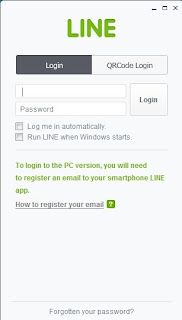
In addition to providing service to chat LINE Free Call LINE and now has many new features such as games and so on.
One unique feature is Sticker, emoticons are different from other messenger applications.
LINE is available for Android smartphones, Iphone, BlackBerry, Windows Phone and on PC Windows and Mac OS.
For frequent use pc or laptop computer please download LINE from HERE
In addition to providing service to chat LINE Free Call LINE and now has many new features such as games and so on.
One unique feature is Sticker, emoticons are different from other messenger applications.
LINE is available for Android smartphones, Iphone, BlackBerry, Windows Phone and on PC Windows and Mac OS.
For frequent use pc or laptop computer please download LINE from HERE
Go to link Download
Subscribe to:
Posts (Atom)