Tuesday, August 30, 2016
How to download torrents on Blackberry Phone
How to download torrents on Blackberry Phone
How to download torrents from your Blackberry phone.

Although this post is intended for Blackberry users on how they can download torrents on their phones, the ways described here can work on computers as well or any phone for that matter with decent specs. The emphasis on Blackberry phones is that most people who own Blackberry phones subscribe to the BIS (Blackberry Internet Service) which means they have unlimited internet on their devices. However, it is wiser to check with your carrier / operator first but generally the rule of thumb is that internet traffic via the phone browser is free if you are subscribed to BIS. Normally the technology with torrents is you need a torrent client like Vuze or utorrent to download them. Things get a bit tricky if you are behind a proxy server for example if you are at work or college where you have unlimited internet but cant install torrents because of blocked firewalls or limited administrator privileges.

 Now getting to the stuff that matters, first thing that you need to do is go to www.torrific.com and create an account there. They only need your email address and password. There is a free account and there is a premium account but we’ll get to that later. After creating the account, you can go to your favourite torrent sites. In my case my favourites are www.thepiratebay.org and www.isohunt.com. When you find the torrent that you want you just copy the download link of the torrent and paste it in the search bar at the Torrific site and click ‘Get’. You will be shown the file extension of the type of file that you want to download and if its a zipped file you can also see the files inside the compressed file. Click on the button which says ‘Initiate bittorrent download’ and the torrent will be queued. After the torrent seeding is complete, the use will receive an email from Torrific saying the download is complete. The user will receive a link where the seeded file can be downloaded. In my case I use a Blackberry 9300 3G running OS6 and it performs admirably and even allows for multiple downloads. The browser in OS6 also has a basic download manager build in to resume broken downloads but in my case it was a case of hit and miss as it didn’t resume all broken downloads. I have heard that some previous versions of Blackberry OS have file size restrictions but im not sure of that.
 However, it is important to some few things here. When Torrific downloads the files for you its ‘cached’ for 24hrs which means you have to download it within that time period. However, for popular content you will find that it can be ‘available’ on your account for several days, presumably because several people will be requesting the same file hence the need to keep it ‘cached’ for downloads. Also, most shared files are copyright material and the user does this at his / her own risk. The other thing to note is that if you have a free account you are given a 10GB bandwidth limit every 24 hours. After you reach your limit, you cannot download anymore stuff. Because Torrific acts like a bittorrent client, some files take long to be seeded on Torrific servers before you can receive the download link. Besides the flexibility of downloading content on one’s Blackberry.
Go to link Download

How to Enable Whatsapp Web on Moxilla FireFox
How to Enable Whatsapp Web on Moxilla FireFox
Whatsapp web was launched this earlier Jan. 2015 but then you have to scan your whatsapp with Google Chrome Browser but today, you scan it with your Moxilla Firefox.
All you have to do is to follow the below tutorial, it is short, it is simple and it is enlightening. And please, your phone must be on when you are scanning until you chat finish.
The below step will help you to use whatsapp
Go to link Download
How to Change QualComm Device IMEI Samsung Without a PC
How to Change QualComm Device IMEI Samsung Without a PC
Its no News that Some Qualcomm Device users are find it difficult to change their Android device IMEI. If any of the previous posted method did not work for your device, here is another perfect working method. The method has been tested to work on Xiaomi redmi 1s, MTNSmart S720 and Samsung Ace 4. It may not work on all Samsung devices, while it works for some.
Disclaimer: Note that changing of IMEI is illegal in some countries, and I will not be held responsible for any consequences that befall the changer.
Remember to write down your original IMEI number and keep it safe. Also, backup your original IMEI incase anything goes wrong, you can easily revert back.
Materials Needed
1. Your device must be rooted
2. Xpose installer, download it here
3. Imei Changer, Play Store Link
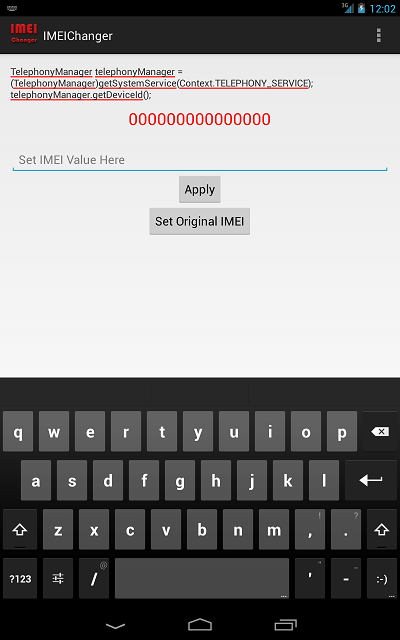
EXPOSED IMEI Changer - see screenshot above...
Now Follow the Steps below Carefully
1. Install Xpose installer and launch it
2. Click on Framework, click on install/update
3. When all is done, reboot your device
4. Install imei changer>>open xpose installer and click on modules, make sure IMEI changer is ticked then click on imei changer to launch the app
5. Generate your blackberry imei with IMEI Generator APK Version and input it in the space provided, then click Apply
6. Reboot your device and dial *#06# to confirm if your imei was successfully changed.
Best of luck.
Dont Forget To Add your View, Comments on this Post.
Always Like and Share Posts, You can Make use of the Share Buttons below.....
Disclaimer: Note that changing of IMEI is illegal in some countries, and I will not be held responsible for any consequences that befall the changer.
Remember to write down your original IMEI number and keep it safe. Also, backup your original IMEI incase anything goes wrong, you can easily revert back.
Materials Needed
1. Your device must be rooted
2. Xpose installer, download it here
3. Imei Changer, Play Store Link
EXPOSED IMEI Changer - see screenshot above...
Now Follow the Steps below Carefully
1. Install Xpose installer and launch it
2. Click on Framework, click on install/update
3. When all is done, reboot your device
4. Install imei changer>>open xpose installer and click on modules, make sure IMEI changer is ticked then click on imei changer to launch the app
5. Generate your blackberry imei with IMEI Generator APK Version and input it in the space provided, then click Apply
6. Reboot your device and dial *#06# to confirm if your imei was successfully changed.
Best of luck.
Dont Forget To Add your View, Comments on this Post.
Always Like and Share Posts, You can Make use of the Share Buttons below.....
Go to link Download
Monday, August 29, 2016
How to Download BlackBerry Apps to Memory Card
How to Download BlackBerry Apps to Memory Card

Share all of this †o ur friends!
Save device space by moving your BlackBerry apps to its microSD card.
BlackBerry phones have a large number of apps, or applications, that can be downloaded and used. However, these apps can take up a large amount of device memory, in turn slowing the BlackBerry down. One solution to this is to download, or archive, your apps to the microSD memory card. Doing so can improve your phone's functionality.
Things You'll Need:
BlackBerry App World version 1.1 or higher
Instructions
Update your BlackBerry App World to version 1.1 or higher. Any older versions will not allow you to archive or download the apps to the microSD memory card.
Download any app or apps that you plan on using in the BlackBerry App World. If you already have your apps downloaded, proceed to Step 3.
Choose "My World" from the main screen in order to view your downloaded apps.
Scroll to the app that you would like to archive or download to the microSD memory card. Select your "Menu" button and choose the "Archive" option. This will begin the download and archiving process. Your app will be uninstalled from the device memory and transferred to the SD card.
Reboot the BlackBerry if requested. Some apps will require this step, while others will not.
Restore the app that you saved to your microSD memory card. You should be able find your archived apps in the Downloads folder or on the home screen. The archived apps will have a green arrow on the icon indicating it was downloaded to the memory card. Select the app and then select "Restore."
Tips & Warnings
Store your music and pictures to a microSD card to free up even more memory.
Go to link Download
How to Calculate Daily Calorie Needs
How to Calculate Daily Calorie Needs

The theory that to lose weight is to reduce our daily caloric needs are not entirely wrong. However, the amount of the reduction should not be drastic. The trend is when people lose their daily calorie intake, they ignore other nutrients the body needs. Down maybe yes, but healthy? Not necessarily. That is why we should not be the origin.
Some say that is good for weight-loss program is healthy is to reduce our daily caloric needs 500-600. For example, your daily calorie requirement is 2300 calories (in a state of rest or activity), so that weight can come down you have to meet the nutritional intake of approximately 1800 calories.
Reduction of caloric needs as much as 500 calories this can be done in 2 ways:
adjusting the diet
regular exercise
Could either or both at once. Will you cut calories is 500 calories. So using the example above (2300 calories daily calorie requirements) are:
adjust your diet so that the total caloric intake is 1800 calories
diet and exercise. Eg: exercise to burn 300 calories and diet there is a reduction of up to 200 calories (total calories minus 500 calories)
To be able to do both, you should first calculate the daily calorie needs. For the sake of your convenience, I have already provided toolnya in the sidebar of this blog. Do not forget to first change the settings for metric units in order to input numbers in units of pounds to the weight and inches for height.
Also measure your Body Mass Index, and see you into the category which. I also once wrote about the Body Mass Index, the initial reason why in the end I decided to do the Easy Diet Program.
If you have found what your daily calorie needs, please be so arranged. Not regulated nor anything. But clearly, if your intake is always on top of the daily caloric requirement is definitely the more days you will be getting fatter. So do not be surprised, though slightly, from year to year you gain weight. Choice is yours.

Go to link Download
Hotspot Shield Vpn Elite Edition v5 20 21 Full Crack
Hotspot Shield Vpn Elite Edition v5 20 21 Full Crack
Selain itu dengan menginstall Hotspot Shield Vpn Elite Edition ini ke komputer anda, maka anda akan merasa lebih aman ketika menjelajah internet, karena software ini akan memberi anda perlindungan yang maksimal dari malware, phising, spam site, serta situs yang membahayakan komputer anda.
Bagi anda yang sudah kenal dengan software ini dan mencari Hotspot Shield Vpn Elite Edition Terbaru 2016, silahkan langsung anda download Hotspot Shield Vpn Elite Edition ini sekarang juga.
Hotspot Shield Vpn Elite Edition Features :
- Protect Your privacy
- Protect your IP Address and surf the web anonymously
- Bypass Internet Censorship
- Bypass internet censorship and restrictions Instantly unblock YouTube, unblock Facebook, or unblock any site. Get access to geo-restricted sites and VOIP application from anywhere.
- Secure Your Internet
- Secure your data, online Shopping, and personal information online with HTTPS encryption.
- Enable Wifi security
- Enable WiFi security and prevent hackers from stealing your personal information
- Get Malware protection
- Protect your device from malware, phishing, spam sites, and malicious sites.
- Get data savings on mobile
- Download up to twice the content for the same bandwidth cost with Hotspot Shield data compression technology.
Download
Go to link Download
How to Prevent It Smartphone and Laptop Battery Explosion
How to Prevent It Smartphone and Laptop Battery Explosion
Lithium - ion or Li - ion called rechargeable batteries have become the most popular at the moment . Therefore has many advantages such as light weight material , has good energy density and not too expensive, the Lithium - ion batteries are widely used to support smartphones , tablets , laptops and many other electronic devices . But behind the superiority Lithium - ion batteries can also be flammable , even explosive.
How to Prevent It ?, (Smartphone and Laptop Battery Explosion)
How to Prevent It ?, (Smartphone and Laptop Battery Explosion)
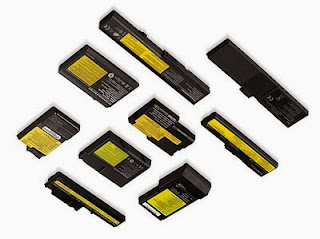
Lithium - ion batteries that catch fire or explode tends to be the result of a process known as thermal runaway ( thermal runaway ) . Thermal runaway is basically the excessive positive feedback resulting energy into high temperature . This causes the system to be more heat , even to burn or explode . The cause of thermal runaway itself there are various kinds , such as short-circuit and the ambient temperature exceeds 60 degrees .
Some examples of battery cases smartphone or tablet ever exploded among other things, the Samsung Galaxy S3 and S4 Galaxy in July . There also exists the iPhone also erupt in China so that a woman injured in the eye . And most recently the case of Retina iPad in Australia , which is still under investigation cause. Although it sounds terrible but not to fear the smartphone , tablet or laptop into a time bomb . Then, what solutions or preventive measures that can be done ?
Go to link Download
Subscribe to:
Posts (Atom)