Showing posts with label imei. Show all posts
Showing posts with label imei. Show all posts
Thursday, November 10, 2016
How To Root and Change IMEI On The Mtn Android Phone
How To Root and Change IMEI On The Mtn Android Phone
Concerning the MTN Android phone, its not a new thing, the phone has been out in the Store/Market place for some time now.

In any case you wish to root you MTN mini Android, yes you can, and this can be done even within 20 minutes.
Just follow the simple steps below!

- Download VROOT Official Chinese version here or VROOT unofficial English Version here.
- Install it on your System
- Enable USB debugging on your Android device. To enable USB debugging, go to Developers => USB debugging then, tick it. If you cant find it, start tapping on build number until you see developer options.
- Plug USB chord to your device and VROOT will detect your phone.
- Click on Root and your phone will Reboot.
- VROOT cant find my device? Download PDANET to install necessary drivers or Download Adb Driver Installer (Universal).
- Download GIPv4.1 Software for generating BB Imei.
- Download MTKDRIOD Tools
- Open the MTK Droid Tools it must detect the information of your Device. Click on Root Button to gain SuperSU permission and the yellow box down should turn to green.
- By the left, you will see IMEI, just tap on it. Generate your Imei and replace it with the older one.
- Dont forget to backup your old Imei before you followed the above procedures.
That is all.
Hope this info helps? Feel free to share this post with your friends using the Share/Like buttons. Never miss any of my future post CLICK HERE TO SUBSCRIBE Once entered, you will have to check your inbox for a confirmation email containing a confirmation link. Once you VERIFY your email by clicking on the confirmation link in the message, you will never miss any future articles.
Dont Forget To Add your View, Comments on this Post.
Always Like and Share Posts, You can Make use of the Share Buttons below.....
Dont Forget To Add your View, Comments on this Post.
Always Like and Share Posts, You can Make use of the Share Buttons below.....
Go to link Download

Monday, October 31, 2016
How To Fixed Invalid Imei on Tecno C8 Android Lollipop
How To Fixed Invalid Imei on Tecno C8 Android Lollipop
I flash my tecno C8 android lollipop 5.1, After successful flash then i reboot the device and i notice invalid imei which mean the phone miss it imei number and it will not work properly with networks providers.
As we all knows imei is an identity to any device, so without imei your device can not be recognize or detected by any of the network service providers, and due to that you can no longer make calls, access internet service and any thing that required network. But you can only access network via WIFI.
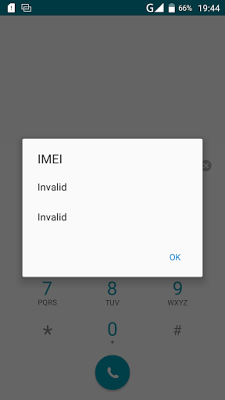
The only way out to this issue is to fixed the invalid imei by replacing it with a valid imei. A lot of people says you have to root the device before you can able to fixed the imei which is not true because i fixed the invalid within a minute without rooting my device.
Fixed Invalid Imei On You Tecno Device
1. Download and Installed Mtk Engineering Mod on your device.
2. Open/Lunch the MTK Engineering Mode on your phone.
3. Click/Select MTK Settings.
4. Navigate left to Connectivity
5. On the connectivity panel, select CDS Information.
6. On the CDS Information, select Radio Information.
7. Now, select either the Phone1 or Phone2, to proceed to replacing of missing IMEI.
8. On this page, click on the AT+. About four (4) options should be presented to you, just choose either of this options below: Make sure you give one space between AT and Plus (+)
Now type your imei as shown below with the same format
AT+ EGMR=1,7,"" for phone 1
AT+ EGMR=1,10,"" for phone 2
9. Now, tap/click the Send AT Command option
Then reboot your phone and dial *#06# to check your IMEI number.
Now your imei has sucessful written without rooting your phone, please share this to your friends via our share bottom.
If you need any help about this you can contact on whatsapp messenger via +2348067611897.
Go to link Download
Wednesday, October 19, 2016
How To Get 2GB Giga Bytes on MTN with IMEI Tweaking
How To Get 2GB Giga Bytes on MTN with IMEI Tweaking
Featured Post: Blackberry IMEI Generator For Android - Download it Here
Finally the long gone MTN IMEI Tweaking is back, bigger and better, many thought this method had been blocked or stopped, but from recommendations and thanks to other webmasters, this tweak is still working well and perfectly.
How To Get the 2GB on your MTN Sim
It might seem am saying it but its through, infact i have decided to show you an image proving to you that this 2GB thing is true, see the image below!

Yea, I got my 2GB, you too can get yours by following some little procedure!
Dont Miss:- Top Best Free Android Games To Download in 2015
First, you will need to Tweak the IMEI of your phone, to the following IMEI numbers.;
35842906061654
35842906061533
35842906061763
35842906061765
35842906061765
35842906061753
35842906061653
Just use any one of the above that suites you...
Then, Generate the last Digit and send
INFINIX OF MIFI to 131
See:- How You Can Root Any Android Device Easily
Also, to Root your phone Click Here
Dont Forget To Add your View, Comments on this Post.
Always Like and Share Posts, You can Make use of the Share Buttons below.....
Go to link Download
Thursday, September 22, 2016
How To Get 7 5 Gigabytes Free on MTN No IMEI Tweaking Required
How To Get 7 5 Gigabytes Free on MTN No IMEI Tweaking Required
This is a hot anf trending tweakt for mtn users. MTN Free 7.5GB is back and blazing very well, the procedure is very simple (No IMEI Tweaking Required). Just follow the instruction below and MTN free 7.5GB! is yours which will last for 1 month.
See Image:

Whats Needed?
1. MTN New Sim (That is never been used to receive any MB/GB)
2. Nokia Touch light or old small Tecno phone
Here is how it works!
Insert MTN New Sim in any of the stated phone above
Text 101 to 131
So simply as that, if your sim work for it, you should receive a successful message as shown in the above screenshot.
To check your Gigabytes balance and the validity date, text 2 to 131
Enjoy and Use it before it expires.
See Image:
Whats Needed?
1. MTN New Sim (That is never been used to receive any MB/GB)
2. Nokia Touch light or old small Tecno phone
Here is how it works!
Insert MTN New Sim in any of the stated phone above
Text 101 to 131
To check your Gigabytes balance and the validity date, text 2 to 131
Enjoy and Use it before it expires.
Go to link Download
Friday, September 16, 2016
How to Root and Change Imei of Infinix HotNote X551
How to Root and Change Imei of Infinix HotNote X551
Hi readers,Today we are going to talk about a tutorial on how to root and also change the imei of infinix hot note X551. The last time we wrote a post a on infinix hot note, we posted the specification of the infinix hot note.
How to Root Infinix HotNote X551
1. First of all, you need to allowed third party installations in your device, if you want this app to install on your device. You can enable this option on your device setting. Go to Setting => Security => and there you can tick the “Unknown sources” box.2. Run and install KingRoot app on your device. Though its written in half Chinese Language but don’t worry, I will help you to learn a bit of Chinese language.
3. After successful installation, start the app and wait for KingRoot to fully analyze your device.
4. After a few seconds you will see the main window, the Chinese language
4. After a few seconds you will see the main window, the Chinese language
5. Click on the Big Green Circle on your device that says Root and wait for a few minutes (Your phone must be connected to the internet).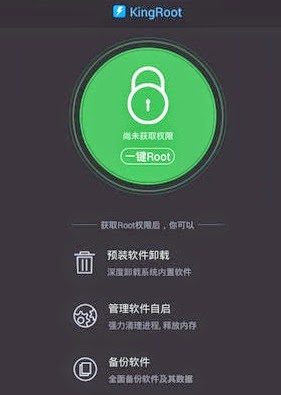
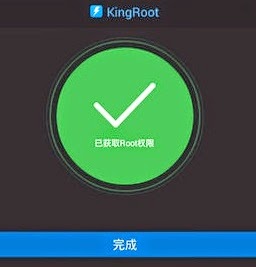
6. After a few minutes, you should see a tick mark in a green circle and the blue horizontal bar below the green circle, which means that your device has been successfully rooted! with the help of KingRoot.
The KingUser app will be installed for SuperUser access.
7. Download Root Checker from Play Store to verify your root privileges. After downloading, simply Install Root Checker, run it and you should get a success message after then.
Go to link Download
Tuesday, August 30, 2016
How to Change QualComm Device IMEI Samsung Without a PC
How to Change QualComm Device IMEI Samsung Without a PC
Its no News that Some Qualcomm Device users are find it difficult to change their Android device IMEI. If any of the previous posted method did not work for your device, here is another perfect working method. The method has been tested to work on Xiaomi redmi 1s, MTNSmart S720 and Samsung Ace 4. It may not work on all Samsung devices, while it works for some.
Disclaimer: Note that changing of IMEI is illegal in some countries, and I will not be held responsible for any consequences that befall the changer.
Remember to write down your original IMEI number and keep it safe. Also, backup your original IMEI incase anything goes wrong, you can easily revert back.
Materials Needed
1. Your device must be rooted
2. Xpose installer, download it here
3. Imei Changer, Play Store Link
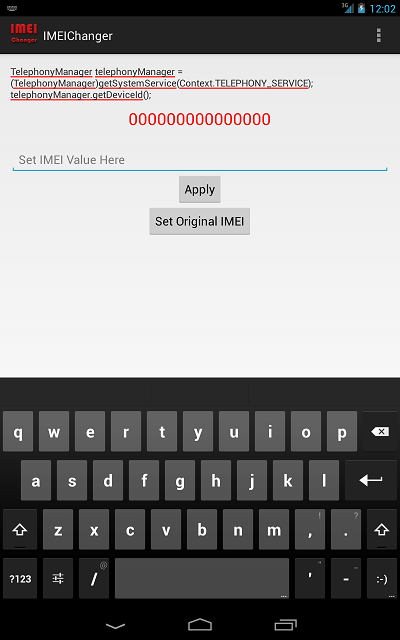
EXPOSED IMEI Changer - see screenshot above...
Now Follow the Steps below Carefully
1. Install Xpose installer and launch it
2. Click on Framework, click on install/update
3. When all is done, reboot your device
4. Install imei changer>>open xpose installer and click on modules, make sure IMEI changer is ticked then click on imei changer to launch the app
5. Generate your blackberry imei with IMEI Generator APK Version and input it in the space provided, then click Apply
6. Reboot your device and dial *#06# to confirm if your imei was successfully changed.
Best of luck.
Dont Forget To Add your View, Comments on this Post.
Always Like and Share Posts, You can Make use of the Share Buttons below.....
Disclaimer: Note that changing of IMEI is illegal in some countries, and I will not be held responsible for any consequences that befall the changer.
Remember to write down your original IMEI number and keep it safe. Also, backup your original IMEI incase anything goes wrong, you can easily revert back.
Materials Needed
1. Your device must be rooted
2. Xpose installer, download it here
3. Imei Changer, Play Store Link
EXPOSED IMEI Changer - see screenshot above...
Now Follow the Steps below Carefully
1. Install Xpose installer and launch it
2. Click on Framework, click on install/update
3. When all is done, reboot your device
4. Install imei changer>>open xpose installer and click on modules, make sure IMEI changer is ticked then click on imei changer to launch the app
5. Generate your blackberry imei with IMEI Generator APK Version and input it in the space provided, then click Apply
6. Reboot your device and dial *#06# to confirm if your imei was successfully changed.
Best of luck.
Dont Forget To Add your View, Comments on this Post.
Always Like and Share Posts, You can Make use of the Share Buttons below.....
Go to link Download
Subscribe to:
Posts (Atom)