Showing posts with label c8. Show all posts
Showing posts with label c8. Show all posts
Monday, October 31, 2016
How To Fixed Invalid Imei on Tecno C8 Android Lollipop
How To Fixed Invalid Imei on Tecno C8 Android Lollipop
I flash my tecno C8 android lollipop 5.1, After successful flash then i reboot the device and i notice invalid imei which mean the phone miss it imei number and it will not work properly with networks providers.
As we all knows imei is an identity to any device, so without imei your device can not be recognize or detected by any of the network service providers, and due to that you can no longer make calls, access internet service and any thing that required network. But you can only access network via WIFI.
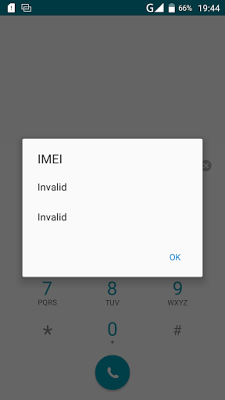
The only way out to this issue is to fixed the invalid imei by replacing it with a valid imei. A lot of people says you have to root the device before you can able to fixed the imei which is not true because i fixed the invalid within a minute without rooting my device.
Fixed Invalid Imei On You Tecno Device
1. Download and Installed Mtk Engineering Mod on your device.
2. Open/Lunch the MTK Engineering Mode on your phone.
3. Click/Select MTK Settings.
4. Navigate left to Connectivity
5. On the connectivity panel, select CDS Information.
6. On the CDS Information, select Radio Information.
7. Now, select either the Phone1 or Phone2, to proceed to replacing of missing IMEI.
8. On this page, click on the AT+. About four (4) options should be presented to you, just choose either of this options below: Make sure you give one space between AT and Plus (+)
Now type your imei as shown below with the same format
AT+ EGMR=1,7,"" for phone 1
AT+ EGMR=1,10,"" for phone 2
9. Now, tap/click the Send AT Command option
Then reboot your phone and dial *#06# to check your IMEI number.
Now your imei has sucessful written without rooting your phone, please share this to your friends via our share bottom.
If you need any help about this you can contact on whatsapp messenger via +2348067611897.
Go to link Download

Friday, September 16, 2016
How To Download the Camon C8 Marshmallow Update on Your Phone
How To Download the Camon C8 Marshmallow Update on Your Phone
TECNO Mobile has finally released the Marshmallow update for the Camon C8 smart phone. I know you all were expectant of this and there was massive traffic to the first one uploaded.
So, it’s now back on our server, with faster download and stress free!
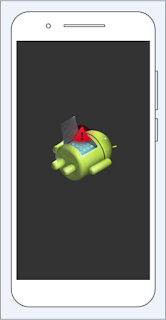
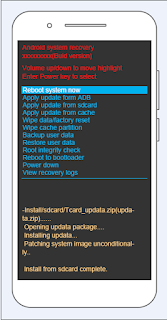
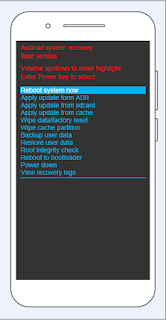
So, before I proceed, Please be sure you have a backup for this update just in case anything goes wrong somewhere somewhat. Also, feedback is highly welcome on this blog!
Also, you will need to register on TECNO SPOT to be able to download this file/update on your phone
Now, follow the STEPS below;
1 Download the SD Card Update from herTransfer the update to the root storage of your SD CardSwitch Off Your mobile phoneSwitch it on by pressing the Power button and the Volume Up buttonWhen it comes on and you see the android logo and warning signal, double tap the buttons again one at a time and it will be boot into recovery modeUse the Volume Down button to navigate to the “Apply Update from SDCard option” and click on the option with the power button!After this process is done, reboot the device and that’s all
Subscribe to our updates by email or with your favorite browser.
Go to link Download
Subscribe to:
Posts (Atom)