Showing posts with label tecno. Show all posts

Monday, October 31, 2016

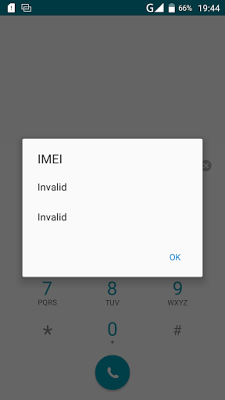
How To Fixed Invalid Imei on Tecno C8 Android Lollipop

How To Fixed Invalid Imei on Tecno C8 Android Lollipop


I flash my tecno C8 android lollipop 5.1, After successful flash then i reboot the device and i notice invalid imei which mean the phone miss it imei number and it will not work properly with networks providers.

As we all knows imei is an identity to any device, so without imei your device can not be recognize or detected by any of the network service providers, and due to that you can no longer make calls, access internet service and any thing that required network. But you can only access network via WIFI.
how to solve invalid imei on all tecno phone

The only way out to this issue is to fixed the invalid imei by replacing it with a valid imei. A lot of people says you have to root the device before you can able to fixed the imei which is not true because i fixed the invalid within a minute without rooting my device.

Fixed Invalid Imei On You Tecno Device

1. Download and Installed Mtk Engineering Mod on your device.

2. Open/Lunch the MTK Engineering Mode on your phone.

3. Click/Select MTK Settings.

4. Navigate left to Connectivity

5. On the connectivity panel, select CDS Information.

6. On the CDS Information, select Radio Information.

7. Now, select either the Phone1 or Phone2, to proceed to replacing of missing IMEI.

8. On this page, click on the AT+. About four (4) options should be presented to you, just choose either of this options below: Make sure you give one space between AT and Plus (+)

Now type your imei as shown below with the same format

AT+ EGMR=1,7,"" for phone 1

AT+ EGMR=1,10,"" for phone 2

9. Now, tap/click the Send AT Command option

Then reboot your phone and dial *#06# to check your IMEI number.

Now your imei has sucessful written without rooting your phone, please share this to your friends via our share bottom.

If you need any help about this you can contact on whatsapp messenger via +2348067611897.

Go to link Download

Read more »

Sunday, October 30, 2016

How i Rooted my Tecno N7 Root any Chinese Android running Android 4 0 ICS 4 1 JB

How i Rooted my Tecno N7 Root any Chinese Android running Android 4 0 ICS 4 1 JB


Here’s an easy to follow tutorial on how to root any Chinese Android device you got there. It uses the rooting script Root_with_Restore_by_Bin4ry, which you can find at XDA. This is confirmed working for any MediaTek MT6577 devices running Android 4.0 or up, even devices with the dual core Qualcomm S4 procie can be rooted by this as long as it is on Android 4.x.
I first tested it on rooting a Cherry Mobile Titan, and it works. On this tutorial, I had used the method on my HDC Galaxy Note 2.

First, you need to properly install the ADB drivers. To do that, you must download and install first an app called Moborobo. Link here.
After installing the app, on your phone, enable USB Debugging by going to Settings > Development.
Connect your device and open the Moborobo app. Moborobo will attempt to install the necessary drivers. Just allow it to do the changes on your computer and if it succeed, you’ll see something like this:
Moborobo-installed-drivers-500x211
Moborobo can read your connected Android device
You can now exit Moborbo. Be sure to close it completely and not just minimize it on the system tray.
Download this file. Root_with_Restore_by_Bin4ry_v18_2.7z
It is the rooting script. Extract it anywhere. You’ll something like this:
2Root_with_Restore_by_Bin4ry_v18_2.7z
Execute the RunMe.bat file if you are on Windows. A command prompt will open.
3
Root with Restore by Bin4ry
Just enter 1 as your option. It will now do its task. You’ll now see something like this on your device. Click restore and wait for the process to finish.
4
Restore data, ignore that encryption password thing
While on the command prompt window, you’ll see this:
5
rooting….
Your device will restart, and if you see the SUPER SU icon on your apps drawer it means that you had successfully rooted the phone.
7
SUPER SU
Checking root access with the Root Checker App:
Rooted-HDC-Galaxy-Note-2-PRO
Rooted HDC Galaxy Note 2 PRO
It is really easy on these Android 4.x devices now. I just posted this so I can just use this as reference for the queries on how to root such Chinese-made Android smartphones. While on lower version of Android, such as 2.3.6 Gingerbread, its a bit tricky as it needs some hacking with the boot.img if the SuperOneClick or UnlockRoot doesnt works. We’ll cover that up on the next update.
As they say, rooting voids the warranty but it depends on where did you buy your Android phone. Root only when you think you really have to and already know why you need to do that. On the other note, this process isnt risky and there is nothing to fear in case you messed up with the steps. Still, do this at your own risk.

If you dont want to miss anything on Stalyfblog, please like us on Facebook. and follow us on Twitter

You can also Subscribe to our updates by email or with your favorite browser. This way, you wont miss any updates from stalyfblog. If you subscribe by email, make sure to check your email to confirm your subscription.

Posted By: Oke David Umurhohwo.

Follow me on Google+, Twitter.

Cheers!

Go to link Download
Read more »

Saturday, October 29, 2016

HOT List UPDATED How To Root Tecno L3 F5 M6 H5 H6 P5 L6 R5 F6 P9 Infinix Hot Hot Note

HOT List UPDATED How To Root Tecno L3 F5 M6 H5 H6 P5 L6 R5 F6 P9 Infinix Hot Hot Note


Ok. So i made this list as a guideline to help you whenever you want to Root any of the listed below phones... Ill try as much as possible to keep it updated so Keep This Page on Your Bookmarks!

ROOT

Tecno F5 - iRoot Pc
Tecno M6 - KingRoot apk
Tecno H5 - com.mgyun.shua.su7 apk
Tecno H6 - KingRoot apk
Infinix Hot X506 + Hot Note - iRoot Pc
Tecno P5 - Framaroot apk
Tecno L6 - KingRoot apk
Tecno R5 - KingRoot apk 

Tecno F6 - KingRoot apk
iTel it501 - iRoot PC

(UPDATE)
Tecno L3 - Shaume PC
Tecno P9  -  FramaRoot Apk

Thanks. And Dont Forget to Leave Your Comments, We Love Comments!

Go to link Download

Read more »

Friday, September 9, 2016

How To Root Tecno P3 and P5 Android phones

How To Root Tecno P3 and P5 Android phones


Basically rooting means the user will gain full access and control of your android smartphone. rooting your tecno p3 and p5 voids your phones warranty and makes it possible to do alot of good things like Running special applications,Freeing up memory,Custom ROMs.

HOW TO ROOT TECNO P3 AND P5 ANDROID PHONES

1 - Download and install the Android SDK from Google and install the USB drivers package and Android tools.
2 - If it is not present, download the fastboot.exe file (available on various places online, like here) and place it in the SDK/Tools (or Platform-Tools) folder. This will be the same folder with adb.exe in it
3 - On your phone or tablet, go into the settings and open the About Phone/Tablet menu. Tap the Build Number seven times. This will enable Developer Options in the main settings menu.
4 - Turn on USB Debugging in the Developer Options, and plug the device into your PC via the USB cable.
5 - Back on the PC, go to the folder where you placed the fastboot.exe file and open a command prompt window there. We’re going to use a tool called Android Debug Bridge (ADB). This is a way to issue commands to a device from your PC.
6 - In the command prompt, type adb devices, then hit enter. The window should show a device ID.
7 - Type adb reboot bootloader in the command prompt and hit enter. Your device will reboot into bootloader mode.
How to Root Your Nexus, HTC One, or Samsung Galaxy S4
8 - Now type fastboot oem unlock and hit enter. The device will pop up a warning as seen below. Select yes, but be aware this is the step that wipes the phone or tablet.
How to Root Your Nexus, HTC One, or Samsung Galaxy S4
9 - On your PC download the TWRP recovery or ClockWorkMod (varies by device) and SuperSUroot package. The versions change as new OS updates come out, but a quick search on XDA will get you the most recent version. Put the recovery file in the folder with ADB. Get your device back into Android and transfer the SuperSU zip to the internal storage.
10 - With your phone or tablet in bootloader mode again, type the following into the command prompt: fastboot flash recovery twrp.img, then hit enter. Substitute the MWN file name if you used that. This installs a new recovery over your old one so you can flash unsigned zip files.
11 - Finally, disconnect the device from your PC and use the volume rocker to navigate through the list of options in the bootloader. Choose the Recovery option and select it using the power button. Once in the recovery, find the option to Install a zip from the SD card, then select the SuperSU zip. And that’s it. You’re rooted

Go to link Download

Read more »

Wednesday, September 7, 2016

How To Root Tecno P6

How To Root Tecno P6


Rooting Tecno P6 is quite easy.. You have to follow the below instrustions

  • Enable USB Debugging (Can Be Done By Continuous Tapping of The "Build Information" Located at the settings of the phone.
  • Turn on Allow Apps From "Unknown Sources"
  • Download Trowel Root from the below link
  • After you have successfully installed it on your phone >> open it and click on "Make It Rain"
  • Allow It Do Its Thing
  • Download And Insatll SuperSu Below 
  • Viola! You Have Successfully Rooted

DOWNLOAD TROWEL ROOT

DOWNLOAD SUPER.SU

Go to link Download

Read more »

Friday, September 2, 2016

How To Root Tecno Phantom Z Mini For Free

How To Root Tecno Phantom Z Mini For Free


Tecno Phantom Z was easily rooted using KingRoot but it wasn’t the case for Tecno Phantom Z Mini. KingRoot didn’t work, neither did Framaroot. You need a PC to get this done.
If you absolutely have no idea why you need to root your phone, it’s advisable not to do it at all.
Rooting your device has a lot of advantages and at the same time, there are risks involved. To know what rooting means, the benefits and risks involved, you can check this article.
Disclaimer: You’re doing this at your own risk. We are not responsible for any damage caused or if you void your warranty.

Steps to Root Tecno Phantom Z Mini

Tools needed:
  1. vRoot
  2. PDANet+
  3. a good USB cable

Steps to root Infinix Hot

1. First enable Developer Options on your device by going to Settings > About. Tap the build number 7 times to enable developer options.
2. Go to Settings > Developer Options. Turn on USB Debugging from here.
3. Download PDANet+ and install. In case you’re asked to select a driver to install, select others.
root-infinix-hot-14. Connect your phone when prompted to continue installation.
This will install the needed PdaNet+ app on your phone as well.
5. Download iRoot and install on your PC.
6. Start the application and wait till it shows your phone is connected.
7. Hit the “Connect Device” button and wait till your phone is properly identified.
root-infinix-hot-28. When the device has been identified, click the “Root” button.
root phantom z mini
9. After a while, the process should successfully complete and the rooting should be done already.
root phantom z mini 2
To confirm, you can install Root Checker Basic from Play Store.

Tutorial learnt from http://geek.ng

Go to link Download

Read more »

Thursday, September 1, 2016

How to freeze apps Using HI Manager On Tecno Devices

How to freeze apps Using HI Manager On Tecno Devices


For many of us that have been using Titanium backup, one feature that stands out from this app is the ability to freeze apps and bloatwares but only people with root access have the privilege to use this app The advantage of the Tecno Hi manager is the ability to freeze apps that you have not been using for like 2 weeks without necessarily uninstalling these apps. No root is also required and is very safe to use. I know somebody will say this is cool.


How to freeze apps on the Hi manager
 1. Locate the Hi manager on your phone 
2. Click on it to open, click on app management. You will see app freeze 
3. Click on app freeze, you will see the + icon click on it to add apps you will like to freeze 
4.That is all, you can also untick any of the frozen apps to unfreeze

Go to link Download

Read more »