Showing posts with label social. Show all posts

Wednesday, October 26, 2016

How To Bypass Etisalat Chat Or Social Pack Speed Throttling

How To Bypass Etisalat Chat Or Social Pack Speed Throttling


Tweet

Bypass Etisalat Chat Or Social Pack Speed Throttle First download this particular Psiphon Handler from this link here, and also you must be on etisalat social pack, this does not work on chat pack so even you are on chat pack Unsubscribe and migrate to social pack. When you start to browse etisalat will send you a message that you have attain your smart pack limit usage, immediately switch off your data connection though sometimes you will still be browsing at a high speed rate. So if you notice your speed rate is slow especially when downloading just off your data and on it till you attain your desired speed. Check out this two screen
shots

[IMG]
Etisalat Social Pack Speed with ss


Go to link Download

Read more »

Wednesday, September 21, 2016

How to Add Email Subscription Box Widget to Blogger with Social Media Icons

How to Add Email Subscription Box Widget to Blogger with Social Media Icons


Todays weve give you blogger tips about how to Add Email Subscription Box with some social media share bottom to your Blogger for getting more subscribers to your blog. You can get more traffic with Email subscription. We give you step by step guide on how to add email subscription box togethe with Facebook, Twitter, Pinterest and Rss Subscriber Icons.

This is very good looking and attractive widget for blogger to increase RSS subscribers with Facebook Fan Page, Twitter Account and Pinterest Icon.
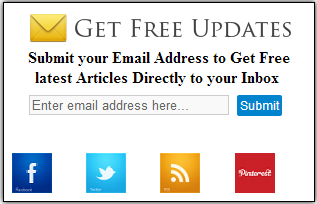
Email Subscription Box Widget to Blogger

Add Email Subscription Box to your Blogger
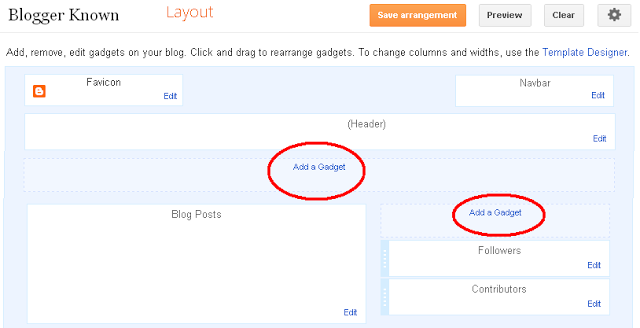
We give you step by step guide to Add Email Subscription Box Widget to Blogger, Please follow below induction to add widget on your blog:

1. Now Login into Blogger Dashboard

2. Go to Layout and Click on Add Gadgets as shown in this below picture.

Email Subscription Box to Blogger

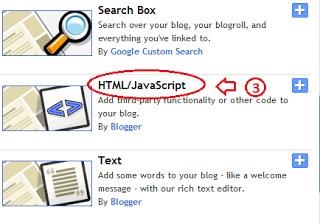
3. When you click on Add a Gadgets a new popup will be opened, and select HTML/JavaScript from list.

Email Subscription Box Widget to Blogger

4. Copy and paste the below code:

<style>   .NNBTsocial_box-email{   background:Fff no-repeat 0px 12px ; width:270px;float:center;font-size:1.4em;font-weight:bold;margin:2px 20px 0px 10px;color:#686B6C;  }  .NNBTsocial_box-emailsubmit{   background:#0084CE;cursor:pointer;  color:#fff; border:none;padding:3px;margin:0 0 0px 0;text-shadow:0 -1px 1px rgbaundefined0,0,0,0.25);   -moz-border-radius:2px; -webkit-border-radius:2px; border-radius:2px; font:12px sans-serif;  }   .NNBTsocial_box-emailsubmit:hover{   background:#E98313;   }   .textarea{   padding:2px; margin:0px 2px 0px 2px; background:#f9f9f9; border:1px solid #ccc; resize:none; box-shadow:inset 1px 1px 1px rgbaundefined0,0,0,0.1);   -moz-box-shadow:inset 1px 1px 1px rgbaundefined0,0,0,0.1); -webkit-box-shadow:inset 1px 1px 1px rgbaundefined0,0,0,0.1); font-size:13px;   width:200px; height:20px;color:#666;}  #socialboxNBT   {  text-align:center;font-weight:bold;padding:5px;border:1px solid black;width:300px;  -moz-box-shadow: 0px 0px 8px #000000;-webkit-box-shadow: 0px 0px 8px #000000;box-shadow: 0px 0px 8px #000000;}  </style>  <br />  <div id="socialboxNBT">  <a href="http://feeds.feedburner.com/kudantown" imageanchor="1" rel="nofollow" style="float: center; margin-left: .5em; margin-right: 1em;" target="blank"><img border="0" src="https://blogger.googleusercontent.com/img/b/R29vZ2xl/AVvXsEj_Cqk1bTk3III2PNGoGLlVp-8xTzjf5aznp5jHvTeaY059y4ZCkFOigrVfzZ8Kh9OhhbkeglsIKatRS0ob5py5kxoi2G9tSjIJX3Kl0mzpDN1oj7qLzJ8egqVfVF8oSy-KnT_L2ijEzO0/s1600/NNBT-rss.png" /></a>  Submit your Email Address to Get Free latest Articles Directly to your Inbox  <br />  <div class="NNBTsocial_box-email">  <form action="http://feedburner.google.com/fb/a/mailverify" id="feedform" method="post" onsubmit="window.openundefinedhttp://feedburner.google.com/fb/a/mailverify?uri=NBTLab, popupwindow, scrollbars=yes,width=550,height=520);return true" target="popupwindow">  <input class="textarea" gtbfieldid="3" name="email" onblur="if undefinedthis.value == &quot;&quot;) {this.value = &quot;Enter email address here&quot;;}" onfocus="if undefinedthis.value == &quot;Enter email address here&quot;) {this.value = &quot;&quot;;}" type="text" value="Enter email address here..." />   <input name="uri" type="hidden" value="haakblog" /><input name="loc" type="hidden" value="en_US" />   <input class="NNBTsocial_box-emailsubmit" type="submit" value="Submit" />   </form>  </div>  <style class="text/css">  table  {border-bottom: 0px solid #E6E6E6;float: center;width: 300px;margin:-8px 0 0 0px;}  .subicons  {border-right: 0px solid #E6E6E6;}  .Fadeout {filter:alphaundefinedopacity=100);opacity: 1.0;border:0;  }  .Fadeout:hover{filter:alphaundefinedopacity=80);opacity: 0.8;border:0;  }  </style>  <br /><div class="table"><table>  <tbody><tr>  <td><div class="subicons">  <a class="Fadeout" href="http://www.facebook.com/symbiangurus" imageanchor="1" rel="nofollow" target="_blank"><img border="0" src="https://blogger.googleusercontent.com/img/b/R29vZ2xl/AVvXsEgaVqgRmbctR2AuCW1vrppd5FByMUfQxcvAEWJ6nfFgAgvX_1phBXjEzscKM0OiNEdnXy31E9FRhtBi-BB6-rhyjIQ9jIm65UlnCYPvFXsF1sjaNAnjbpu6Dmt9briC9ZKUUhKYXXRuyh0/s1600/NNBT-facebook-icon.png" /></a></div>  </td><td><div class="subicons">  <a class="Fadeout" href="http://www.twitter.com/abubakarkudan" imageanchor="1" rel="nofollow" target="_blank"><img border="0" src="https://blogger.googleusercontent.com/img/b/R29vZ2xl/AVvXsEh3sfbC5sjAzPRn-Dzh3yXTsqULxfbE5LtC2YGcm6BNK_32BSMFcAkyLrL7-NooFy4IjP9Fd0nwXrwPtvDpRK8ux82hiE63Qvbxu5WBR0I2vcv03UIdz8N3WjnX2-NUa568tWhQY6rQ9yc/s1600/NNBT-twitter-icon.png" /></a></div>  </td>  <td><div class="subicons">  <a class="Fadeout" href="http://feeds.feedburner.com/kudantown" imageanchor="1" rel="nofollow" target="_blank"><img border="0" src="https://blogger.googleusercontent.com/img/b/R29vZ2xl/AVvXsEiyBW3w223Z0Gpt8mA9ZJb3H9gkCXrcxcTlM-X51po0gBInIjm0JHs2ebbTHEjNF3lQTmAzEzj8c3-q5YUXb18GbmTKy5V3IDPki4gZhf9pWL73fE2xmswUhGJFKhkQGSfGe-8L1gIQqtM/s1600/NNBT-rss-icon.png" /></a></div>  </td>  <td><a class="Fadeout" href="https://pinterest.com/kudantown" imageanchor="1" rel="nofollow" target="_blank"><img border="0" src="https://blogger.googleusercontent.com/img/b/R29vZ2xl/AVvXsEitQx3nz2mgd0XsbjwrHeY8o1SOrtlo3waxPMLgpA3oS6RzAAZBFIw7i7b2d-NCKsJg_4p1DAy7BHmyJE5NiSLgkA7R0hR7A-3BiTZCu74SDBmTGff6YCgQ98x4yTwRLZkfbWgqeDxj6mA/s1600/NNBT-Pinterest-icon.png" /></a></td>  </tr></tbody></table></div></div>
<small>
<a href="http://www.haakblog.com" rel="dofollow" target="_blank" title="blogger"><img src="https://bitly.com/haakblog" alt="blogger" border="0" style="position: fixed; bottom: 10%; right: 0%;" /></a><a style=align:center; href=http://www.haakblog.com/2013/10/add-email-subscription-box-widget-blogger.html target=_blank>Get Widget</a></small>

5. After copy and paste the code follow and the below with your username.
  • Change  http://feeds.feedburner.com/kudantown to your Feed Burner username 
  • Change http://www.facebook.com/symbiangurus to your Facebook fans Page Name.
  • Change http://www.twitter.com/abubakarkudan to your Twitter Username.
  • Change https://pinterest.com/kudantown to your Pinterest Username.
 Steps to change your username:

Then Click on save button and enjoy,dont forget to share this post to your friends.

Also Join our Facebook group for more.


Go to link Download

Read more »

Sunday, August 28, 2016

How to Find a Job on LinkedIn Facebook MySpace and Other Social Networks

How to Find a Job on LinkedIn Facebook MySpace and Other Social Networks


Finding the job of your dreams the old way just doesn?t happen anymore. If you want great pay, great benefits, and great satisfaction in your career, you must begin social networking.

How to Find a Job on LinkedIn, Facebook, Twitter, MySpace, and Other Social Networks helps you take full advantage of the bounty of opportunities to be found on the most popular sites. Online job-search experts Brad and Debra Schepp take you step-by-step through the process of joining networks, creating effective online profiles, and successfully

* Marketing yourself

* Building a network of business contacts

* Connecting with employers

* Getting recommendations

* Finding new leads

Mailing a resume and hoping for the best simply puts your fate in the hands of others. To stay in the running, you have to take control by keeping your information fresh and current?in real time. Online social networking is the only way to go, and this forward-looking guide is the best way to get there.


Download

http://hotfile.com/dl/21725587/161200e/BR-1525-HTFJ.rar.html

Mirror

http://rapidshare.com/files/325420971/BR-1525-HTFJ.rar


Go to link Download

Read more »