Showing posts with label jailbreak. Show all posts
Showing posts with label jailbreak. Show all posts
Wednesday, November 30, 2016
How To Jailbreak iPhone 4 4s 5 5s and 5c with iOS 7 Evasi0n7
How To Jailbreak iPhone 4 4s 5 5s and 5c with iOS 7 Evasi0n7
- Perform Jailbreak quickly and easily to your iPhone compatible with iOS 7.
- Evasi0n7 is the best tool to untethered jailbreak your iPhone.
 How to Jailbreak all iPhone models compatible with the new iOS 7 - Evasi0n
New Jailbreak for iOS 7 is here and thank the Evasi0n 7 tool ,to Jailbreak your iPhone is easier than ever. As we warned over yesterday, maybe most Cydia tweaks and features not presently optimized for iOS 7, but imagine that soon this problem will be solved.If you already have your iPhone on hand and eager to perform Jailbreak your device, we shall only get down to work.
What should I know before Jailbreak my iPhone?
It is untethered Jailbreak. Which means? Roughly the Jailbreak will not disappear when turned off or reboot the device, nor will need to connect it to your computer every time you turn on the iPhone. If you want to know more, we have a great section on Jailbreak .It is highly unlikely that our iPhone runs a real risk of breaking completely, but we can deal with data loss. Therefore, it is highly recommended to perform a backup on iTunes and iCloud.
Evasi0n7 is compatible with the following versions of iOS7 ,so make sure you have installed on your iPhone: 7.0, 7.0.1, 7.0.2, 7.0.3, 7.0.4 and beta 1 and 2 of iOS 7.1.Being a newly released Jailbreak, you may find many errors / inconsistencies .Before Jailbreak you should disable the access code if you have it enabled.
What iPhone are compatible with iOS Jailbreak 7?
- iPhone 4
- iPhone 4s
- iPhone 5
- iPhone 5c
- iPhone 5s
What do I need to Jailbreak my iPhone?
1. An iPhone compatible with iOS 7 and Evasi0n7 tool (You can view the list).2. A computer operating system Windows or OS X.
3. A data cable to connect it.
4. The Evasi0n7 tool. »For Windows »For Mac
Steps to untethered Jailbreak to your iPhone iOS 7
1 - The first thing to do download the Evasi0n7 tool links that i have left in the previous section. Try to choose the one that belongs to your operating system. Once downloaded, extract it.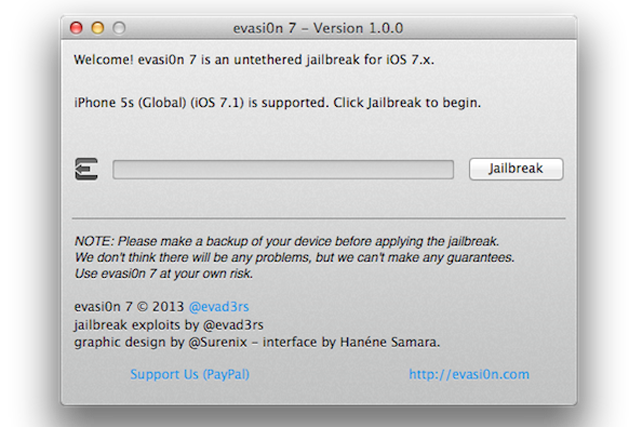
2 - The following is connect your iPhone via the data cable. Once Evasi0n7 detects the "Jailbreak" button will be activated and we will release it. We should not worry about putting it in DFU mode, the application will do it for us.
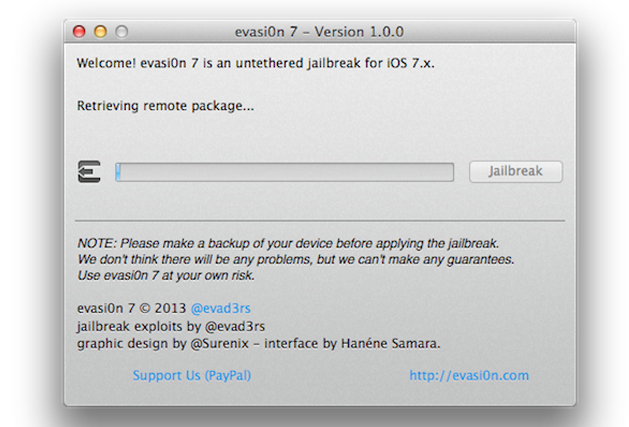
3 - After a few minutes, we see that our iPhone is restarted several times. This is very important not to touch or unlock your device in any course.
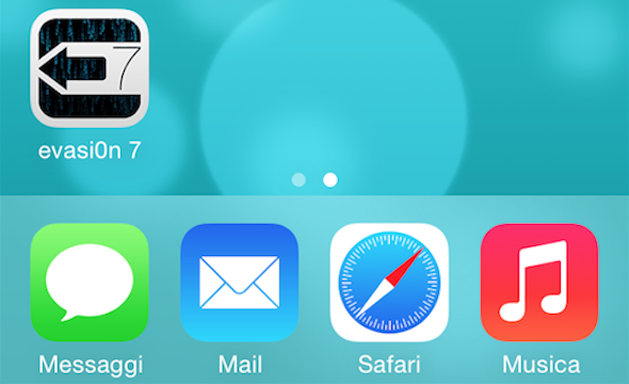
4 - After several reboots and once the transfer is successful, we will see a new application on our home screen. It is "Evasi0n" and we open it to finish to complete the process.
5 -. When the process is complete, we will see that the old application has disappeared and in its place we have . Cydia Were done!
As you have seen, the process is extremely simple and does not require more than a few minutes to have our unthetered our iPhone Jailbreak iOS 7
Go to link Download

Monday, November 28, 2016
How To Pangu Jailbreak iOS 8 1 iOS 8 On Windows
How To Pangu Jailbreak iOS 8 1 iOS 8 On Windows
As you know, the Pangu jailbreak for iOS 8.1 - iOS 8 released recently turned out to be the first jailbreak for iOS 8 as well as for iPhone 6 and above.

Are you planning to jailbreak your iOS 8.1-iOS 8 using Pangu? If you are looking for a complete guide, then he this article is a must read. The jailbreak process is a pretty easy and painless. Then Click here to continue reading..
Are you planning to jailbreak your iOS 8.1-iOS 8 using Pangu? If you are looking for a complete guide, then he this article is a must read. The jailbreak process is a pretty easy and painless. Then Click here to continue reading..
Go to link Download
Monday, November 21, 2016
How to jailbreak iOS 8 1
How to jailbreak iOS 8 1
How to jailbreak iOS 8.1 - Pangu8 is a continuation of the previously released Pangu7 to jailbreak iOS 7. Now you can jailbreak iOS 8.0 - 8.1 . However, it should be noted that in Pangu8 version 1.0.1 there is no Cydia app compatible for iOS 8. Therefore, you must install the Cydia app separately . For that Saurik has also menyedikan Cydia app for iOS 8-compatible Pangu8 jailbreak.

Pangu8 you can use to jailbreak iOS 8.0 - 8.1 running on iPhone 5s , iPhone 6 iPhone 6 Plus and other iDevice that can run iOS 8:
1. Restore iOS 8.1 on your iDevice using iTunes .
2. On the iDevice , go to Settings > iCloud > Find My iPhone , Find My iPhone is disabled .
3. On the iOS device , go to Settings > Passcode , Passcode Lock disabled .
4. Install iTunes on a Windows computer , make sure that iTunes can recognize IOD your device when connected to a computer .
5. Download Pangu tools 1.0.1 from the download page and save it on the desktop Gopego .
6. Right-click Pangu tool, select Run as Administrator > Yes
7. Uncheck the box to prevent Pangu tools installed on the iOS device .
8. Wait until Pangu recognize that you connect your iDevice , click the blue jailbreak .
9. Wait until the jailbreak process is complete , then run the application on the iPhone Pangu .
10. Install Cydia app for iOS 8, and download tweaks and apps that you need . See here for a tutorial to install Cydia on jailbroken iOS device 8 .
Pangu8 you can use to jailbreak iOS 8.0 - 8.1 running on iPhone 5s , iPhone 6 iPhone 6 Plus and other iDevice that can run iOS 8:
1. Restore iOS 8.1 on your iDevice using iTunes .
2. On the iDevice , go to Settings > iCloud > Find My iPhone , Find My iPhone is disabled .
3. On the iOS device , go to Settings > Passcode , Passcode Lock disabled .
4. Install iTunes on a Windows computer , make sure that iTunes can recognize IOD your device when connected to a computer .
5. Download Pangu tools 1.0.1 from the download page and save it on the desktop Gopego .
6. Right-click Pangu tool, select Run as Administrator > Yes
7. Uncheck the box to prevent Pangu tools installed on the iOS device .
8. Wait until Pangu recognize that you connect your iDevice , click the blue jailbreak .
9. Wait until the jailbreak process is complete , then run the application on the iPhone Pangu .
10. Install Cydia app for iOS 8, and download tweaks and apps that you need . See here for a tutorial to install Cydia on jailbroken iOS device 8 .
Go to link Download
Monday, November 14, 2016
How to Jailbreak iPad on iOS Air 4 3 2 Mini 7 Using Evasi0n Mac
How to Jailbreak iPad on iOS Air 4 3 2 Mini 7 Using Evasi0n Mac
How to Jailbreak iPad on iOS Air/4/3/2/Mini 7 Using Evasi0n (Mac) - This tutorial is a step by step you can lakkan to jailbreak the iPad Air, iPad 4, iPad 3, iPad 2, or iPad running iOS 7.0 mini to iOS 7.0.4 (including iOS 7.1 beta 1 and beta 2) using Evasi0n with the help of Mac computer. Before starting, make sure you turn off the passcode lock (can be re-enabled after the jailbreak process is complete). And if you were to update via OTA, make sure you do a full backup and restore again. 1.Connect your iPad to the computer and then do manual backups. 2. Create a folder with the name Pwnage thendownload evasi0n 7 , save it in the folder. We recommend you download the iOS 7.0.4 firmware and save it in the Pwnage folder. In addition evad3rs team also asks you to do a full restore before jailbreak. Download iOS firmware here .

3. Open Evasion by double-clicking Evasi0n dmg file from the Pwnage folder on the desktop.

4. Drag the application from the mounted dmg Evasi0n to the Pwnage folder on the desktop.

5. Run iTunes from the dock.

6. Make sure the iPad is connected to a computer via a USB cable, and select the name of your iPad from the left side bar or on the top right-corner of the iTunes window.

7. Press and hold the Option key and click the "Restore iPad"
8. From the popup window that opens, select the firmware ipsw iPads in the Pwnage folder you created earlier on the desktop. Click Open .
8. From the popup window that opens, select the firmware ipsw iPads in the Pwnage folder you created earlier on the desktop. Click Open .

9. You will be asked to confirm the restore. Click the Restore .

10. If the restore goes right, right click (ctrl + click) Evasi0n app icon from the Pwnage folder, select Open and the contextual menu that appears. If prompted, click the Open once again.


11. Make sure there is no lockscreen passcode on your iPad, click on the button to start the jailbreak.

12. The process of retrieval of information from the iPad will take time; generate the data jailbreak, jailbreak upload the data, inject evasi0n app 1, app 2 evasi0n inject, configuring the system 1, 2 configuring the system, then reboot.


13. You will be required to unlock the iPad and tap the app icon evasi0n. Important note that you only tap 1x.Applications will be open and will close quickly.


14. Evasi0n iPad will reboot once again, modify the rootfs, and ... done!


15. Your iPad will now reboot with Cydia on the SpringBoard ready! Good luck! Source
Go to link Download
Wednesday, November 9, 2016
How To Do iOS 7 Jailbreak
How To Do iOS 7 Jailbreak
How To Do iOS 7 Jailbreak
Since the birth of iphones they have been very famous around the globe. With their top notch performance, operating system, and their quality and design. But all the nice things does not come in one box. Unlike its toughest competition android , iOS has been very strict in terms of their Operating system and its customization.This is where iOS 7 Jailbreak comes in, Jailbreak was meant to be a method which gave apple iphone,ipad users the freedom of customization,well ! not like android but closer to it.
Jailbreak is a certain process where you install an app like cydia in your iphone and that cydia grants permission to 3rd party or cracked apps to be used in iOS giving iphone complete freedom.
- Is your iphone Jailbroken?
- Is your iphone factory unlocked ?
Jailbreak provides certain features and customizations that makes every iDevice user want to jailbreak their’s.
iOS 7 Jailbreak
After an era of ios 6 io7 Was rolled out which was completely evolved into a new one. Giving more security,performance,features,privacy to users. But that didn’t stopped developers from jailbreaking it.Infact it was a new challenge for Cydia Team to try and jailbreak iOS 7 and perform an ios 7 Jailbreak.iOS is a new operating system which was rolled out in the late 2013. It was the last major update for the iPhone 4 and starting updates for iphone 5 and Above.
iOS 7 Jailbreak is not a hard thing to do. You can jailbreak your io7 Device. It does not depend on the version of your ios. If your on ios 7 then you can jailbreak. It does not require a specific ios 7 jailbreak.
How To Do iOs 7 Jailbreak
Requirements
- iOS 7 Supported device i.e a device running on ios 7
- iPhone charged to atleast 50%
- A fully working cable, one that does not occasionally disconnects your iphone
- iphone 4, iphone4s , iphone 5, iphone 5s, iphone5c
- Evasion Jailbreak utility.Download it from here
Steps
1. First of all you must have EvasiOn Jailbreak Utility downloaded into your computer. You can choose mac os or Windows depending on what type of OS you have from the EvasiOn Website.2. After you’ve downloaded your evasion software. Open it.

3. Now connect your iphone,ipod,ipad to get your ios 7 jailbreak.
4. If your device does not connect then try installing itunes first and then connect to Evasion Jailbreak Utility.
5. Now After Clicking Jailbreak If a video pops up saying to change your date and time setting then do so accordingly.It will guide you in changing the time and date on your device to 8:30 PM on June 2nd 2014, which is needed for jailbreak exploit to work. If it does not then dont worry. Just proceed ahead.
6. The Evasion jailbreak utility will now start jailbreaking your iphone. If it asks you to do something then do it . Dont be afraid. Nothing will happen.
7. After your phone restarts and evasion utility says successfull then hurray, you got your ios 7 jailbreak. You should see a Cydia app icon in your Homescreen. Just open it and let it configure. Now you successfully have your ios 7 jailbreak.

Tethered and Untethered Jailbreak :
Tethered Jailbreak : A Jailbreak which will delete itself automatically when your phone restarts. After restart You will again have to jailbreak for cydia.
Untethered Jailbreak : A Jailbreak Which will not delete itself even after you restart your iphone. It will reamain in your idevice untill or unless you delete it yourself.
Go to link Download
Saturday, November 5, 2016
How To Pangu Jailbreak iOS 9 On Mac OS X
How To Pangu Jailbreak iOS 9 On Mac OS X

Pangu team has released the jailbreak tool to jailbreak iOS 9 - iOS 9.2 for Mac version. In this article you can get a simple step by step guide to know how to jailbreak iOS 9 on Mac. This is definitely gonna be a useful article. Come and take a look.
Go to link Download
Tuesday, November 1, 2016
How To Jailbreak Your iPhone iPad And iPod Touch On iOS 9 iOS 9 0 2 Using Pangu Jailbreak
How To Jailbreak Your iPhone iPad And iPod Touch On iOS 9 iOS 9 0 2 Using Pangu Jailbreak
Pangu has released the first jailbreak for iOS 9 as well as for iPhone 6s and iPhone 6 plus. Pangu9 is an untethered jailbreak. It is a free jailbreak tool.

In this article you are going to get a simple step-by-step guide on how to jailbreak your iOS device using Pangu9. All you need to do is just follow these steps. Ensure to Backup your device using iTunes or iClouds. Even though the jailbreak is reported to work well in most of the cases, it is always better to backup your data and personal information. Click here to continue reading..
In this article you are going to get a simple step-by-step guide on how to jailbreak your iOS device using Pangu9. All you need to do is just follow these steps. Ensure to Backup your device using iTunes or iClouds. Even though the jailbreak is reported to work well in most of the cases, it is always better to backup your data and personal information. Click here to continue reading..
Go to link Download
Monday, October 17, 2016
How to Jailbreak iPhone on iOS 5s 5c 5 4s 4 7 Using Evasi0n Mac
How to Jailbreak iPhone on iOS 5s 5c 5 4s 4 7 Using Evasi0n Mac
How to Jailbreak iPhone on iOS 5s/5c/5/4s/4 7 Using Evasi0n (Mac) - This tutorial is a step by step you can lakkan to jailbreak iPhone 5s, 5c iPhone, iPhone 5, iPhone 4s or iPhone 4 running iOS 7.0 to iOS 7.0.4 (including iOS 7.1 beta 1 and beta 2) using computer-assisted Evasi0n Mac. Before starting, make sure you turn off the passcode lock (can be re-enabled after the jailbreak process is complete). And if you were to update via OTA, make sure you do a full backup and restore again.
1.Connect iPhone to the computer and then do manual backups.
2. Create a folder with the name Pwnage then download evasi0n 7 , save it in the folder. We recommend you download the iOS 7.0.4 firmware and save it in the Pwnage folder. In addition evad3rs team also asks you to do a full restore before jailbreak. Download iOS firmware here .

3. Open Evasion by double-clicking Evasi0n dmg file from the Pwnage folder on the desktop.

4. Drag the application from the mounted dmg Evasi0n to the Pwnage folder on the desktop.


5. Run iTunes from the dock.
6. Make sure your iPhone is connected to a computer via a USB cable, and select the name of your iPhone from the left side bar or on the top right-corner of the iTunes window.

7. Press and hold the Option key and click the "Restore iPhone"

8. From the popup window that opens, select your iPhone firmware ipsws in the Pwnage folder you created earlier on the desktop. Click Open.

9. You will be asked to confirm the restore. Click the Restore .

10. If the restore goes right, right click (ctrl + click) Evasi0n app icon from the Pwnage folder, select Open and the contextual menu that appears. If prompted, click the Open once again.


11. Make sure there is no lockscreen passcode on your iPhone, click the button to start the jailbreak.

12. The process of retrieval of information from the iPhone will require time; generate the data jailbreak, jailbreak upload the data, inject evasi0n app 1, app 2 evasi0n inject, configuring the system 1, 2 configuring the system, then reboot.


13. You will be prompted to unlock your iPhone and tap the app icon evasi0n. Important note that you only tap 1x.Applications will be open and will close quickly.


14. Evasi0n iPhone will reboot once again, modify the rootfs, and ... done!


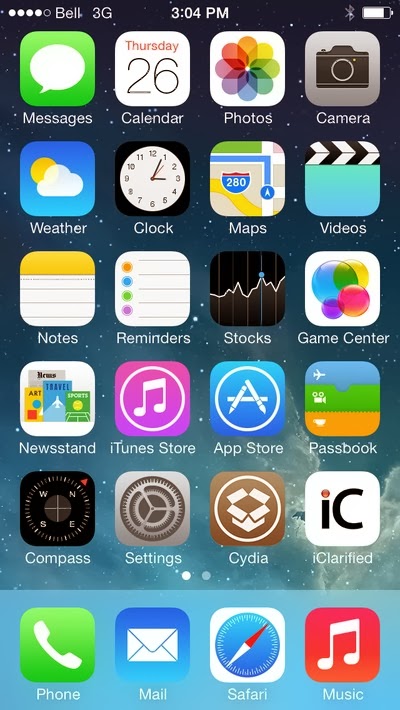
15. Your iPhone will now reboot with Cydia on the SpringBoard ready! Good luck! Source
Go to link Download
Monday, September 19, 2016
How to Jailbreak Your iPhone or iPad on iOS 7 7 0 4
How to Jailbreak Your iPhone or iPad on iOS 7 7 0 4

Till now I have shared knowledge about iPhone ,iPads apps, games and features. Now I am again with knowledge about iPhone and iPad which you search more on internet. You searched many times about jailbreaking of iPhone and iPad and found a lot of methods. All of these are not work some are difficult to implement. So to resolve these issues I am sharing with you very simple and easy method of jailbreaking. After reading this artcile you will able to learn How to Jailbreak Your iPhone or iPad on iOS 7 / 7.0.4. This method of jailbreaking is compatible with iPhone or iPad having iOS 7 or 7.0.4.So follow given below simple and easy steps to jailbreak iPhone and iPad.
How To Download Facebook, youtube Videos Using Firefox
1). Download latest version of iTunes from here, and install it.
2). Go to setting of iPhone /iPad >> General.
3). In general, click on Auto-Lock and change it to Never.Then move back.
4). Click on Touch ID & Passcode or just Passcode.
5). Tap Turn Passcode Off.Enter current Passcode to confirm.
6). Connect your iPhone / iPad with computer via USB / data cable.
7). Open iTunes on your computer. Click on Back Up Now.
8). This is important step to jailbreak iPhone / iPad / iPod. Download
Evasi0n jailbreak and save it to your computer.
9). If you are using Mac then double click the .dmg file and install the Evasion program.
10). If you are using Windows then right-click the .zip file >> Extract all >>Click exe file inside to install the program
11). Click on Jailbreak.When prompted then unlock the home screen.
12). Click on Evasi0n app icon on your iPhone and wait for it to reboot.
13). Exit the Evasi0n app when it’s done and Cydia will appear on your device.
14). Thats all. You have done. Share this information with your friends.
Sony Xperia Z1 Mini Appears Again,Launched in China Recently
Go to link Download
Subscribe to:
Posts (Atom)