Wednesday, November 30, 2016
How To Jailbreak iPhone 4 4s 5 5s and 5c with iOS 7 Evasi0n7
How To Jailbreak iPhone 4 4s 5 5s and 5c with iOS 7 Evasi0n7
- Perform Jailbreak quickly and easily to your iPhone compatible with iOS 7.
- Evasi0n7 is the best tool to untethered jailbreak your iPhone.
 How to Jailbreak all iPhone models compatible with the new iOS 7 - Evasi0n
New Jailbreak for iOS 7 is here and thank the Evasi0n 7 tool ,to Jailbreak your iPhone is easier than ever. As we warned over yesterday, maybe most Cydia tweaks and features not presently optimized for iOS 7, but imagine that soon this problem will be solved.If you already have your iPhone on hand and eager to perform Jailbreak your device, we shall only get down to work.
What should I know before Jailbreak my iPhone?
It is untethered Jailbreak. Which means? Roughly the Jailbreak will not disappear when turned off or reboot the device, nor will need to connect it to your computer every time you turn on the iPhone. If you want to know more, we have a great section on Jailbreak .It is highly unlikely that our iPhone runs a real risk of breaking completely, but we can deal with data loss. Therefore, it is highly recommended to perform a backup on iTunes and iCloud.
Evasi0n7 is compatible with the following versions of iOS7 ,so make sure you have installed on your iPhone: 7.0, 7.0.1, 7.0.2, 7.0.3, 7.0.4 and beta 1 and 2 of iOS 7.1.Being a newly released Jailbreak, you may find many errors / inconsistencies .Before Jailbreak you should disable the access code if you have it enabled.
What iPhone are compatible with iOS Jailbreak 7?
- iPhone 4
- iPhone 4s
- iPhone 5
- iPhone 5c
- iPhone 5s
What do I need to Jailbreak my iPhone?
1. An iPhone compatible with iOS 7 and Evasi0n7 tool (You can view the list).2. A computer operating system Windows or OS X.
3. A data cable to connect it.
4. The Evasi0n7 tool. »For Windows »For Mac
Steps to untethered Jailbreak to your iPhone iOS 7
1 - The first thing to do download the Evasi0n7 tool links that i have left in the previous section. Try to choose the one that belongs to your operating system. Once downloaded, extract it.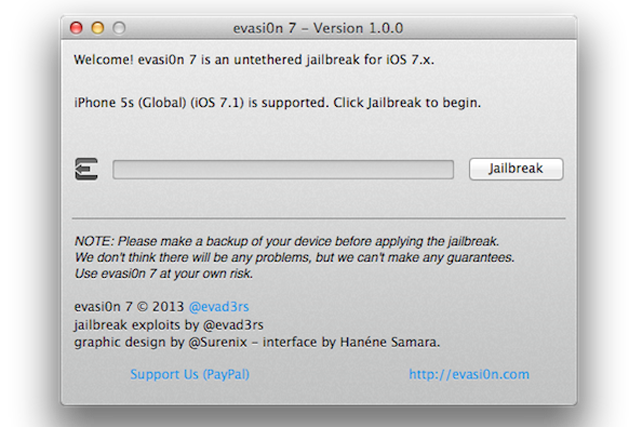
2 - The following is connect your iPhone via the data cable. Once Evasi0n7 detects the "Jailbreak" button will be activated and we will release it. We should not worry about putting it in DFU mode, the application will do it for us.
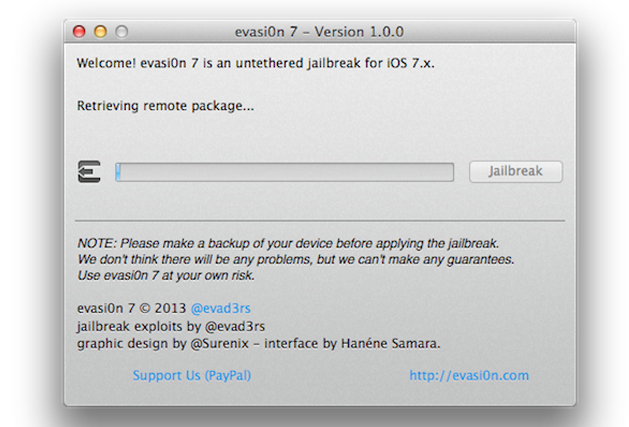
3 - After a few minutes, we see that our iPhone is restarted several times. This is very important not to touch or unlock your device in any course.
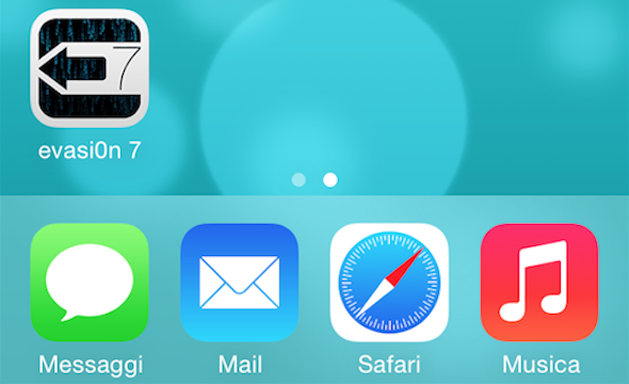
4 - After several reboots and once the transfer is successful, we will see a new application on our home screen. It is "Evasi0n" and we open it to finish to complete the process.
5 -. When the process is complete, we will see that the old application has disappeared and in its place we have . Cydia Were done!
As you have seen, the process is extremely simple and does not require more than a few minutes to have our unthetered our iPhone Jailbreak iOS 7
Go to link Download

Tuesday, November 29, 2016
How to Check 2013 JAMB UTME Results More Than 5 Times for Free
How to Check 2013 JAMB UTME Results More Than 5 Times for Free

1. visit http://www.jamb.org.ng/postregistrationefacility/VerifyResult.aspx?id=15
2.enter your registration number
3.then click check result
Thats all
hope its helps
Go to link Download
Sunday, November 27, 2016
Hotspot Shield 5 4 0 For Windows Download FREE
Hotspot Shield 5 4 0 For Windows Download FREE

Hotspot Shield 5.4.0 For Windows Download From Developer
Go to link Download
Friday, November 4, 2016
How to Install Google Experience Launcher 5 on Android Nexus Owned Devices KitKat
How to Install Google Experience Launcher 5 on Android Nexus Owned Devices KitKat

Although the Nexus 7 and 10 get improved performance and user interface design through a KitKat but it looks that characterize Google Experience launcher can not be found in the update . In other words , large changes in Android such as presence status and navigation bars transparent , app icons with larger sizes as well as Google Now in the home screen , only available on the Nexus 5 .
If you are the owner of Nexus 7 or Nexus 10 and has been manually install Android 4.4 KitKat and did not find a Google Experience Launcher in it , do not be too disappointed . You could try to install Laucher owned the Nexus 5 after install KitKat .
Not only for the Nexus 7/10 , will each have a device that runs Android KitKat you can install Google Experience launcher separately .
1 . Please download the APK file from the launcher Google Experience Android Police website .
2 . Copy the file to your Android device and then install.
3 . Run Google Experience Launcher as your other running Android launcher ( Settings app > Home )
In this way the KitKat Android phone you have, any make or model , will be able to get Google Experience Launcher experience , complete with the integration of Google Now on the homescreen , and vavigaiton status bar transparent , etc. . Good luck
Go to link Download
Thursday, November 3, 2016
How to Install BackTrack 5 R3 on VMWare Windows 8 1
How to Install BackTrack 5 R3 on VMWare Windows 8 1
How to Install BackTrack 5 R3 on VMWare ? Windows 8.1
Here are the Video Tutorial that teaches you " How to Install BackTrack 5 R3 on VMWare ? " in Step by Step Guide. You can Simply See the Below Video in 720p and see how We Install BackTrack 5 R3 on Virtual Box ? See Full Video Because there are some Sensitive steps you should dont Know about.How to Install BackTrack 5 R3 on VMWare ?
Go to link Download
Thursday, October 27, 2016
Hotspot Shield 5 2 1 For Windows Latest Version 2016 Download
Hotspot Shield 5 2 1 For Windows Latest Version 2016 Download
Hotspot Shield 5.2.1 For Windows Download From Developer
Go to link Download
Wednesday, October 26, 2016
How to Downgrade iOS 7 to iOS 6 1 3 iOS 6 1 4 For iPhone 5 iPhone 4s iPhone 4
How to Downgrade iOS 7 to iOS 6 1 3 iOS 6 1 4 For iPhone 5 iPhone 4s iPhone 4
And if you have installed and tried the iOS 7 yours, and want to go back to the previous version like iOS version 6, then you can follow these simple steps. Please check how to downgrade your iPhone from iOS beta 7 to iOS 6 in this post.
7 Restore iPhone from iOS 6.1.3 to iOS 6.1.4 or iOS:
This month Apple reveals iOS 7 and introduce to the world, bringing a number of new features are astounding. And one of them is a very cool design. iOS 7 is the result of a total renewal, new icons, new colors and a lot of new functions. However, not all users are happy with this upgrade, one of them did not like the look of this new icon.
So if you do not like with iOS 7, or want to go back to iOS 6.xx because it is unstable, error, then the following steps can you restore to iOS 6.1.3 / iOS 6.1.4.
To restore to the firmware resmin, then you need the following things ini.ng.
Requirements:
- Download iOS 6.1.3 for iPhone 4 and iPhone 4S.
- Download iOS 6.1.4 for iPhone 5
- Download the latest version of iTunes.
Steps to downgrade your iPhone from iOS 7 to iOS 6.1.4 and iOS 6.1.3.
7 Downgrade iOS 6.1.3 To iOS / iOS 6.1.4
This procedure is a manual way, thus avoiding the problems and errors when performing a restore directly.
Step 1. Put your iPhone into DFU mode.
Step 2. Connect iPhone 4, iPhone 4S and iPhone 5 to iTunes.
Step 3. Put your iPhone back into DFU mode.
Step 4. Go to Options -> click on Restore iPhone.
Step 5. Now select the firmware for your iPhone, whether its iOS 6.1.3 or iOS 6.1.4.
Its finished, you have successfully followed the steps to downgrade from iOS 7 beta 1 to iOS 6 above.
Go to link Download
How to Root Xiaomi Mi 5 in just few Steps TWRP file
How to Root Xiaomi Mi 5 in just few Steps TWRP file

Please, have in mind that this is an unofficial version of TWRP Recovery file. Credits goes to the developer by name Cofface for providing us with this version of TWRP recovery. Works well with no bug issue, so you can comfortably install on your Xiaomi Mi 5 device.
Important Notice:
It’s recommended you take nandroid backup of your device current ROM and also take full backup of your data because during the process, the entire files and data on your device will be wiped off. Also know that this process might void the warranty of your device, so implementing the below guide is at your own risk. TaseUpdatesBlog won’t be held responsible for whatsoever happens to your device.
We’ll know the benefits of rooting, if you’re not informed about the benefits, I will quickly mention a few. With root access, you can install custom roms, tweak the dark corners of your device, reduce battery drainage on your device, and improve RAM management.
Go to link Download
Monday, October 17, 2016
How to Jailbreak iPhone on iOS 5s 5c 5 4s 4 7 Using Evasi0n Mac
How to Jailbreak iPhone on iOS 5s 5c 5 4s 4 7 Using Evasi0n Mac
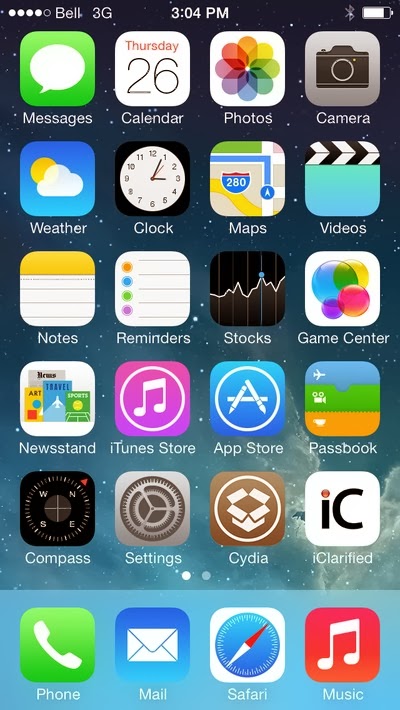


4. Drag the application from the mounted dmg Evasi0n to the Pwnage folder on the desktop.


5. Run iTunes from the dock.

6. Make sure your iPhone is connected to a computer via a USB cable, and select the name of your iPhone from the left side bar or on the top right-corner of the iTunes window.


8. From the popup window that opens, select your iPhone firmware ipsws in the Pwnage folder you created earlier on the desktop. Click Open.

9. You will be asked to confirm the restore. Click the Restore .

10. If the restore goes right, right click (ctrl + click) Evasi0n app icon from the Pwnage folder, select Open and the contextual menu that appears. If prompted, click the Open once again.


11. Make sure there is no lockscreen passcode on your iPhone, click the button to start the jailbreak.

12. The process of retrieval of information from the iPhone will require time; generate the data jailbreak, jailbreak upload the data, inject evasi0n app 1, app 2 evasi0n inject, configuring the system 1, 2 configuring the system, then reboot.


13. You will be prompted to unlock your iPhone and tap the app icon evasi0n. Important note that you only tap 1x.Applications will be open and will close quickly.


14. Evasi0n iPhone will reboot once again, modify the rootfs, and ... done!


15. Your iPhone will now reboot with Cydia on the SpringBoard ready! Good luck! Source
Go to link Download
Tuesday, October 4, 2016
How to Draw Steve Univer 1 5 APK Download for Android
How to Draw Steve Univer 1 5 APK Download for Android

Here we provide How to Draw Steve Univer 1.5 APK file for 4.0+ or Blackberry (BB10 OS). It is newest and latest version
You are about to download the How to Draw Steve Univer 1.5 APK file for Android 4.0 How to Draw Steve Univer is a free Education Apps
Choose one of the server location below to start to get the apk file for How to Draw Steve Univer, move the file to your Android phones SD card and then use one file manager you prefer to browse & install it. Enjoy.
Please be aware that ApkPlz only share the original and free apk installer for How to Draw Steve Univer 1.5 WITHOUT ANY cheat, crack, unlimited gold patch or any other modifications.
All the apps & games here are for home or personal use only. If any apk download infringes your copyright,
- Filename: how-to-draw-steve-univer-1-5.apk
- Filesize: 12.20MB
- Version: 1.5
- Requires: Android 4.0
Application "How to Draw Steve Univer" will show you in short time all the basic skills that are useful for drawing people, exactly cartoon characters. Easy step by step lessons help you become a true master of each user, without any previous experience. Therefore, even a novice will open the road to the art. A nice bonus is waiting fans "Steven Univers". After all, the characters of this cartoon you can learn to draw. But do not worry if you hear about it in the first. So, the first steps in the visual arts are the same for all artists. Therefore, learning to draw Garnet and her team, you will easily be able to apply their skills in the future and for the rest of the heroes!
Click here to download How to Draw Steve Univer 1.5 apk for android
Go to link Download
Thursday, September 29, 2016
How to fix Wi Fi Connectivity bugs in Android 5 0 Lollipop
How to fix Wi Fi Connectivity bugs in Android 5 0 Lollipop
 |
| Wi-Fi bugs in Android 5.0 |
Go to link Download
Thursday, September 22, 2016
How To Get 7 5 Gigabytes Free on MTN No IMEI Tweaking Required
How To Get 7 5 Gigabytes Free on MTN No IMEI Tweaking Required
See Image:

Whats Needed?
1. MTN New Sim (That is never been used to receive any MB/GB)
2. Nokia Touch light or old small Tecno phone
Here is how it works!
Insert MTN New Sim in any of the stated phone above
Text 101 to 131
To check your Gigabytes balance and the validity date, text 2 to 131
Enjoy and Use it before it expires.
Go to link Download
Saturday, September 17, 2016
How To Root Nokia X X and XL Android In Just 5 Minutes
How To Root Nokia X X and XL Android In Just 5 Minutes

If you are interested for rooting your Nokia X model, just follow this simple steps below. This procedure is likely to void the phones warranty, so have this in mind when you fire up the root application on your first Nokia with Android operating system.

- New Download New Whatsapp+ For Android users
- Download Framaroot.apk
- Now Install it (you can use the built-in Astro file manager Download here, to locate where is downloaded) & Open
- Between “Aragorn” and “Grandalf” Click on Grandalf.
- Now Reboot your device. Its just as easy as that, after your phone has been rebooted, Your Nokia device has been rooted successful.
Go to link Download
Wednesday, September 14, 2016
How to Fix Google Play Store Error 498 –Using 5 Ways
How to Fix Google Play Store Error 498 –Using 5 Ways
CAUSES OF ERROR 498 IN PLAY STORE
There are Few things that causes this Error on your Smartphone while you try to download any app from Google Play store.
The Most common issue is the Size of Device’s Cache Partition. You will get Error 498 in play store if you try to download apps that are larger in size then your Device’s Cache partition. For Eg: Your Cache partition is of 30M and you try to download an app with Size 35M then you might get this error. Usually Play store have issues when downloading apps that are large in size.

Another Reason is Google Servers from where you are trying to download the apps might be under maintenance. So if you are downloading an App and you get Play store erro 498 message then Server may be the issue. Just wait and try to download it again. So these were just Couple of Possible Reasons for a User to get this Error in Google Play store, Now let us see Some Possible Ways to Fix it.
5 WAYS TO FIX GOOGLE PLAY STORE ERROR 498
METHOD 1: CLEARING CACHE
Most Common Reason you might be facing this Error is because of Cache, so i will start the Methods list by Recommending you to Clearing the Cache.
To do So, Just navigate to Settings > Applications > Manage Applications > Select Google Play store > Clear Data & Clear Cache.
Now Try and download the App if Cache was the problem and clearing it solved the Issue for you. One more reason of listing this method on top is this worked for me and i was able to download the game easily after clearing the Cache. Though the Solution for all might not be the same so try below methods too.
METHOD 2: USE WIFI TO DOWNLOAD.
Many a times your Internet Service Provider(ISP) Creates this Problem of Error 498 and many other Errors. so Try and get access to Wifi somehow and try to download the app thats giving you the Error.
METHOD 3: ADDING NEW PLAY STORE ACCOUNT.
You will need to Add a new Play store account inorder to fix this Error. Go to Settings > Accounts > Add New Account > Click on Google > Next > Enter email > Done.
After setting up new Play store account try to download the same app and see if this have Solved your Problem.
· Read Also: How to Protect Your System Information :computer Security Tricks
· Read Also: 11 tricks to keep it healthy and glowing Skin
METHOD 4: CONNECTING WITH COMPUTER:
One of my Friend reported that he fixed Error 498 by installing apps from Computer to Smartphone. You just need to connect your Smartphone to Computer Using USB Cable. then goto Google Play Store using your Favourite Browser on your Computer. [post_ad]Then Search for the App which was getting error on your Smartphone. Click on the Preferred Result that you get, next On the App page you will see Install button. Click it to Download that app On your Smartphone. No it will not Install on your Computer. it will Install on your Smartphone. Just make sure your Smartphone is Connected or else you will not See Install Button.
· Read Also: Tech Zone News: Samsung Galaxy S7 Android update
· Read Also: How to Find your Smartphone using Android Device Manger
· Read Also: How to Convert any word document Webpage to PDF
METHOD 5: UNINSTALL & REINSTALL GOOGLE PLAY STORE:
If your Phone is Rooted then You might just want to Uninstall and Then Reinstall Google Play store so that to make sure that you actually get rid of Error 498 in Google Play Store. If any of the above Listed methods don’t work for you then go for this one and you will fix it for sure. I hope this helps you to get rid of this error and you can again download your favourite app from play store just like before.
If these Helps then please don’t forget to spend few seconds and Comment below which Method solved the Issue for you. Or If you have any other way to get rid of this error message in play store then feel free to share it in Comments below.
Don’t forget to Share it with your friends via Facebook & Google+ and Twitter, And if you like the article How to Fix Google Play Store Error 498 and you may even Subscribe for New post, to get directly in your mail inbox.
Go to link Download
Tuesday, August 30, 2016
How To Root Infinix Zero X506 In Less Than 5 mins With Root Genius
How To Root Infinix Zero X506 In Less Than 5 mins With Root Genius
Hi dear reader, Want to know how you can root your infinix zero x506 ? Fellow my simple steps and in less than 5 mins your inifinix X506 should be rooted...
Requirements??
A Windows PC/Laptop
An Inifinix Zero X506
Battery % at 100%
Lets Begin...
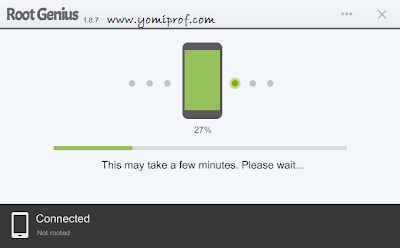
Root Genius is One click root tool designed to work on Windows Computer. It helps user to root their Android Smartphone in a single click. Here, i am going to guide you through on how to use Root Genius to root the latest infinix zero x506.
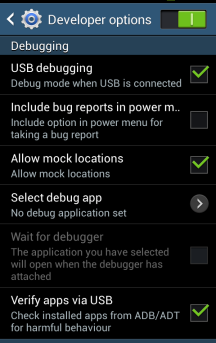
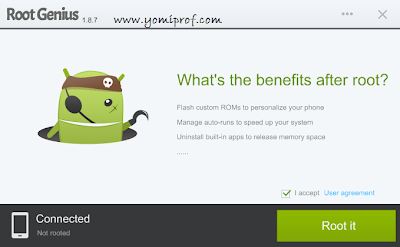
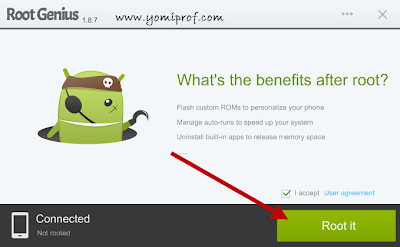
If you have anything to say or ask, Kindly make use of the comment form below. If you also want me to post a short review of your company or product, on this blog, do not hesitate to contact me.
Please, do not forget to SUBSCRIBE to this blog, so that you can be receiving future articles, freebies DIRECTLY into your email inbox, even when you are not online.
CLICK HERE TO SUBSCRIBE NOW!
Cheers!
Go to link Download