Showing posts with label less. Show all posts
Showing posts with label less. Show all posts
Saturday, October 22, 2016
How to Get UK Phone Number For Free in Less Than 5min
How to Get UK Phone Number For Free in Less Than 5min
Ill briefly share with you on how to get a UK and US phone numbers for free in less than 5min. its absolutely free, usable anywhere. I receive calls with it, make calls with it. In short, I sent an SMS from my NG line and was charged N8.
Note that this info is for educative purpose... All I need from you right now is your 100% attention.
Nextplus is a phone company that provides complete phone service into an app. With the app, you can get the following features for free.


- Receive a free phone number
- Free unlimited incoming and outgoing calls to any phone number
- Send and receive unlimited free text messages with anyone
- NO contracts, NO commitments, NO phone purchase, and NO hidden fees
- Compatible with all of your Android devices (phones and tablets)
- No cellular service required
- Fun and social features
Not just that but you can meet new friends, see who is online, your text are delivered instantly. And YES! You can use it to verify some site that are not Nigeria Supported.
Available for Android and iOS users respectively.
For iOS users Download it here
Install it>>Register and get the ball rolling.
Once youve done that, you can use the comment box to share your UK number let someone add you up.
Note that this info is for educative purpose... All I need from you right now is your 100% attention.
How Can I Get UK & US Numbers For Free?
Nextplus is a phone company that provides complete phone service into an app. With the app, you can get the following features for free.
- Receive a free phone number
- Free unlimited incoming and outgoing calls to any phone number
- Send and receive unlimited free text messages with anyone
- NO contracts, NO commitments, NO phone purchase, and NO hidden fees
- Compatible with all of your Android devices (phones and tablets)
- No cellular service required
- Fun and social features
Not just that but you can meet new friends, see who is online, your text are delivered instantly. And YES! You can use it to verify some site that are not Nigeria Supported.
Available for Android and iOS users respectively.
Where Can I Download it?
For Android Users Download it here
For iOS users Download it here
Install it>>Register and get the ball rolling.
Once youve done that, you can use the comment box to share your UK number let someone add you up.
Welcome to United Kingdom from Nigeria.
Go to link Download

Tuesday, August 30, 2016
How To Root Infinix Zero X506 In Less Than 5 mins With Root Genius
How To Root Infinix Zero X506 In Less Than 5 mins With Root Genius
Hi dear reader, Want to know how you can root your infinix zero x506 ? Fellow my simple steps and in less than 5 mins your inifinix X506 should be rooted...
Requirements??
A Windows PC/Laptop
An Inifinix Zero X506
Battery % at 100%
Lets Begin...
Root Genius is One click root tool designed to work on Windows Computer. It helps user to root their Android Smartphone in a single click. Here, i am going to guide you through on how to use Root Genius to root the latest infinix zero x506.
Step 1: Enable USB Debuggin on your Android Smartphone. To enable USB debugging, openSettings>> Developers option>>> USB Debugging >> Tick to Enable
Tip: for Android 4.2.2 or above, to show this option Go to Settings>> About Phone >>Built Number (Tap on it for 5-8 times).
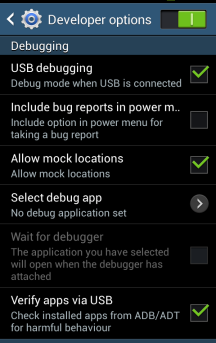
Step 2: Download Root Genius Application on your PC here and open it
Step 3: connect your Android device to the computer (with USB Debugging enabled).
--Once your Infinix zero is connected successfully to the computer, Root Genius will automatically detect your Device.
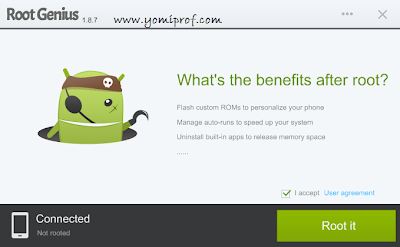
Step 4: Click on the “Root It” button to begin the rooting process
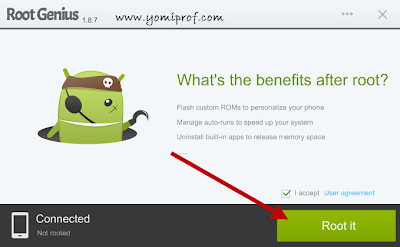
-- Root Genius will automatically “Root” your Android Device and also install the KingUser Application On your device
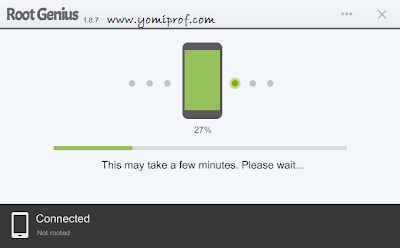
Step 5: Your Infinix Zero X506 is rooted. :0 ;)
To check if your Infinix Zero is rooted correctly, open any app that requires root access if the app works flawlessly, it means your device has been successfully rooted.
Alternatively, you can head over to Google play store and download RootChecker app to verify root access.
Photo Credits to: YomiProf
DISCLAIMER:
i shall not be held responsible for what ever that may happen during your root process...
If you have anything to say or ask, Kindly make use of the comment form below. If you also want me to post a short review of your company or product, on this blog, do not hesitate to contact me.
Please, do not forget to SUBSCRIBE to this blog, so that you can be receiving future articles, freebies DIRECTLY into your email inbox, even when you are not online.
CLICK HERE TO SUBSCRIBE NOW!
Cheers!
Go to link Download
Subscribe to:
Posts (Atom)