Showing posts with label mins. Show all posts

Wednesday, August 31, 2016

Hot Cake Enjoy Free 100 Mins to All MTN Users

Hot Cake Enjoy Free 100 Mins to All MTN Users


Hot Cake: Enjoy Free 100 Mins to All MTN Users

MTN is not through with their festive
season surprises to their customers yet, and I know it as I know my name that something more is still cooking.
Sometimes last week, they dish out 6,000MIN Airtime to 60% of their
customers and only those who has partner where able to use it successfully.
Just this evening again, I got a message from Mtn Yello Surprise! You have received 100 free minutes to call a number randomly selected from your called numbers list! I was like ah….. what kind of surprise is this, after all I wasn’t eligible for the free 6,000 min they gave last week.
How Do I know if I’m Eligible For This
Offer?
Just wait for the message perhaps they are actually randomly selecting those numbers. Or better still, text
FRIEND to 400 then wait for their reply.
The question now is are you eligible or MTN is simply not sure if you have a genuine friend or not?

Go to link Download

Read more »

Tuesday, August 30, 2016

How To Root Infinix Zero X506 In Less Than 5 mins With Root Genius

How To Root Infinix Zero X506 In Less Than 5 mins With Root Genius


Hi dear reader, Want to know how you can root your infinix zero x506 ? Fellow my simple steps and in less than 5 mins your inifinix X506 should be rooted...

Requirements??
A Windows PC/Laptop
An Inifinix Zero X506
Battery % at 100% 

Lets Begin...
Root Genius is One click root tool designed to work on Windows Computer. It helps user to root their Android Smartphone in a single click. Here, i am going to guide you through on  how to use Root Genius to root the latest infinix zero x506.


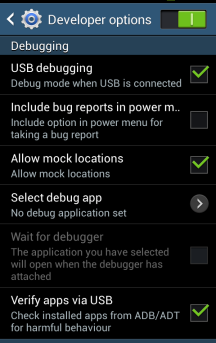
Step 1: Enable USB Debuggin on your Android Smartphone. To enable USB debugging, openSettings>> Developers option>>> USB Debugging >> Tick to Enable

Tip: for Android 4.2.2 or above, to show this option Go to Settings>> About Phone >>Built Number (Tap on it for 5-8 times).
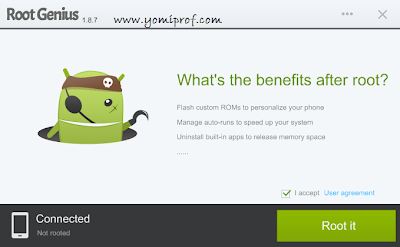
Step 2: Download Root Genius Application on your PC here and open it
Step 3: connect your Android device to the computer (with USB Debugging enabled).
--Once your Infinix zero is connected successfully to the computer, Root Genius will automatically detect your Device.

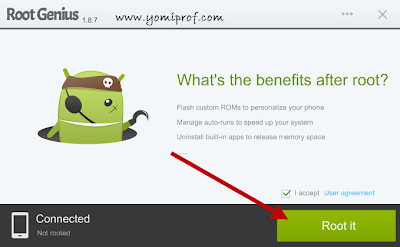
Step 4: Click on the “Root It” button to begin the rooting process


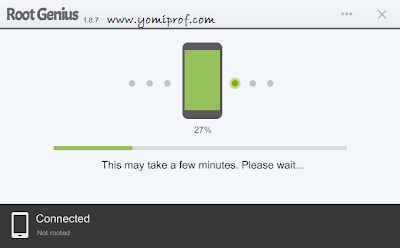
-- Root Genius will automatically “Root” your Android Device and also install the KingUser Application On your device


Step 5: Your Infinix Zero X506 is rooted. :0 ;)

To check if your Infinix Zero is rooted correctly, open any app that requires root access if the app works flawlessly, it means your device has been successfully rooted.

Alternatively, you can head over to Google play store and download RootChecker app to verify root access.

Photo Credits to: YomiProf

DISCLAIMER
i shall not be held responsible for what ever that may happen during your root process...

I hope this helps.

If you have anything to say or ask, Kindly make use of the comment form below. If you also want me to post a short review of your company or product, on this blog, do not hesitate to contact me.

Please, do not forget to SUBSCRIBE to this blog, so that you can be receiving future articles, freebies DIRECTLY into your email inbox, even when you are not online.

CLICK HERE TO SUBSCRIBE NOW!

Cheers!

Go to link Download

Read more »