Showing posts with label view. Show all posts
Showing posts with label view. Show all posts
Sunday, November 27, 2016
How to Add Gadgets to Bloggers Mobile View
How to Add Gadgets to Bloggers Mobile View
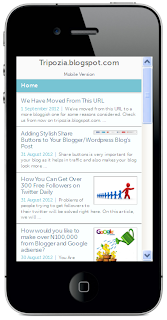
Here on this tutorial, I will show you how you can customize the defaults widgets and add gadgets to your mobile site. Here are the default widgets on your mobile site:
- Header
- Blog
- Adsense
- PageList
- Profile
- Attribution
Other property attributes include, no, yes, and only
If you want to hide a widget on the mobile site, just add the property mobile= with the attribute no to its widget tag (example: mobile=no)
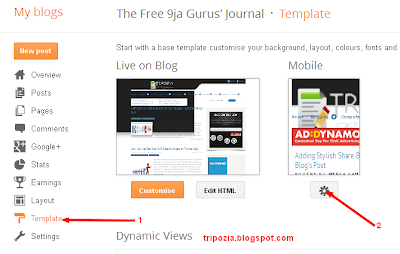
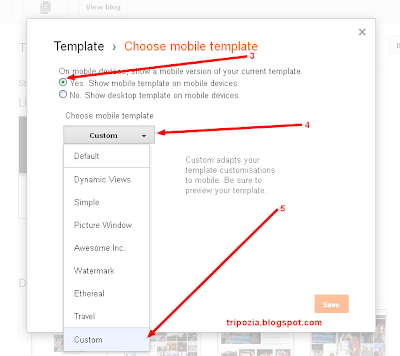
You will need to first of all change your mobile view to custom. Go to the Template page of your blogspot account click the settings for the mobile view. Set to Yes. Show mobile template on mobile devices. Choose mobile template and select custom then save. Check the picture below for guidiance
Now lets try to hide the profile widget otherwise gadget from showing on your mobile site.
This is the original code for the Profile widget tag:
<b:widget id=Profile1 locked=false title=contributors type=Profile>
To hide it from showing in the mobile view add the attribute mobile=no to its widget tag
<b:widget id=Profile1 locked=false mobile=no title=contributors type=Profile>
Save your template and preview it with a phone.
You can do this for any widget you want to view on mobile. Insert yes after mobile= to enable the gadget show the mobile view. Add only to enable the gadget for mobile view only. You can ask questions by leaving a comment if you need help and please help us click the facebook share and twitter tweet button to share this post by saying thank you. God bless yall
Go to link Download

Thursday, November 10, 2016
How To Add Whatsapp Share Button to Mobile View Of your Blog or Website
How To Add Whatsapp Share Button to Mobile View Of your Blog or Website
Whatsapp is undoubtedly the most popular mobile messenger with over 600 million users all around the globe. The the amount of people using the messenger app, i will without doubt tell you that it will sure help boost your traffic if you add whatsapp share button to your blog of website for users to easily share whatever they read on your blog or website with their friends.

I will be showing you how to add whatsapp share button to your blog or website and increase your mobile traffic.
For WordPress Users Wordpress users can easily add Whatsapp share button to their blog using Mobile Sharebar, https://wordpress.org/plugins/mobile-sharebar/ . This is actually one of the first Plugin on wordpress to add whatsapp share button and I must say the developer did a good job. The Sharebar only appears to your visitors If they are browsing using a mobile device.
Just Like any Sidebar Plugin, you can customize it to show on Top of page,Bottom of page, Front page, Pages, Posts, Categories, Archives, Tags and Custom Post types. The settings of the plugin is quiet easy to follow.
Normally the Whatsapp share button shows on Iphones and Android Devices but you can force it to show on all devices by Clicking the "Show Everywhere " box as shown on the image above.
For Blogger and Other CMS You can easily add the Whatsapp share button to your blog by using the Whatspp sharing button tool,whatsapp-sharing.com to generate a code and add it to your blog.
You can also easily customize the whatsapp share button to the size you want,text that will appear on sharing and also a custom url. Just follow the instruction as shown above,generate a code and embed on your blog or website.
There you have it, you have added whatsapp share button to your blog or website and I bet you, it will help double your mobile traffic.
I know that this was really increase your mobile traffic. Also share this post to your friends on social media.
Go to link Download
Subscribe to:
Posts (Atom)