Showing posts with label history. Show all posts
Showing posts with label history. Show all posts
Thursday, November 10, 2016
How to delete or disable your Google history and data
How to delete or disable your Google history and data

How to look at your Google data
> Web & App History
> Voice & Audio Activity
> Device Information
> Location History
> YouTube Watch History
> YouTube Search History
How to disable your Google history
Maybe you don’t want to delete your history forever. You just want it to stay inactive for a while, then reactivate it to keep enjoying everything Google has to offer. If this is the case, you can simply disable it and be on your way.
> Go to your Google history page from any browser.
> Click on the data section you want disabled. (e.g. Location History).
> Select the 3-dot menu button located on the top-right corner of the page.
> Select “Settings”.
> You will find a switch next to the writing “Your searches and browsing activity”. Toggle it off.
> You will get a warning telling you some information about what this action may cause.
> Select “Pause” if you still want to go through with this.
> Repeat the process for each of the history sections you want to disable. Or from any of the Settings pages, select “SHOW MORE CONTROLS” and toggle them all off.
How to delete your Google history
Now, if you are sure of what you are doing and really want it all gone, here are the necessary steps for deleting all your Google data.
> Go to your the Google history page from any browser.
> Click on the data section you want disabled. (e.g. Location History).
> Select the 3-dot menu button located on the top-right corner of the page.
> Select “Delete options”.
> You can pick whether you want to delete data from today or yesterday. Selecting “Advanced” will allow you to delete the past 4 weeks of activity. But if you really want every single trace of information to disappear you can choose “All time”.
> Make your selection and click on “Delete”.
> Confirm your selection.
> Repeat the process for each of the history sections you want to delete.
> How to take a screenshot on your macbook
> How To Root Sony Xperia C C2305
> How To Root Samsung Galaxy S Duos S7562 with pc
It should also be noted that deleting your history won’t make you completely invisible to Google. If you have a Google account to use services like Gmail, YouTube or any others, you’re being tracked. For more information on how to delete your Google account, head to our guide here.[post_ad]Don’t forget to Share it with your friends via Facebook & Google+ and Twitter, And if you like the article, Don’t forget to Share it with your friends via Facebook & Google+ and Twitter, And if you like the article, ,and you may even Subscribe for New post, to get directly in your mail inbox. and you may even Subscribe for New post, to get directly in your mail inbox.
Go to link Download

Wednesday, October 12, 2016
How to clear browsing history android chrome
How to clear browsing history android chrome
Do you want to hide all search history from others and make some privacy in browsing?
Google browser save past search results, pages as well as password which are named as browsing cache. For some privacy reason, if you really don’t want to keep search records, passwords or any kind of data in Chrome. We have easy steps to Clear Google Chrome browsing cache.
 |
| image credit Android central |
Clear browsing cache on Android:
First of all find history option under overflow button on top right corner. By scroll down at the end tap on clear browsing data option, which pop out what you want to clear? Select auto fill data, saved password, cookies, browsing history, site data then tap on clear. All done!
Similarly we can all do this on Apple iOS operating system chrome as well as in PC. But there is another way to avoid auto save browsing cache in chrome. Google also offers incognito mode for in PC browser, which doesn’t store browsing history. To launch incognito mode>hold CTRL+SHIFT+N.
Feel free to get connect through socially and like us on Facebook!
Go to link Download
Friday, September 16, 2016
HOW TO REMOVE AND CLEAR GOOGLE PLAY HISTORY IN LG V10
HOW TO REMOVE AND CLEAR GOOGLE PLAY HISTORY IN LG V10
How to take away & clear history in Google Play Store on LG V10:
Turn on your LG V10
Go to the Google Play Store
Wipe from the left to the center of the screen
Press the menu item “Settings”
Then choose on the ”Clear native Search History” choice
Select on Menu item and every one your past search history can become deleted.
After you follow the steps on top of, all of your search history within the Google Play Store are deleted on your LG V10.
Go to link Download
Wednesday, August 31, 2016
How to clear recommendation history in Google Play Music
How to clear recommendation history in Google Play Music
If you head into the settings page of the desktop Google Play Music site then you’ll see a new option that rolled out today called “delete recommendation history” that will do just that and allows you to remove the history used to give you recommendations and customise radio. It’s worth noting that this will not remove ratings and play counts on individual tracks.

If you head into the settings page of the desktop Google Play Music site then you’ll see a new option that rolled out today called “delete recommendation history” that will do just that and allows you to remove the history used to give you recommendations and customise radio. It’s worth noting that this will not remove ratings and play counts on individual tracks.
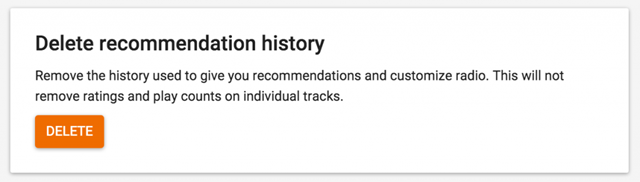
Head on to the Google Play Music settings page
Scroll down to the bottom of the page
Hit delete and confirm the deletion on the warning screen that pops up.
This will clear your recommendation history used to suggest tracks you might like based on your listening history, perfect for if you’ve been sharing an account and someone has been listening to Taylor Swift and you’re recommendations are all messed up!
Don’t forget to Share it with your friends via Facebook & Google+ and Twitter, And if you like the article How to clear recommendation history in Google Play Music and you may even Subscribe for New post, to get directly in your mail inbox.[post_ad]
If you head into the settings page of the desktop Google Play Music site then you’ll see a new option that rolled out today called “delete recommendation history” that will do just that and allows you to remove the history used to give you recommendations and customise radio. It’s worth noting that this will not remove ratings and play counts on individual tracks.
How to delete recommendation history -
Scroll down to the bottom of the page
Hit delete and confirm the deletion on the warning screen that pops up.
This will clear your recommendation history used to suggest tracks you might like based on your listening history, perfect for if you’ve been sharing an account and someone has been listening to Taylor Swift and you’re recommendations are all messed up!
Don’t forget to Share it with your friends via Facebook & Google+ and Twitter, And if you like the article How to clear recommendation history in Google Play Music and you may even Subscribe for New post, to get directly in your mail inbox.[post_ad]
Go to link Download
Subscribe to:
Posts (Atom)