Showing posts with label required. Show all posts
Showing posts with label required. Show all posts
Saturday, October 1, 2016
How to hide iPhone Dock No JB Required
How to hide iPhone Dock No JB Required
Have you ever wanted to hide the dock that appears at the bottom of your iPhones home screen ? The trick is so simple and doesnt need from you to have a jailbroken iOS device. The trick takes advantage of a wallpaper rendering bug in various versions of iOS — including iOS 9.3 — and here’s how you use it.
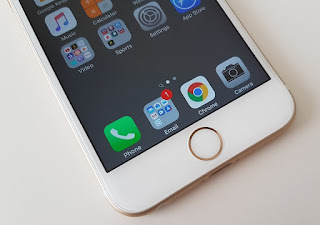 The trick is available on all versions of iOS 9.3, according to RedmondPie, and some older firmwares, too — such as iOS 9.1 — but not all have been tested. Here are the steps you need to follow:
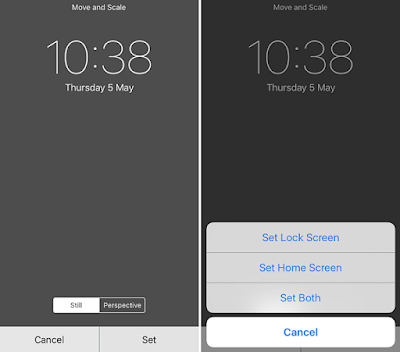
6. Choose “Set Home Screen” and note that you can use any wallpaper for your lock screen
7. Return to the home screen.
- Visit the following URL to find the wallpaper you need to make this possible: 98.246.187.61:47224/hide_the_dock.html
- Tap and hold on the wallpaper, then select “Save Image”
- Go into the Photos app, find the wallpaper you just saved, then tap the share button
- Tap “Use as Wallpaper”
- Tap “Still,” then tap “Set”
6. Choose “Set Home Screen” and note that you can use any wallpaper for your lock screen
7. Return to the home screen.
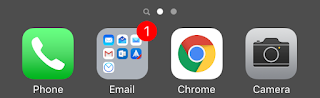
When your home screen reappears, the dock should have vanished — like in the photos above and below — leaving you with a cleaner look. To bring the dock back, simply select another wallpaper.
So did the trick works with you or not ? Share your thoughts in our comment section below.
Go to link Download

Thursday, September 22, 2016
How To Get 7 5 Gigabytes Free on MTN No IMEI Tweaking Required
How To Get 7 5 Gigabytes Free on MTN No IMEI Tweaking Required
This is a hot anf trending tweakt for mtn users. MTN Free 7.5GB is back and blazing very well, the procedure is very simple (No IMEI Tweaking Required). Just follow the instruction below and MTN free 7.5GB! is yours which will last for 1 month.
See Image:

Whats Needed?
1. MTN New Sim (That is never been used to receive any MB/GB)
2. Nokia Touch light or old small Tecno phone
Here is how it works!
Insert MTN New Sim in any of the stated phone above
Text 101 to 131
So simply as that, if your sim work for it, you should receive a successful message as shown in the above screenshot.
To check your Gigabytes balance and the validity date, text 2 to 131
Enjoy and Use it before it expires.
See Image:
Whats Needed?
1. MTN New Sim (That is never been used to receive any MB/GB)
2. Nokia Touch light or old small Tecno phone
Here is how it works!
Insert MTN New Sim in any of the stated phone above
Text 101 to 131
To check your Gigabytes balance and the validity date, text 2 to 131
Enjoy and Use it before it expires.
Go to link Download
Sunday, September 4, 2016
How to Enable Whatsapp calls activity NO Root Required Guide APK Download Updated
How to Enable Whatsapp calls activity NO Root Required Guide APK Download Updated
Few days back we have found a few lucky Whatsapp users with a new feature which was hidden inside the whatsapp update. So even if you are not that lucky enough to get an invitation for the new feature but you still can get this hidden activity and amaze your friends or you might be the lucky Android 5.0 Lollipop user that gets an invitation.

Whats new ?
This can make the calls activity your home of whatsapp forever..!
So what you need to do..?
By just editing AndroidManifest.xml of whatsapp
Requirements
1. Decompile whatsapp
2. open AndroidManifest.xml
3. search for :
<activity android_configChanges="keyboard|keyboardHidden|orientation|screenLayout|screenSize|smallestScreenSize|uiMode" android_hardwareAccelerated="false" android_name="com.whatsapp.Main">
<intent-filter>
<action android_name="android.intent.action.MAIN"/>
<category android_name="android.intent.category.LAUNCHER"/>
<category android_name="android.intent.category.MULTIWINDOW_LAUNCHER"/>
</intent-filter>
</activity>
4. Change it to :
Code:
<activity android_configChanges="keyboard|keyboardHidden|orientation|screenLayout|screenSize|smallestScreenSize|uiMode" android_hardwareAccelerated="false" android_name="com.whatsapp.Main"/>
5. Then search for this line
Code:
<activity android_configChanges="keyboard|keyboardHidden|orientation|screenLayout|screenSize|smallestScreenSize|uiMode" android_label="@string/app_name" android_launchMode="singleTask" android_name="com.whatsapp.HomeActivity" android_theme="@style/Theme.App.Home"/>
6. Change to :
Code:
<activity android_configChanges="keyboard|keyboardHidden|orientation|screenLayout|screenSize|smallestScreenSize|uiMode" android_label="@string/app_name" android_launchMode="singleTask" android_name="com.whatsapp.HomeActivity" android_theme="@style/Theme.App.Home">
<intent-filter>
<action android_name="android.intent.action.MAIN"/>
<category android_name="android.intent.category.LAUNCHER"/>
<category android_name="android.intent.category.MULTIWINDOW_LAUNCHER"/>
</intent-filter>
</activity>
7. Now compile and sign
8. Uninstall the old whatsapp
9. Install the modified one
Whats new ?
This can make the calls activity your home of whatsapp forever..!
So what you need to do..?
By just editing AndroidManifest.xml of whatsapp
Requirements
- Latest Whatsapp apk
- ApkTool (HERE)
- Basic knowledge of decomipling
- Basic knowlegde of editing xml files
- notepad++
1. Decompile whatsapp
2. open AndroidManifest.xml
3. search for :
<activity android_configChanges="keyboard|keyboardHidden|orientation|screenLayout|screenSize|smallestScreenSize|uiMode" android_hardwareAccelerated="false" android_name="com.whatsapp.Main">
<intent-filter>
<action android_name="android.intent.action.MAIN"/>
<category android_name="android.intent.category.LAUNCHER"/>
<category android_name="android.intent.category.MULTIWINDOW_LAUNCHER"/>
</intent-filter>
</activity>
4. Change it to :
Code:
<activity android_configChanges="keyboard|keyboardHidden|orientation|screenLayout|screenSize|smallestScreenSize|uiMode" android_hardwareAccelerated="false" android_name="com.whatsapp.Main"/>
5. Then search for this line
Code:
<activity android_configChanges="keyboard|keyboardHidden|orientation|screenLayout|screenSize|smallestScreenSize|uiMode" android_label="@string/app_name" android_launchMode="singleTask" android_name="com.whatsapp.HomeActivity" android_theme="@style/Theme.App.Home"/>
6. Change to :
Code:
<activity android_configChanges="keyboard|keyboardHidden|orientation|screenLayout|screenSize|smallestScreenSize|uiMode" android_label="@string/app_name" android_launchMode="singleTask" android_name="com.whatsapp.HomeActivity" android_theme="@style/Theme.App.Home">
<intent-filter>
<action android_name="android.intent.action.MAIN"/>
<category android_name="android.intent.category.LAUNCHER"/>
<category android_name="android.intent.category.MULTIWINDOW_LAUNCHER"/>
</intent-filter>
</activity>
7. Now compile and sign
8. Uninstall the old whatsapp
9. Install the modified one
You are Done..!

Still Lazy .. ?

Still Lazy .. ?
If you liked our post then please use the social bar to spread to your friends, let them know once you are ;)
Go to link Download
Subscribe to:
Posts (Atom)