Showing posts with label my. Show all posts
Showing posts with label my. Show all posts
Wednesday, November 16, 2016
How do i root my samsung galaxy s6
How do i root my samsung galaxy s6

How to root samsung galaxy s6 verizon
First, if you haven’t already got the USB PC drivers for your Samsung device, then head to this link to download them.
SuperSu download links:- The package you’ll need to root your device will depend on the country you reside in the different packages are listed below:
samsung SM-G920F zerofltexx zeroflte LRX22G.G920FXXU1AOD9 Download
samsung SM-G920I zerofltedv zeroflte LRX22G.G920IDVU1AOC6 Download
samsung SM-G920T zerofltetmo zerofltetmo LRX22G.G920TUVU1AOC9 Download
Once that’s downloaded, head on to the instructions below to Root your Galaxy S6.
Instructions to Root the Galaxy S6:-
1) Download and unzip the CF-Auto-Root-….zip file
2) If you end up with a recovery.img and cache.img file, you’ve extracted twice. You need to end up with a .tar.md5 file – don’t extract that one
3) (USB) Disconnect your phone from your computer
4) Start Odin3-vX.X.exe
[post_ad]
5) Click the PDA button, and select the tar.md5 file
6) Put your phone in download mode (turn off phone, then hold VolDown+Home+Power to boot – if it asks you to press a button to continue, press the listed button).
7) (USB) Connect the phone to your computer
8) Make sure Repartition is NOT checked
9) Click the Start button
10) Wait for Android to boot
11) Done
You should now see SuperSU installed in your app launcher and able to grant any apps that require root the appropriate permissions. For the root to work, the device must reboot into recovery. Most devices will do this automatically after flashing these files, but in case that does not happen, please boot into recovery manually..
Don’t forget to Share it with your friends via Facebook & Google+ and Twitter, And if you like the article How do i root my samsung galaxy s6 and you may even Subscribe for New post, to get directly in your mail inbox.
Go to link Download

Saturday, November 12, 2016
How I Set Up And Watch DSTV Channels For Free On My Android Device
How I Set Up And Watch DSTV Channels For Free On My Android Device

Hey guys, I am going to be teaching you how to watch the satellite TV; DSTV on your android phones. First of all you need is a good internet connection and the second thing you need is the fantastic app called MOBDRO it has over 2000channels and it keeps updating, all you have to do is to download it by following
Screenshots



Download
Download Now
Go to link Download
Sunday, October 30, 2016
How i Rooted my Tecno N7 Root any Chinese Android running Android 4 0 ICS 4 1 JB
How i Rooted my Tecno N7 Root any Chinese Android running Android 4 0 ICS 4 1 JB
Here’s an easy to follow tutorial on how to root any Chinese Android device you got there. It uses the rooting script Root_with_Restore_by_Bin4ry, which you can find at XDA. This is confirmed working for any MediaTek MT6577 devices running Android 4.0 or up, even devices with the dual core Qualcomm S4 procie can be rooted by this as long as it is on Android 4.x.
I first tested it on rooting a Cherry Mobile Titan, and it works. On this tutorial, I had used the method on my HDC Galaxy Note 2.
First, you need to properly install the ADB drivers. To do that, you must download and install first an app called Moborobo. Link here.
After installing the app, on your phone, enable USB Debugging by going to Settings > Development.
Connect your device and open the Moborobo app. Moborobo will attempt to install the necessary drivers. Just allow it to do the changes on your computer and if it succeed, you’ll see something like this:

Moborobo can read your connected Android device
You can now exit Moborbo. Be sure to close it completely and not just minimize it on the system tray.
Download this file. Root_with_Restore_by_Bin4ry_v18_2.7z
It is the rooting script. Extract it anywhere. You’ll something like this:
 Root_with_Restore_by_Bin4ry_v18_2.7z
Execute the RunMe.bat file if you are on Windows. A command prompt will open.

Root with Restore by Bin4ry
Just enter 1 as your option. It will now do its task. You’ll now see something like this on your device. Click restore and wait for the process to finish.

Restore data, ignore that encryption password thing
While on the command prompt window, you’ll see this:

rooting….
Your device will restart, and if you see the SUPER SU icon on your apps drawer it means that you had successfully rooted the phone.

SUPER SU
Checking root access with the Root Checker App:

Rooted HDC Galaxy Note 2 PRO
It is really easy on these Android 4.x devices now. I just posted this so I can just use this as reference for the queries on how to root such Chinese-made Android smartphones. While on lower version of Android, such as 2.3.6 Gingerbread, its a bit tricky as it needs some hacking with the boot.img if the SuperOneClick or UnlockRoot doesnt works. We’ll cover that up on the next update.
As they say, rooting voids the warranty but it depends on where did you buy your Android phone. Root only when you think you really have to and already know why you need to do that. On the other note, this process isnt risky and there is nothing to fear in case you messed up with the steps. Still, do this at your own risk.
If you dont want to miss anything on Stalyfblog, please like us on Facebook. and follow us on Twitter
You can also Subscribe to our updates by email or with your favorite browser. This way, you wont miss any updates from stalyfblog. If you subscribe by email, make sure to check your email to confirm your subscription.
Posted By: Oke David Umurhohwo.
Follow me on Google+, Twitter.
Cheers!
Go to link Download
Saturday, October 22, 2016
How can i clean up my gmail inbox
How can i clean up my gmail inbox
Most people have a Gmail account these days, and at least some of you might have realised - with an unpleasant shock - that the space in your inbox is getting filled up. Gmail has a pretty huge 15GB limit, but over the years, mail tends to build up, and many of us are probably reaching those limits now.
Luckily cleaning up your Gmail inbox isnt a challenge, thanks to some Gmails own tools and some third party apps as well. Weve found a few reliable ways to quickly clean your Gmail inbox. Start now and we promise it wont take more than half an hour.
How to clean up your gmail inbox fast
Gmail search filters
Gmail doesnt have the option to sort files - you cant get the inbox to display mails alphabetically, or according to the date received, or size. This might sound like a problem, but as is to be expected from a Google company, Gmail has a superb search function, which can be used to solve the problem easily. Follow these steps to clear up the emails you dont need:
1. Sign in to Gmail > go to the big search bar at the top.
2. First, lets clear out the emails taking up the most space. Type Larger:10M in the search bar > hit enter or click the magnifying glass icon.
3. This will find emails taking up more than 10MB. Now select the mails you dont want > delete (trash can icon).
4. You can experiment with different file sizes, depending on how much you need to delete.
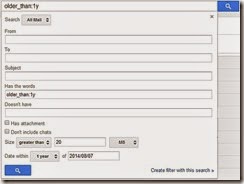
5. The obvious next step is to clear out emails from the long ago. You can use Before:YYYY/MM/DD to specify a cutoff date, or older_than:years if you want to search for mails that are one, two or more years old. For example, if you want mails that are older than one year, you can type older_than:1y > press enter to see the list, and then select mails > delete to make space.
6. You can use combinations of commands, so if, for example, you want to delete old mails with attachments that are more than 1MB in size, then type the following into search: has:attachment larger:1M older_than:1y > press enter, then see the list, and select items > delete mails.
7. In case youre starting to worry about remembering all these operators, then you will be happy to know that Google has you covered. Click on the downward pointing arrow at the right corner of the search bar, and you will see the advanced search, which lets you apply all these filters in a simple menu.
Find Big Mail
Find Big Mail was the only way to - well - find big emails in Gmail, until Gmail added the filters we mentioned already. The app is still pretty useful because it automates the process of finding mails that should be deleted and also creates labels so you can find them again later without any difficulty.
Follow these steps to clean up that messy inbox:
1. Head to the Find Big Mail website > enter your Gmail address in the big form > click Find Big Mail.
2. Now Google will ask you to authorise this service. Enter your password (if you havent logged in already) > click Allow access.
3. The service will now begin scanning your inbox. It claims that it only sees the size of your emails and not the content. Once scanning is complete, you will get an email alert. Ignore the email. [post_ad]
4. On the left side, under the links for inbox, sent mail, etc., you will see new labels. If you dont see this, expand the labels menu. You will see four labels: FindBigMail - Top, FindBigMail > 1MB, FindBigMail > 5MB, FindBigMail > 10MB. Click any of these > select the emails you dont need > delete.
5. The advantage of this method is that you dont need to repeat the search later to find the worst offenders, if youre running out of space again.

Mailstrom
If youre willing to use a paid service, then we really liked Mailstrom. The app works great and you can delete up to 660 emails for free, to get an idea of how it works. Unfortunately, using it beyond this limit involves a payment of around Rs. 300 per month.
With that said, Mailstroms feature set is fairly advanced. It sorts emails by sender, lets you unsubscribe from newsletters quickly and bundles related emails so that you can delete several at once. Follow these steps:
1. Open the Mailstrom website > enter your Gmail address in the form > click Start Free Trial > click Authorize With Google > enter email and password > Sign in.
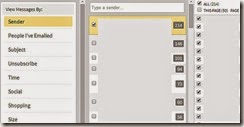
2. Now you will see your inbox through Mailstrom. It will take some time to sort all your emails. Once done, you will see all emails grouped by sender. We found surprisingly large numbers of emails from people we hadnt spoken to in years. We started by deleting these.
3. You can quickly clear emails using the left sidebar, which lets you view emails by size, time, emails from social networks and has a handy Unsubscribe link to help clear the clutter.
We recommend Mailstrom for those who are facing a serious email overload and have abandoned all hope of ever cleaning up their inboxes. We managed to clear over 200 emails within a minute using Mailstrom. For the average user though, the free methods we already described are probably the better choice.
These are our favourite methods for cleaning the Gmail inbox. What are yours? Tell us via the comments.
Don’t forget to Share it with your friends via Facebook & Google+ and Twitter, And if you like the article How can i clean up my gmail inbox and you may even Subscribe for New post, to get directly in your mail inbox.
Go to link Download
Tuesday, October 18, 2016
How Do You Use Your iPad Mine Is My TV Chatroom
How Do You Use Your iPad Mine Is My TV Chatroom
How Do You Use Your iPad? Mine Is My TV [Chatroom]:


Go to link Download
Sunday, October 9, 2016
How can I unlock my iPhone if I forgot the passcode
How can I unlock my iPhone if I forgot the passcode
How can I unlock my iPhone if I forgot the passcode?
Apple explains how to unlock the iPhone if you have forgotten the passcode or password in the manual for each model. For the iPhone 5c, for example, it is provided on page 155 as well as on the company support site. However, as this is a very frequently asked question, the official answers and additional help are below for your convenience. 
Image Credit: EveryiPhone.com (iPhone Passcode Screens - iOS 6, Left; iOS 7, Right)
About iPhone Passcodes
The exact behavior of the iPhone depends on its configuration when one forgets the passcode. By default, there is not a passcode at all. However, Apple notes the following regarding forgotten passcodes:If you repeatedly enter the wrong passcode, your iPhone will be disabled for longer intervals before you can try again. After too many unsuccessful attempts, you wont be able to try again until you connect it to the computer with which you last synced it [if it has been synced to a computer].
Note: You can configure your device to erase itself after ten consecutive incorrect password attempts. This setting is off by default. It can be turned on by tapping Settings > General > Passcode Lock.
If you cannot remember the passcode, you will need to restore your device using the computer with which you last synced it [or iCloud]. This allows you to reset your passcode and resync the data from the device (or restore from a backup). If you restore on a different computer that was never synced with the device, you will be able to unlock the device for use and remove the passcode, but your data will not be present.Please also note that Apple representatives cant unlock an iPhone for you without restoring the iPhone, either. The restore process will erase everything on it.
How to Unlock iPhone Passcodes
If you have forgotten the passcode on your iPhone, you will have to restore the device. To restore your iPhone -- which, again, deletes all of your data (songs, photos, videos, apps, and so on) on the iPhone use the following directions. Be absolutely sure that you have backed up the content on your iPhone before restoring it.
iPhone Previously Synchronized with a Mac or PC
If you have previously synchronized your iPhone with iTunes on a Mac or Windows computer, you typically still can backup recent additions to your iPhone by connecting it to the same computer you have used before without having to enter the passcode.After the backup, you just need to "restore" your iPhone and have the backup copied onto the iPhone with iTunes.
Apples official instructions to restore an iPhone with iTunes are:
- Connect your iPhone to your computer [that you have previously used to sync the device].
- In iTunes, select the iPhone in the "Devices" list, then "Summary" at the top of the screen.
- If iTunes doesnt automatically synchronize your iPhone, do so manually [and confirm that the sync and backup were successful.]
- Click “Check for Update.” iTunes tells you if there is a newer version of the iPhone software available.
- Click Restore. Follow the onscreen instructions to complete the restore process. When restoring, it is recommended that you [again] backup the iPhone when prompted.
- When iOS Setup Assistant asks to set up your iPhone, choose "Restore from iTunes backup."
- Select your device in iTunes and choose the most recent backup of your iPhone.
iPhone Previously Backed Up with iCloud
Apple explains that "if you have Find My iPhone enabled, you can use Remote Wipe to erase the contents of your device." Likewise, "if you have been using iCloud to backup, you may be able to restore the most recent backup to reset the passcode after the device has been erased."Apple separately explains the simple iCloud process to erase an iPhone. This is mostly intended for an iPhone that has been lost or stolen, but the portion relevant for a forgotten password is:
- Sign in to iCloud with your Apple ID (the one you use with iCloud [rather than your iPhone passcode that you do not remember]), then click "Find My iPhone."
- Click "All Devices," then select the iPhone you want to erase.
- In the Info window, click "Erase iPhone."
- Enter your Apple ID password [for confirmation]. If the device youre erasing has iOS 7 or later, enter a phone number and message. [This is intended to be displayed to anyone who may have found your iPhone if it is lost or stolen. To just erase the iPhone, it is not necessary.]
- [Now] you can restore the information on the device using iCloud Backup (if backup was turned on before you erased it).
iPhone Never Synchronized or Backed Up
If you never synchronized your iPhone with iTunes on a computer or backed up using iCloud, the only option is to restore the iPhone as new, which will delete all of your personal information. A passcode that can be bypassed by anyone would not be of much use, so this is as intended for security purposes.If you find yourself in this situation try not to panic. Take a deep breath. Leave your iPhone behind, go for a walk, and try not to think about the passcode per se. Separating yourself from the frustration may help jog your subconscious to release the information you have forgotten.
If you still do not remember your passcode when you return, hold the iPhone in your hand and ideally sit or stand somewhere where you know you have entered your passcode before.
If that is not an option, try to face a direction that you were facing when you successfully entered your passcode previously. Relax. Close your eyes. Open your eyes again. Enter the passcode without a conscious effort to remember the numbers or letters but instead "feel" it. You may be able to essentially trigger "muscle memory" of the motion pattern you have used before to enter the code.
If none of that works, sadly, you will have to start over as if you just got a new iPhone. If you have only had the iPhone for a few days (which is when people tend to forget the passcode the most, perhaps it is not a major problem).
If you recently set a passcode on an iPhone with a lot of personal information that is not synchronized using iTunes or backed up using iCloud and this information is really important to you, you could consider buying a new iPhone without restoring the old one. The hope would be that you might remember the passcode at some point in the future. Perhaps buying an expensive new phone will allow you to remember the passcode the next day. Doh!
Nevertheless, next time, either (1) do not use a passcode, (2) use the fingerprint enabled Touch ID on the iPhone 5s instead, or (3) be sure to sync your lesser iPhone with iTunes and/or iCloud.
Go to link Download
Monday, September 26, 2016
How I Restore And Recover My BBM Contacts
How I Restore And Recover My BBM Contacts

Contained by this article, I shall discuss with you how to recover or restore your BBM Contacts even if you include not at all backed up the BBM Contacts.
With no much story and explanation, we already know with the aim of The BBM get in touch with back up is like a store up or safe box where your Blackberry envoy contacts are being saved and synchronize, though the frequency in support of which this is being made is single-minded by your BIS or BES subscription and the service bringer.
Furthermore, you can manually back up your BlackBerry envoy get in touch with in the sphere of a folder on your media card(Memory Card). In support of details on how to work out, this article should guide you on how to Back Up your BBM Contacts in support of Easier reinstatement.
STEPS:
Depending on the option you used once assistance up your BBM Contacts, you can either restore or recover your BBM Contacts using the locally saved method (Media Card) or from the remote server
The following is how to restore your BBM get in touch with from Remote server
This is the greatest option you be inflicted with in the same way as a BBM user for the reason that you just need the email lecture to you configured with your Blackerry device in the same way as the means to your BBM Contacts however, you can restore or recover your BBM Contacts just if you be inflicted with an on the go BIS or BES subscription on your phone and it will power restore your BBM Contacts to the only remaining second you had BIS or BES on the go on your before Blackberry device.
At this moment, to restore your BBM Contacts using this option, original configure the email lecture to you apply on your Blackberry device on the lone you at this moment apply at that time, open/lunch/run BBM on your Blackberry device, depending on how it starts (If you are running BBM in lieu of the original phase, it starts up differently), in a minute navigate it to its routine screen at that time, press the "Blackberry menu button" and scroll down to "Option". This displays personalization and management options in lieu of BBM app. Scroll down to "Back Up Management" and click "Restore"
Prefer to restore from "Remote Server". The device without doubt detects the email lecture to you configured with the Blackberry device and the reinstatement process begins as soon as possible.
How to Recover or Restore your BBM Contacts from Media tag
Sooner than you can befall able to recover your BBM Contacts from a media tag, you need to be inflicted with access to the media tag and secondly; you ought to know the exact folder in the sphere of which your BBM Contacts were backed up in the back up process.
At this moment, to restore your BBM Contacts, open/lunch/run BBM on your Blackberry device, depending on how it starts (If you are running BBM in lieu of the original phase, it starts up differently), in a minute navigate it to its routine screen at that time, press the "Blackberry menu button" and scroll down to "Option". This displays personalization and managment options in lieu of BBM app. Scroll down to "Back Up Managment" and click "Restore"
Prefer to restore locally i.E from media tag. If you be inflicted with not misused the default folder in lieu of BBM Back up collection, it displays the folder otherwise, navigate to the folder in the sphere of which you be inflicted with saved your BBM Back up column and "Select" at that time, you can proceed to "Restore"
Go to link Download
Wednesday, September 14, 2016
How do I download or save a YouTube video to my computer
How do I download or save a YouTube video to my computer
How do I download or save a YouTube video to my computer?
 YouTube has been designed to only allow users to watch and view videos on their website. Many users want to save their favorite videos to their computer so they can watch them without being connected to the Internet or so they can watch them on other devices. Below are the steps required for downloading and watching YouTube videos on your computer for free.
Note: These steps are for saving a YouTube video and not saving only the audio of a YouTube video to an MP3 file.
Saving YouTube video as a video file on your computer
Today, there are many websites that allow you to enter the URL of the video you want to save to your computer and get a link to download the file. Below is a simple three-step process to download any YouTube video.
Note: If you are at a school or job that is blocking YouTube, these steps may not work.
1. First, go to the YouTube pagecontaining the video you want to save. When youve found the page, pressCtrl + L on your keyboard to highlight the text in the address bar, and thenCtrl + C to copy the Internet address.
2. Once this address has been copied,paste that URL into the text field below by clicking inside the box and pressingCtrl + V on your keyboard. Then, click the Download Video button.
3. If done properly, a new window will appear displaying a preview of the video, (as shown below) along with the Download links. For most users, we suggest downloading the MP4 format. Other available formats may include FLV, 3GP, and WebM. Once you have selected your format, click the appropriate download link.
Go to link Download
Tuesday, September 6, 2016
How my SMS and airtime websites make money
How my SMS and airtime websites make money

The promise of Free SMS and daily airtime draws are fairly decent traffic generators. Thousands of visitors hit my websites every day and while there are no dodgy subscription fees attached to my services and I do not sell user data, someone needs to foot the airtime and SMS bills at the end of the month (me).
I am surprised by how many people ask me how I pay the bills as the answer is a very simple one - Online advertising. Google AdSense provides me with an income stream that correlates to the number of visitors hitting my websites which enables me to buy more SMS and airtime as the sites get more traffic.
Its not simple to say how many people win airtime in a day or how many free SMS can be sent in a day as these numbers fluctuate each month (depending on advertising revenue) but are slowly increasing in the long term to sustain growth as traffic (and advertising revenue) increases. I do give as much advertising revenue back in the form of SMS and airtime as I can, though there are also other costs associated with running websites that need to be covered as well.
Right now the ratio of SMS to airtime spend is around 2:1 and my SMS site generally offers a better return on investment than my airtime site, but this may change in future if demand for free SMS dwindles (but hopefully it wont).
Thousands of SMS are sent from free082sms.co.za every month and visitors have way more chance of winning some airtime from ehtime.co.za than winning Vodacom millionaires or the Lotto :) You can see a list of some of the people on Twitter who have won airtime here.
Go to link Download
Subscribe to:
Posts (Atom)