Showing posts with label top. Show all posts
Showing posts with label top. Show all posts
Monday, November 28, 2016
How To Buy Airtime with GTBank using the Instant Top Up Recharge Code
How To Buy Airtime with GTBank using the Instant Top Up Recharge Code
Recharging one’s mobile line has never been easier as GTBank Nigeria has rolled out several methods to quickly purchase call credit or mobile recharge as it’s often called and get billed from your GTB account.
Simplest ways to recharge via GTBank in Nigeria
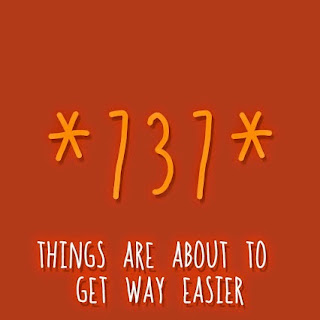
With the new GTBank recharge process, you simply need to send an SMS or dial a shortcode from your line, and your account get’s billed.
Note: You must use the same phone number which is registered on your GTB account. If not, this tutorial won’t work for you. If you might have misplaced your line used in your account registration, you’ll need to visit the nearest GTB branch so they get your new line running with your account.
Method 1: How To Recharge via GTB SMS
It’s quite easy, follow the steps below.
1. Launch the SMS app of your mobile phone and type “Network Amount NUBAN no.“. For instance, if you want to recharge your MTN line with 750 recharge, type “MTN 750 1234567890“. Please type without quotes, and remember that your NUBAN number refers to your GTB account number.
2. Send the SMS to 080766655555.
That’s all you need do as your phone would get recharged with your desired airtime as your accounts gets billed accordingly.
Method 2: Buying Airtime via GTBank’s Recharge ShortCode
This method is easier and yet effective to recharging via GTBank. All you need do is detailed as follows.
1. Dial *737*Amount# and that’s it. For instance, you want a N1,500 recharge, dial *737*1500# from the line used in your GTBank registration.
These are simple right? I hope this post is useful. Please kindly share this post on your social medias.
Simplest ways to recharge via GTBank in Nigeria
With the new GTBank recharge process, you simply need to send an SMS or dial a shortcode from your line, and your account get’s billed.
Note: You must use the same phone number which is registered on your GTB account. If not, this tutorial won’t work for you. If you might have misplaced your line used in your account registration, you’ll need to visit the nearest GTB branch so they get your new line running with your account.
Method 1: How To Recharge via GTB SMS
It’s quite easy, follow the steps below.
1. Launch the SMS app of your mobile phone and type “Network Amount NUBAN no.“. For instance, if you want to recharge your MTN line with 750 recharge, type “MTN 750 1234567890“. Please type without quotes, and remember that your NUBAN number refers to your GTB account number.
2. Send the SMS to 080766655555.
That’s all you need do as your phone would get recharged with your desired airtime as your accounts gets billed accordingly.
Method 2: Buying Airtime via GTBank’s Recharge ShortCode
This method is easier and yet effective to recharging via GTBank. All you need do is detailed as follows.
1. Dial *737*Amount# and that’s it. For instance, you want a N1,500 recharge, dial *737*1500# from the line used in your GTBank registration.
These are simple right? I hope this post is useful. Please kindly share this post on your social medias.
Go to link Download

Sunday, October 16, 2016
How To Add Scroll To Top Button For Blogger
How To Add Scroll To Top Button For Blogger
To add Scroll To Top Button for Blogger.
- Go to Layout.
- Click on Add A New Gadget.
- Now Paste The Following HTML Code in the Content Area.
<!--NBT Scroll to top widget Start--><script src=http://ajax.googleapis.com/ajax/libs/jquery/1.7.1/jquery.min.js type=text/javascript></script><script type=text/javascript>$(function(){$(window).scroll(function(){if($(this).scrollTop()!=0){$("#NBT-top").fadeIn()}else{$("#NBT-top").fadeOut()}});$("#NBT-top").click(function(){$("body,html").animate({scrollTop:0},800);return false})});</script><a href="http://www.newbloggertips.com"></a><a id=NBT-top style=display: none; position: fixed; bottom: 1px; right:1%; cursor:pointer;font:12px arial;><img src=https://blogger.googleusercontent.com/img/b/R29vZ2xl/AVvXsEjgWjNN_gIVppg5xxvaSxbpLc2XV5x8t2jLXXCZxaUgyXe4R6ZKRX2i4o8ra7zfSW_ZZYQMet30dPHXDAfwXrFO4I9zonbomEkkBuD4fxLiSwK0LPZnAlvIWiX_qMdzFE_pwAiUeN9yIC5k/s1600/NBT-scroll+up.png alt=Scroll to top widget @NBT Blog.newbloggertips.com width="67px" height="67px"/></a><!--NBT Scroll to top widget End-->
- Click on Save
- Refresh Your Blog.
- Scroll down a bit and you will see on the right corner a scroll to top button.
- Thats all.
To View Demo Click Here.
Go to link Download
Subscribe to:
Posts (Atom)