Showing posts with label up. Show all posts
Showing posts with label up. Show all posts
Monday, November 28, 2016
How To Buy Airtime with GTBank using the Instant Top Up Recharge Code
How To Buy Airtime with GTBank using the Instant Top Up Recharge Code
Recharging one’s mobile line has never been easier as GTBank Nigeria has rolled out several methods to quickly purchase call credit or mobile recharge as it’s often called and get billed from your GTB account.
Simplest ways to recharge via GTBank in Nigeria

With the new GTBank recharge process, you simply need to send an SMS or dial a shortcode from your line, and your account get’s billed.
Note: You must use the same phone number which is registered on your GTB account. If not, this tutorial won’t work for you. If you might have misplaced your line used in your account registration, you’ll need to visit the nearest GTB branch so they get your new line running with your account.
Method 1: How To Recharge via GTB SMS
It’s quite easy, follow the steps below.
1. Launch the SMS app of your mobile phone and type “Network Amount NUBAN no.“. For instance, if you want to recharge your MTN line with 750 recharge, type “MTN 750 1234567890“. Please type without quotes, and remember that your NUBAN number refers to your GTB account number.
2. Send the SMS to 080766655555.
That’s all you need do as your phone would get recharged with your desired airtime as your accounts gets billed accordingly.
Method 2: Buying Airtime via GTBank’s Recharge ShortCode
This method is easier and yet effective to recharging via GTBank. All you need do is detailed as follows.
1. Dial *737*Amount# and that’s it. For instance, you want a N1,500 recharge, dial *737*1500# from the line used in your GTBank registration.
These are simple right? I hope this post is useful. Please kindly share this post on your social medias.
Simplest ways to recharge via GTBank in Nigeria
With the new GTBank recharge process, you simply need to send an SMS or dial a shortcode from your line, and your account get’s billed.
Note: You must use the same phone number which is registered on your GTB account. If not, this tutorial won’t work for you. If you might have misplaced your line used in your account registration, you’ll need to visit the nearest GTB branch so they get your new line running with your account.
Method 1: How To Recharge via GTB SMS
It’s quite easy, follow the steps below.
1. Launch the SMS app of your mobile phone and type “Network Amount NUBAN no.“. For instance, if you want to recharge your MTN line with 750 recharge, type “MTN 750 1234567890“. Please type without quotes, and remember that your NUBAN number refers to your GTB account number.
2. Send the SMS to 080766655555.
That’s all you need do as your phone would get recharged with your desired airtime as your accounts gets billed accordingly.
Method 2: Buying Airtime via GTBank’s Recharge ShortCode
This method is easier and yet effective to recharging via GTBank. All you need do is detailed as follows.
1. Dial *737*Amount# and that’s it. For instance, you want a N1,500 recharge, dial *737*1500# from the line used in your GTBank registration.
These are simple right? I hope this post is useful. Please kindly share this post on your social medias.
Go to link Download

Sunday, November 27, 2016
How to Come Up Volume Percent Volume in iPhone HUD
How to Come Up Volume Percent Volume in iPhone HUD
How to Come Up Volume Percent Volume in iPhone HUD - So far, you probably wondered how to determine the percentage of the volume of your iPhone . If so , you can use the help of Voltage .
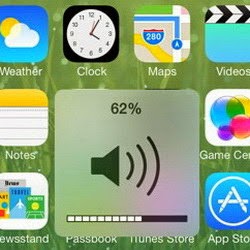
Voltage is a new jailbreak tweak that was released and could be the answer to your curiosity over the volume percentage of the iPhone . The jailbreak tweak has a settings panel that allows you to use a variety of variables to format the UHD models .
Once installed on jailbroken iPhones Voltage , please check the Settings app and look at the preferences . Along the kill- switch , youll find a section for format changes based on a variable set . By placing two percent symbols in the column format , you can display the numeric value that represents the current volume . If you add three percent symbol then you will get a percentage using basic values ??. If you want to use the default format UHD volume , blank columns Field .
Moreover Voltage also allows you to type in a special text that can be raised with the volume number . The text displayed diverse and as you see fit . Voltage can be installed on jailbroken iPhone , iPod Touch and iPad which has been running iOS 7 . Interested? Please download Voltage Direct Bigboss repo in Cydia .
Voltage is a new jailbreak tweak that was released and could be the answer to your curiosity over the volume percentage of the iPhone . The jailbreak tweak has a settings panel that allows you to use a variety of variables to format the UHD models .
Once installed on jailbroken iPhones Voltage , please check the Settings app and look at the preferences . Along the kill- switch , youll find a section for format changes based on a variable set . By placing two percent symbols in the column format , you can display the numeric value that represents the current volume . If you add three percent symbol then you will get a percentage using basic values ??. If you want to use the default format UHD volume , blank columns Field .
Moreover Voltage also allows you to type in a special text that can be raised with the volume number . The text displayed diverse and as you see fit . Voltage can be installed on jailbroken iPhone , iPod Touch and iPad which has been running iOS 7 . Interested? Please download Voltage Direct Bigboss repo in Cydia .
Go to link Download
Saturday, November 26, 2016
How To Sign Up For Flickr Account Free Sign In Download Flickr App www flickr com
How To Sign Up For Flickr Account Free Sign In Download Flickr App www flickr com
 |
| CASCITY.BLOGSPOT.COM |
Flickr allows its users to share personal photographs in an embedded form, it is a very reliable online community mostly used by bloggers to host embedded images in their blogs and social media. Photo researchers also makes use of Flickr.
UNIQUE FEATURES OF FLICKR
- Flickr offers its users terabyte of storage which means that as a registered member you have an unlimited space to store up your pictures and videos hence no more deleting of your files for the sake of memory space.
- Flickr allows its users to tag and label uploaded images.
- Flickr offers its users private and public storage of images. Private Images are initially visible only the uploader however can be marked as viewable by family and friends.
- Flickr also offers a "Contact List" which helps the audience which can view your images and uploads.
- It also offer another feature known as "guest pass" which allows unregistered visitors to view private photos.
- Flickr has also provided an interesting slide features which allows it users access images freely and easily.
- Flickr has so many apps with which you can share your images.
- Flickr is available on mobile apps for all devices such as Android, iOS, Windows, PlayStation Vista and Mac OS X.
How To Sign Up For Flickr Account Free
There two methods to Sign Up Flickr.- One is sign up Flickr without a Yahoo ID.
- Two is signing up with a Yahoo ID.
- Go to www.flickr.com
- You would have to click on Sign Up with Yahoo
- Enter your valid email address whether it is yahoo or not. You can choose to create a Yahoo email address just click on "Id rather create a new email address."
- Enter your personal information.
- You wil have to Click on Continue
- Select Send me a code
- Fill out the code that was sent to your inbox.
- Click on Submit.
- Fill in a Preferred Flickr username and name.
- Click on Lets get started.
How to sign up Flickr with a Yahoo ID:
- Go to www.flickr.com.
- Click on Sign in.
- Fill in your Yahoo ID and password.
- Choose and enter a preferred Flickr name and as well username.
- Then Click on Next.
How To Sign In Flickr Account
- Go to www.flickr.com
- Click on Sign in
- Fill in your details
- Now you are logged in.
How To Download Flickr App
- To download Flickr App Click Here.
Go to link Download
Tuesday, November 15, 2016
How to set up Outlook to wirelessly synchronize your contacts and calendar with a BlackBerry Z10
How to set up Outlook to wirelessly synchronize your contacts and calendar with a BlackBerry Z10
Before we begin, a very important note! Please ensure you perform a backup of your Outlook data using Microsoft Outlook and your BlackBerry Z10 smartphone using BlackBerry Link before proceeding.
Do you have a Microsoft account?
If you already have an account with Outlook.com, Hotmail or Windows Live, skip to the next step or optionally create a new account.
For those that don’t have a Microsoft account and use a different email provider in Outlook on your computer that does not support wireless synchronization of your contacts and calendar, register for a new Outlook.com account (or Hotmail or Windows Live if desired).
Tip: Within this post you’ll see me use the term PIM which represents your contacts and calendar
Download and install the Microsoft Outlook Connector
Provided you have a Microsoft account and Outlook installed on your computer, the next step is installing the Microsoft Outlook Hotmail Connector (this tool supports Outlook.com and Live accounts as well). Depending on which version of Microsoft Office you are using, the 32-bit or 64-bit edition, click one of the following links and follow the instructions to download and install the Outlook Hotmail Connector on your computer. If you aren’t sure which version of Microsoft Outlook you are using, try the 32-bit version first.
- Outlook Hotmail Connector (32-bit)
- Outlook Hotmail Connector (64-bit)
After installing the connector software, follow the steps below to add your account to Outlook 2010. If you are using Outlook 2007 or 2003, the steps are similar but if you need additional assistance on adding a new account, search the Outlook help file.
- Open Outlook 2010
- If a dialog appears stating “Would you like to add a Hotmail account” click Yes. If not, skip to next step.
- Enter your name, email address and password
- Optionally name the account by clicking Advanced and entering a name
- Click Ok
- If you do not get prompted to add a new account, click File followed by +Add Account
- Ensure E-mail Account is selected and enter your name, email address and password
- Click Next followed by Finish
Since you have added the new account to Outlook, you’ll notice that two accounts appear now when viewing your email, contacts and calendar. Since Outlook makes it easy to manage multiple accounts, the next step is copying your existing contacts and calendar data that is stored in Outlook on your computer, to the new account equivalents that appear within Outlook.
After doing this, your contacts and calendar will synchronize automatically with your Microsoft account and the only change you need you to make is use these new equivalents in Outlook going forward when you are on your computer.
If you need help copying your contacts or calendar data, review the Outlook Help file (press F1 on your keyboard to access it) as well as some of the tips I’ve listed below.
- Contacts – Switch your local Contacts view to List and use the Select All option (Keyboard shortcut: CTRL + A) followed by copying and pasting the Contacts entry to your new Outlook.com, Hotmail or Live account
- Calendar – Repeat the same steps using the List view
Go to link Download
Saturday, November 12, 2016
How I Set Up And Watch DSTV Channels For Free On My Android Device
How I Set Up And Watch DSTV Channels For Free On My Android Device

Hey guys, I am going to be teaching you how to watch the satellite TV; DSTV on your android phones. First of all you need is a good internet connection and the second thing you need is the fantastic app called MOBDRO it has over 2000channels and it keeps updating, all you have to do is to download it by following
Screenshots



Download
Download Now
Go to link Download
Tuesday, November 1, 2016
How to speed up Chrome on Android
How to speed up Chrome on Android
If youre looking for ways to speed up Chrome on Android, Six tips that are sure to give your browsing a performance boost.
Chrome is one of the best browsers available for Android, mostly because it is so highly customizable through the many tricks you can use to improve your experience. Did you know that you can save on your data plan with Chrome or play a hidden game when you’re offline? Find out how to do these things and more by using our tips and tricks list to improve your Chrome for Android experience. read also How To Clear cache in Chrome Broswer
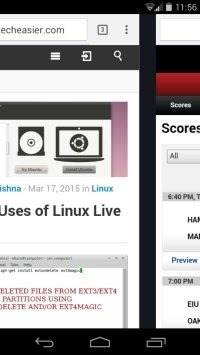
A lot of folks don’t know it, but Chrome comes with a sweet little shortcut for switching between tabs. All you have to do is swipe right or left on the toolbar when your browser is open to access any of the other tabs you have open.
You can also swipe the toolbar down to see the tabs you have open in a stacked list. Swiping makes for a smoother and sexier Chrome experience than tapping on everything all the time.
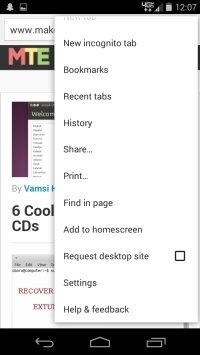
This is a cool little trick for those days when you’re too tired to even lift a finger. If you want to navigate to the Chrome menu just tap and hold the menu icon and slide your finger down to whichever option you’re looking for. It’s that easy.
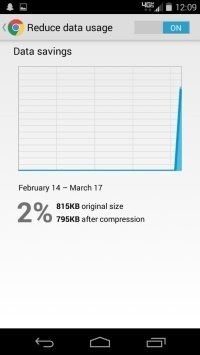
One of the most overlooked and useful features of Chrome for Android is the option to reduce how much data you use when you’re browsing. To enable this feature, just tap Menu -> Chrome -> Settings -> scroll to the bottom and tap Reduce Data Usage -> turn the data saver on.
You’ll even get a monthly graph to show how much data you’ve saved. As you can see, I don’t really use a lot of data, but for people who do this it is a real lifesaver.
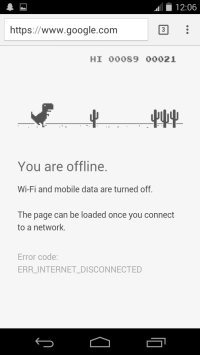
For those moments when you get disconnected from the Web (and may they be few and far between), Google has created an addictive game to its Chrome browser for Android devices.
The little T-Rex that appears with the “You are offline” message is there for more than just good looks. Tapping him will start the endless runner game. Tapping the T-Rex when he gets close to a cactus will make him hop over the obstacle. It’s a lot harder than it looks …
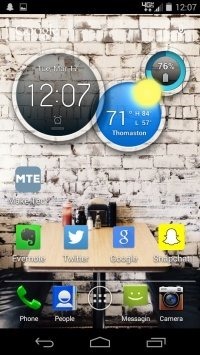
We all love a good shortcut, and if there’s a way to access your favorite websites without fiddling around in Chrome, I’d be willing to bet money you’re going to jump on it. All you have to do to make icons that will direct you to your favorite sites on your phone’s homescreen is go to your favorite site in Chrome -> Menu -> Add to Homescreen. That’s it.
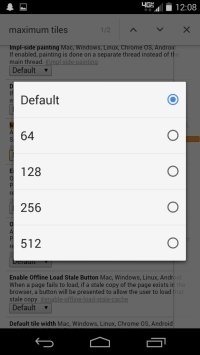
By default, 64 MB of RAM is dedicated to Chrome. By tapping the URL bar and typing
Once you’re in, tap Menu -> Find in Page -> type “maximum tiles.” Tap the drop-down menu you see below “Maximum files for interest,” and select whichever amount of RAM you want Chrome to utilize and tap “Relaunch.”
What are some of your favorite tips and tricks for improving the Chrome for Android experience?
you can see my another post about best Camera android application. Have you still any question suggestion about the article or about the blog please feel free to contact us.
Chrome is one of the best browsers available for Android, mostly because it is so highly customizable through the many tricks you can use to improve your experience. Did you know that you can save on your data plan with Chrome or play a hidden game when you’re offline? Find out how to do these things and more by using our tips and tricks list to improve your Chrome for Android experience. read also How To Clear cache in Chrome Broswer
Smoothly Switch Between Tabs
A lot of folks don’t know it, but Chrome comes with a sweet little shortcut for switching between tabs. All you have to do is swipe right or left on the toolbar when your browser is open to access any of the other tabs you have open.
You can also swipe the toolbar down to see the tabs you have open in a stacked list. Swiping makes for a smoother and sexier Chrome experience than tapping on everything all the time.
Gesture Your Way Directly to Menu Options
This is a cool little trick for those days when you’re too tired to even lift a finger. If you want to navigate to the Chrome menu just tap and hold the menu icon and slide your finger down to whichever option you’re looking for. It’s that easy.
Use Chrome to Save Data
One of the most overlooked and useful features of Chrome for Android is the option to reduce how much data you use when you’re browsing. To enable this feature, just tap Menu -> Chrome -> Settings -> scroll to the bottom and tap Reduce Data Usage -> turn the data saver on.
You’ll even get a monthly graph to show how much data you’ve saved. As you can see, I don’t really use a lot of data, but for people who do this it is a real lifesaver.
Play the Offline Endless Runner Game
For those moments when you get disconnected from the Web (and may they be few and far between), Google has created an addictive game to its Chrome browser for Android devices.
The little T-Rex that appears with the “You are offline” message is there for more than just good looks. Tapping him will start the endless runner game. Tapping the T-Rex when he gets close to a cactus will make him hop over the obstacle. It’s a lot harder than it looks …
Make Your Favorite Sites’ Homescreen Icons
We all love a good shortcut, and if there’s a way to access your favorite websites without fiddling around in Chrome, I’d be willing to bet money you’re going to jump on it. All you have to do to make icons that will direct you to your favorite sites on your phone’s homescreen is go to your favorite site in Chrome -> Menu -> Add to Homescreen. That’s it.
Dedicate More RAM to Chrome
By default, 64 MB of RAM is dedicated to Chrome. By tapping the URL bar and typing
chrome://flags you can toggle with the settings and make Chrome run faster. You don’t need to pay any attention to the warning messages when you go to chrome://flags; I’ve got your back.Once you’re in, tap Menu -> Find in Page -> type “maximum tiles.” Tap the drop-down menu you see below “Maximum files for interest,” and select whichever amount of RAM you want Chrome to utilize and tap “Relaunch.”
What are some of your favorite tips and tricks for improving the Chrome for Android experience?
you can see my another post about best Camera android application. Have you still any question suggestion about the article or about the blog please feel free to contact us.
Go to link Download
Monday, October 31, 2016
How to Register Sign Up Yahoo Mail Account – Register for Yahoo
How to Register Sign Up Yahoo Mail Account – Register for Yahoo
How to Create Yahoo Mail Account seems to be one of the greatest challenges which people faces especially those from less development in technology like Nigeria, Cameroon Rwanda and lots other African countries.
Also See: Aptitude Test Past Questions for All Nigerian Universities

But i promise that at the end of this article, you will never find it difficult again to create an email account with yahoo, though that actually depends on if you can read and understand all the processes very well.
Actually i have come to understand that some people while trying to create new yahoo email account, jumps from one step to the other without following it sequentially.
Though some of the challenges involved in yahoo mail registration, results from the default way of selecting country which yahoo sign up form comes with, if you have tried it you will find out that U.S.A is the default country. So as such people from other countries finds it difficult to change it to their own country in order to put their number.
This is why i have come up with this easy steps on how to Create Yahoo Mail Account to help resolve that Menes, which i will teach you how to use your country number during the yahoo mail sign up process, to how you can upload your yahoo profile picture.
To create Yahoo ID is a very important thing because it will open the doors to various services offered by the company. For instance, you can make a Yahoo profile and share things with friends and family. Lets go ahead to the yahoo email account create processes.
Still visit https://eu.edit.yahoo.com/registration

2. Click on the point where the arrow is pointing at to select your country
Once you click on the Yahoo create account button, you will be able to do yahoomail login and start taking advantage of all the great tools and features that yahoomail service offers. was how to Create Yahoo Mail Account made easy? use the comment box bellow.
Also See: Aptitude Test Past Questions for All Nigerian Universities
But i promise that at the end of this article, you will never find it difficult again to create an email account with yahoo, though that actually depends on if you can read and understand all the processes very well.
Actually i have come to understand that some people while trying to create new yahoo email account, jumps from one step to the other without following it sequentially.
Though some of the challenges involved in yahoo mail registration, results from the default way of selecting country which yahoo sign up form comes with, if you have tried it you will find out that U.S.A is the default country. So as such people from other countries finds it difficult to change it to their own country in order to put their number.
This is why i have come up with this easy steps on how to Create Yahoo Mail Account to help resolve that Menes, which i will teach you how to use your country number during the yahoo mail sign up process, to how you can upload your yahoo profile picture.
How to Create Yahoo Mail Account / www.yahoomail.com
To create Yahoo ID is a very important thing because it will open the doors to various services offered by the company. For instance, you can make a Yahoo profile and share things with friends and family. Lets go ahead to the yahoo email account create processes.
- Go to https://eu.edit.yahoo.com/registration
- Complete the registration form in the center of the page. Type your first name in the first blank text field at the top left side of the page.
- Type your last name in the second field box.
- Choose your Yahoo! username.
- Create a password for your new Yahoo Mail account.
- Enter mobile number.
- Select your date of birth from the drop down menu.
- Specify your gender, simply check “Male” or “Female” depending on your status.
- Now click on the “Create Account” button at the bottom of the registration form and you’re done!
How to Create Yahoo ID With Your Country Number
If you want to Register for yahoomail from out U.S.A, then you have to follow the steps am going to show you hereStill visit https://eu.edit.yahoo.com/registration
2. Click on the point where the arrow is pointing at to select your country
Once you click on the Yahoo create account button, you will be able to do yahoomail login and start taking advantage of all the great tools and features that yahoomail service offers. was how to Create Yahoo Mail Account made easy? use the comment box bellow.
Go to link Download
Sunday, October 30, 2016
How To Print NYSC Call Up Letter
How To Print NYSC Call Up Letter
I believe you are on this website because you searched for "How To Print NYSC Call Up Letter". Lets get started...
This post "How To Print NYSC Call Up Letter" is brought to you courtesy of Naija Gist
Others also Read: Waptrick-mp3-music-Download
How To Print NYSC Call Up Letter 2016
This is the basic procedures and steps on how to print the 2016 NYSC Call-Up Letter online.To print your 2016 NYSC Call-Up Letter online, you are expected to visit the link below.- Visit this link => http://portal.nysc.org.ng/nysc4/
- Then enter your email address and password
- Then finally click the “resume”
NYSC 2016 Batch A Stream 2 Call Up Letter
The sam procedure is applicable in printing NYSC 2016 Batch A stream 2 Call Up letterThis post "How To Print NYSC Call Up Letter" is brought to you courtesy of Naija Gist
Others also Read: Waptrick-mp3-music-Download
Go to link Download
Friday, October 28, 2016
HOW TO SPEED UP WEB BROWSING TO LG V10
HOW TO SPEED UP WEB BROWSING TO LG V10
Below we’ll justify however youll be able to fix issues associated with web once it’s slow, laggy and buggy that cause a headache for thus many various users. the following pointers square measure from a Reddit user UN agency explains his very simple answer to up the net browsing expertise that works for the LG V10. What we’ll be doing is permitting the browser to use additional of the devices RAM to boost performance, particularly whereas scrolling.
Even though these changes won’t build your web speed immoderate quick, the following pointers can give you with an honest speed boost once browsing the net. The quicker web speed are going to be detected once mistreatment sites jam-packed with pictures or animated GIFs. thus if you wish a quicker net browsing on the LG V10, follow the directions below.
How to Speed Up net Browsing On LG V10
To speed up the LG V10, youll be able to access the hidden Google Chrome browser options. youll be able to access these choices by simply typewriting into the address bar. rather than typewriting Twitter.com within the address bar, follow the directions to access the hidden menu to induce quicker web speed:
Turn on the LG V10
Go to the Chrome Browser
Type or copy/paste “chrome://flags into the uniform resource locator bar”
Browse for “Maximum tiles for interest area” (#max-tiles-for-interest-area ) within the list
Tap the Dropdown menu titled “Default” and alter to 512
At the lowest, choose “Relaunch Now” to verify the changes
It’s vital to notice that you just mustnt modification the other choices or settings within the Chrome://flags menu, because it might cause the net browser to become unstable or perform but expected. Most of the choices square measure for beta testing or future options that have nevertheless to be completed.
After following the steps from higher than, you must currently be able to have a quicker web speed once mistreatment the Chrome Browser on your LG V10.
Go to link Download
Monday, October 24, 2016
How To Sign Up For Tumblr Account Free Download Tumblr www tumblr com
How To Sign Up For Tumblr Account Free Download Tumblr www tumblr com

How To Sign Up For Tumblr Account Free/ Downloa Tumblr - www.tumblr.com- May be you might have seen its symbol in many billboards or have heard about it from friends but dont know what it is all about. Today I will be giving you a vivid explanation of all you need to know about tumblr.
Tumblr is a social network media which supports sharing of text messages, images, quotes, videos, links, and music from different web browser, phones,email or any other platform you operate on.
Tumblr is seen as am microblogging social networking website its a cross-platform between a social networking media site and a blog. Founded in 2007 by David karp , however in May 20, 2013 Yahoo presented a proposal to purchase tumblr and the deal was concluded on 20th June, 2013 making Yahoo the parent owner of Tumblr.
Tumblr allows its users to follow the blogs of other users. its users can also choose to make their blogs a private one.
Unique Features of Tumblr
- Tumblr has feature known as dashboard, the dashboard is like an interface where users have the option to access posted content of their own blog and followed blogs. It is one of the unique features of tumblr.
- Tumblr allows it users to connect their blogs with their twitter and Facebook account, this makes it easier to for them to update their status and tweets at once.
- With queue feature of tumblr, user can choose to delay the time of the updates of the post they make.
- The tags used in tumblr helps users to help their audience to be able to discover the post they make by adding a tag on the post.
- With HTML editing features enables its users to edit the theme HTML of their blogs and as well choose a customised domain name.
- Tumblr works on iOS, Blackberry, Android, Windows devices and as well on May 16, 2013, an app was launched for the Google Glass.
- Tumblr uses a "fan mail" feature which allows users to send messages to blogs that they follow. it also alternative supports users submitting of question either as an anonymous or as themselves to the blog of which a response is expected.
- Tumblr has an instant messaging feature which was introduced on November 10, 2015. You can send to other tumblr users or to a group.
- Tumblr introduced in May, 2012 a feature of known as Storyboard. On storyboard the most popular blogs are being collected and published.
How To Sign Up For Tumblr Account Free
- Go to www.tumblr.com/register on your browser.
- Click on the sign up button at the right upper side of the window.
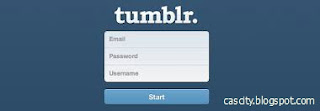
- Fill in your details on the form that would apear. You will be required to fill in your email address, a password, and then choose a unique URL. Make sure the information you submitted are correct as they would be of vital use for your tumblr account
- After filling the information click on the start button to begin by selecting an avatar , a theme and title for your blog, with that you can start exploring tumblr microblogging features by posting on the go!
Download Tumblr app for all devices to make your tumblr more interesting and exciting.
To download the app go to www.tumblr.com/apps.
We would like to get your questions and contributions as regards How To Sign Up For Tumblr Account Free/ Download Tumblr - www.tumblr.com we encourage you to make use of the comment box we would get back to you in a jiffy!
Enjoy!
Go to link Download
Saturday, October 22, 2016
How can i clean up my gmail inbox
How can i clean up my gmail inbox
Most people have a Gmail account these days, and at least some of you might have realised - with an unpleasant shock - that the space in your inbox is getting filled up. Gmail has a pretty huge 15GB limit, but over the years, mail tends to build up, and many of us are probably reaching those limits now.
Luckily cleaning up your Gmail inbox isnt a challenge, thanks to some Gmails own tools and some third party apps as well. Weve found a few reliable ways to quickly clean your Gmail inbox. Start now and we promise it wont take more than half an hour.
How to clean up your gmail inbox fast
Gmail search filters
Gmail doesnt have the option to sort files - you cant get the inbox to display mails alphabetically, or according to the date received, or size. This might sound like a problem, but as is to be expected from a Google company, Gmail has a superb search function, which can be used to solve the problem easily. Follow these steps to clear up the emails you dont need:
1. Sign in to Gmail > go to the big search bar at the top.
2. First, lets clear out the emails taking up the most space. Type Larger:10M in the search bar > hit enter or click the magnifying glass icon.
3. This will find emails taking up more than 10MB. Now select the mails you dont want > delete (trash can icon).
4. You can experiment with different file sizes, depending on how much you need to delete.
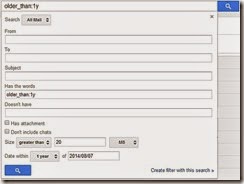
5. The obvious next step is to clear out emails from the long ago. You can use Before:YYYY/MM/DD to specify a cutoff date, or older_than:years if you want to search for mails that are one, two or more years old. For example, if you want mails that are older than one year, you can type older_than:1y > press enter to see the list, and then select mails > delete to make space.
6. You can use combinations of commands, so if, for example, you want to delete old mails with attachments that are more than 1MB in size, then type the following into search: has:attachment larger:1M older_than:1y > press enter, then see the list, and select items > delete mails.
7. In case youre starting to worry about remembering all these operators, then you will be happy to know that Google has you covered. Click on the downward pointing arrow at the right corner of the search bar, and you will see the advanced search, which lets you apply all these filters in a simple menu.
Find Big Mail
Find Big Mail was the only way to - well - find big emails in Gmail, until Gmail added the filters we mentioned already. The app is still pretty useful because it automates the process of finding mails that should be deleted and also creates labels so you can find them again later without any difficulty.
Follow these steps to clean up that messy inbox:
1. Head to the Find Big Mail website > enter your Gmail address in the big form > click Find Big Mail.
2. Now Google will ask you to authorise this service. Enter your password (if you havent logged in already) > click Allow access.
3. The service will now begin scanning your inbox. It claims that it only sees the size of your emails and not the content. Once scanning is complete, you will get an email alert. Ignore the email. [post_ad]
4. On the left side, under the links for inbox, sent mail, etc., you will see new labels. If you dont see this, expand the labels menu. You will see four labels: FindBigMail - Top, FindBigMail > 1MB, FindBigMail > 5MB, FindBigMail > 10MB. Click any of these > select the emails you dont need > delete.
5. The advantage of this method is that you dont need to repeat the search later to find the worst offenders, if youre running out of space again.

Mailstrom
If youre willing to use a paid service, then we really liked Mailstrom. The app works great and you can delete up to 660 emails for free, to get an idea of how it works. Unfortunately, using it beyond this limit involves a payment of around Rs. 300 per month.
With that said, Mailstroms feature set is fairly advanced. It sorts emails by sender, lets you unsubscribe from newsletters quickly and bundles related emails so that you can delete several at once. Follow these steps:
1. Open the Mailstrom website > enter your Gmail address in the form > click Start Free Trial > click Authorize With Google > enter email and password > Sign in.
2. Now you will see your inbox through Mailstrom. It will take some time to sort all your emails. Once done, you will see all emails grouped by sender. We found surprisingly large numbers of emails from people we hadnt spoken to in years. We started by deleting these.
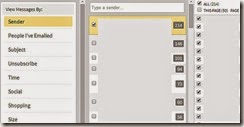
3. You can quickly clear emails using the left sidebar, which lets you view emails by size, time, emails from social networks and has a handy Unsubscribe link to help clear the clutter.
We recommend Mailstrom for those who are facing a serious email overload and have abandoned all hope of ever cleaning up their inboxes. We managed to clear over 200 emails within a minute using Mailstrom. For the average user though, the free methods we already described are probably the better choice.
These are our favourite methods for cleaning the Gmail inbox. What are yours? Tell us via the comments.
Don’t forget to Share it with your friends via Facebook & Google+ and Twitter, And if you like the article How can i clean up my gmail inbox and you may even Subscribe for New post, to get directly in your mail inbox.
Go to link Download
Monday, October 17, 2016
How To Set Up Wireless Ad Hoc Network Connection In Windows 8
How To Set Up Wireless Ad Hoc Network Connection In Windows 8

The procedure outlined here makes use of Windows’ native Network Shell utility, deploying the wlan command within the utility to enable a hosted network that will, in turn, serve as your ad hoc connection. If all this sounds daunting, fret not, for the actual procedure is fairly easy. Follow the steps outlined below, and you should be good to go.
Procedure
Step 1: Launch an elevated command prompt under Windows 8 (one with administrator privileges).
Step 2: Run the following command to verify that your network interface supports
netsh wlan show drivers

If Hosted network supported says Yes, you’re all set. Otherwise, you need to upgrade your hardware, if the software update doesn’t fix it.
Step 3: Now, set up the ad hoc wireless network using this command. Replace the parts in markup tags with your own choices
netsh wlan set hostednetwork mode=allow ssid=<enter_network_name_here> key=<enter_password_here>

Step 4: Until now, your hosted network has been created. Now, you need to start it. Use the command below:
netsh wlan start hostednetwork

Step 5: You’re all set, with just one thing remaining. If it’s not already enabled, you need to allow Internet Connection Sharing (ICS) for your currently-active internet connection. Simply head over to Network & Sharing Center, and in the properties for the current internet connection, enable ICS. Make sure to select the ad hoc connection under Home networking connection.

Now you can connect any device to the internet using the ad hoc wireless network with internet connection sharing that you just created on your Windows 8 PC.

Go to link Download
Monday, October 10, 2016
How To Spee Up Your PC Boot Time
How To Spee Up Your PC Boot Time

There is this friend of mine who stays far away from my house, i visited him and i needed to use his PC for some important thing online, when i powered it ON and guess what i have to wait for almost 20 minutes before the PC can boot up completely, i was very angry that i have to call the client that i can no longer come online, so i got the issue / problem fixed for him with this procedure am about to unleashed to you!
The major cause of this problem is that the unwanted programs on the PC are starting up when you dont need them at a particular time! A good example is Yahoo messenger, if you have Yahoo messenger installed on your PC, and you power ON your computer, while booting, Yahoo messenger will also start running in background alongside other programs on your system and before you know, your computer will start running slow, lets get it fixed.
How To Stop Unwanted Program From Running On Start-up
1. Click on the start Button and type msconfig in Run dialog box and hit Enter

2. A dialog box like the one below will appear, Click on the Startup tab
3. You will see some programs ticked. Those programs will automatically start Running anytime you ON your PC making it become slow, just click on the Disable All button and look on the list again, all the programs will now be un-ticked, try locating your Anti-Virus and the necessary one you need out of them, tick/mark them only.
4. Then click on the Apply button and click OK.
That is all, you can now start to enjoy your PC, no need to wait for a Decade before your PC can boot up fast!
Dont forget to share/like and use comment box to ask questions and you will receive answer immediately.
Go to link Download
How to Speed Up a Slow Windows Computer 2
How to Speed Up a Slow Windows Computer 2

To view the part 1 click here