Showing posts with label recover. Show all posts
Showing posts with label recover. Show all posts
Monday, November 28, 2016
How to delete and Recover Google or Gmail account
How to delete and Recover Google or Gmail account
A Google account gives you access to all of Google’s services, including Gmail, YouTube, Google+, Drive, and more. There’s certainly a lot of data you’ll be losing if you plan to delete your Google account. You may have a secondary account that you don’t use anymore, or have some other reason to do so, but if you want to delete your Google account permanently, it is quite easy to get done. Let’s take a look. How to delete a Google or Gmail account

If you have used your Google account for a while, you’ll probably have some important data that needs saving, such as emails, notes, photos, and other information. If there isn’t a lot, you can download them individually, but Google provides a simple way to backup all your data.
> Open your Google account settings by going to accounts.google.com.
> Under the “Personal info & privacy” option, click on “Control your content.”
> Once open, click on “Create archive.” There you can select which Google products you want the information saved from.
> You can then choose the file type of the archive and where you want to save it. You can also opt to get a download link via email, or save it to cloud services like Drive, OneDrive or Dropbox.
> Depending on how much information is being archived, the entire process could take a while.
Also, remember that you might have your Gmail address associated with other services as well, such as bank accounts, and other websites, so make sure that you keep a track of these accounts and update the information accordingly, before deleting your Google account.
Deleting your Google account
> Go to your Google account settings, and under the “Account Preferences” option, click on “Delete your account or services.” Then tap on “Delete Google account and data.”
> You will see an option to backup your data here as well, followed by a comprehensive list of all the content you will be losing access to when you delete your Google account.
[post_ad]
> At the end of the page, there are two acknowledgements you will have to accept before you can tap on the “Delete Account” button to permanently delete your Google account.
Deleting specific services only
> There you will see a list of services that you can individually remove.
> If you delete your Gmail account, you will have to add an alternate email address that will now be linked to the other Google services that you are still using.
Recover a recently deleted account
> Go to the password assistance page.
> Select “I’m having other problems signing in.”
> Then follow the instructions on the page to see if you can recover the account. Keep in mind that it might not be possible. Further, if you have deleted Gmail and have added another non-Google email address to be able to access other Google services, recovering your Gmail username will not be possible.

< How to Unlist Your Number From Truecaller Database
> How to download facebook videos on android phone
> How to stop Android apps running in the background
> How to Update Samsung Galaxy S6 marshmallow
Don’t forget to Share it with your friends via Facebook & Google+ and Twitter, And if you like the article, How to delete and Recover Google or Gmail account and you may even Subscribe for New post, to get directly in your mail inbox.
Go to link Download

Saturday, November 26, 2016
How to Recover Unsaved Microsoft Word Documents With Version Control
How to Recover Unsaved Microsoft Word Documents With Version Control
It is always a good idea to timely save your work while working on a software program like MS Word, MS Excel and MS PowerPoint. There are several reason when you accidentally lose you work when working on any MS Office documents, it may be due to your window system crashing, accidentally hitting ‘Don’t save’ button or power break down.
Now the question most of you would like to ask “is there’s a way to recover it?” Luckily the answer is yes even if you don’t have file history enabled The Microsoft Office 2010 comes with an amazing feature that lets you recover document with some quick and easy steps.
So here we suppose that you were working on word document that accidentally crashed or unsaved.
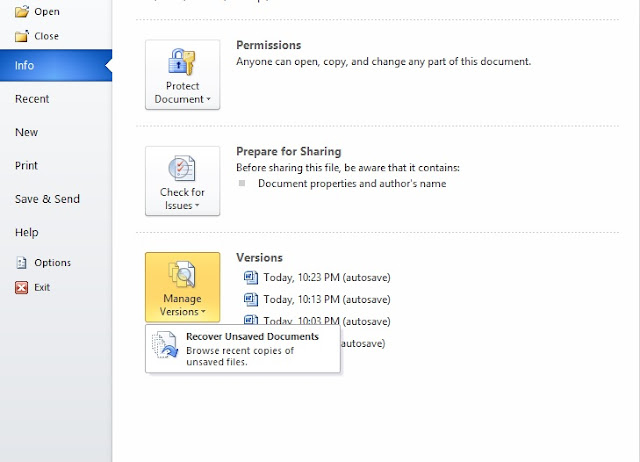
The good thing about this document recovery option is that here you will see a list of several unsaved documents that can be recovered. It will only save files that are five days old. Keep in mind that word doesn’t save each and every file and this option usually better to use in case of emergencies. How the best thing is that using this option in Microsoft Office 2010 will not only recover your unsaved documents but also save your time and efforts.
Now the question most of you would like to ask “is there’s a way to recover it?” Luckily the answer is yes even if you don’t have file history enabled The Microsoft Office 2010 comes with an amazing feature that lets you recover document with some quick and easy steps.
So here we suppose that you were working on word document that accidentally crashed or unsaved.
- Open a blank word document
- Select file from the menu bar and then info
- Here you will see a large square box titled “Manage Versions”
- Click on the dropdown menu and select Recover Unsaved Documents
The good thing about this document recovery option is that here you will see a list of several unsaved documents that can be recovered. It will only save files that are five days old. Keep in mind that word doesn’t save each and every file and this option usually better to use in case of emergencies. How the best thing is that using this option in Microsoft Office 2010 will not only recover your unsaved documents but also save your time and efforts.
Go to link Download
Friday, November 25, 2016
How To Recover Your Andriod Phone When Your Forget Your Pattern
How To Recover Your Andriod Phone When Your Forget Your Pattern

Its frustrating when you want to open your phone and you forgot your lock screen pattern. Getting your phone working again is pretty simple. I know two(2) ways to unlock it if you completely forgot how to unlock it. You can either use your Google account or hard reset your device. I will show you both.
This might not work for all phones as different phones have different designs especially later models (In this tutorial, my phone is running Gingerbread).
Additionally, you can go back to where you bought your device or to a professional but that will cost money; the ones Im showing you are free.
Step 1: Use your google account
- At the bottom right part of the screen, youll see "Forgot Pattern" button.
- Tap it and it will ask you to enter your email and password.
- Type in the required information and tap "sign in" and youll be redirected to Google play.
- There youll see instructions. Just follow them and youll be fine.
Step 2: Boot to Android System Recovery
- You can start by powering off your device in any way you can.
- Removing the sd is optional.(It makes sure that the process wont delete the files there.)
- Then, turn the device on by holding down the Power Button and Volume Down rocker simultaneously. In some phones, there may be other combinations like Power + Home / Power + Volume Up / Power + Volume Up and Down / etc.... you can try other combinations on yourself and see which ones work.
- If youre successful, an option will appear. Select "System Recovery" by pressing volume up. On some phones, it goes directly to the Android System Recovery Screen .
- Youll see the Android System Recovery screen (If you dont see it, try again with other key combinations)
Step 3: Hard Reset And Done
Android System Recovery will be shown
- Using the volume rocker, select "wipe/factory data reset"(in my case, the 3rd option shown)
- Select it by tapping on the left soft key (the key used for menu/options or menu in some phones)
- Confirm it by selecting yes
- Wait for it to finish
- After that, press home button to go back and select "reboot device" (1st option shown).
- This might take longer than usual because your device is configuring.
- After that, youll see your home screen and youre done. Just like when you bought it.
Go to link Download
Thursday, November 10, 2016
How to recover deleted sms from phone or sim
How to recover deleted sms from phone or sim
Have you deleted SMS messages that you wish had not gotten deleted? You will be happy to know there are a number of different software that can help you recover the messages you need and want, but not all of them are free and you need to purchase the software. However, if you own a Nokia phone you might be in luck, as there are very good chances of message recovery from your cellphone without need of any specialized data recovery software for free. In this tutorial I will explain, what are the steps to be followed in order to recover deleted SMS from a SIM card or phone memory.
STEPS INVOLVED:
1. First of all download and install FExplorer, excellent file manager and also sends files via Bluetooth.

DOWNLOAD:
http://www.mediafire.com/?wzdzsejfksq
2. Launch FExplorer and navigate to C: if you use Phone Memory to store your messages (default) and D: if you use Storage Card as your SMS storage location.
3. Now navigate to and open "system" folder.
4. Now open the "mail" folder.
5. This folder should contain many folders named similar to 0010001_s etc. with files named similar to 00100000 etc. These files are the actual deleted messages. Simply, use the FExplorer inbuild text viewer to view these files. You will need to browse through every folder and open all files inside them until you get the required SMS.
This tool includes more great fetures like:
- Cut, copy & paste files
- Check date modified & size
- Display free space available
- View file with inbuilt text viewer
- Cut, copy, create & paste directories
- File find. (although this only works within a directory)
- Take screenshots
- Set your backlight to be permanently on
- Send files via bluetooth. (may be necessary to rename .sis to .sis_)
- Compress memory - increasing available free memory ...and much more.
Go to link Download
Sunday, October 30, 2016
How to Recover From Glandular Fever
How to Recover From Glandular Fever
 More than a page of facts, this post is to share my fight with glandular fever in order to encourage and hopefully help other people through it too.
 You probably already know that glandular fever or infectious mononucleosis (mono) is caused by the Epstein-Barr Virus and is often referred to as “the kissing disease”, because the virus can be spread in saliva (though kissing is not the only method of transmission). Most people are exposed to the virus at some stage in their lives without even knowing it. However, the older you are when you contract it, the more severe the symptoms are and the more your body struggles to get over it. I was forced to drop out of university for a year to battle through it. Unfortunately my mother contracted it too and she was admitted to hospital for two weeks – the doctors were even looking for cancer before they finally figured out what was actually wrong with her – Idiots!
No doctor offered me constructive help or treatment – They pretty much said: “There is nothing you can do, just stay at home until you are better. It could take anywhere from two weeks to two years and some people never get better... ”. While this is true, it is probably only true because this is what all the doctors tell everyone who is suffering from glandular fever. A positive mind set is the most important weapon to combat the virus, so dont let doctors rob you of hope. Glandular fever is notorious for “feeding on stress”, “flaring up” or relapsing even years later, during intense periods such as exams, year end, etc. Whatever you do, do not dwell on negative thoughts, even if it’s a medical doctor who is putting them in your head – The doctor can’t/won’t do anything to help you anyway. Your health is in your own hands - The more you can soothe yourself of stress, the sooner you will recover.
Symptoms
As the name is supposed to imply, classic glandular fever presents as fever and swollen glands; lots of illnesses cause this arbitrary disease state, which makes the name pretty silly and the crazy thing is that I didn’t experience fever or especially swollen glands while I was ill. Symptoms include any combination of headaches, sore throat, nausea, loss of appetite, fever, swollen lymph nodes, crippling fatigue and probably more. A blood test confirms the presence of the virus and makes it official...
The disease can linger for as little as two weeks, or remain with you for the rest of your life if it spirals into full blown chronic fatigue syndrome. The fatigue is not mere laziness, but a heavy tiredness that actually results in physical pain.
Glandular fever started off as a throaty cough for me but soon matured into aching muscles, incapacitating fatigue, complete inability to hold down much food, and a horrid tenseness throughout my body and mind as if I was always on the edge, about to jump. Up until the time the doctors figured out what was wrong with me I actually thought I was going crazy, so I was quite relieved that there was something wrong with me, just depressed that there was apparently no treatment or remedy for how ghastly I felt.
Cure
But I did overcome glandular fever and I am so glad that I can now look back on the terrible experience and really appreciate that life is so normal again. Fair enough, there is no magic potion that you can take three times a day for a week that will cure you, but I have identified the behaviors that helped me to get better.
Take it easy, seriously...
As inconvenient and frustrating as I know it is, you need to remove yourself from as much as you can, everything if possible. Don’t try and be a hero and carry on or push through. Stay at home in bed and sleep properly until you feel well rested. Ideally, until you stop worrying about everything – though I know that in this state it is very difficult to stop worrying, but you must believe that you are one of the people that will get better – if you do, then you will recover.
Glandular fever is a tricky disease to understand and there will be people who show you no sympathy. Avoid them, and don’t let anyone abuse your “free time”. Encourage the people around you to learn about glandular fever, to help them understand what you are going through and how they can help you. The idea is that you get some time to rest in a stress free environment.
Vitamin B injections
This is as close as it gets to a “magic potion”. I would recommend you go for a vitamin B injection (the big neurobion one) every two weeks (alternating butt cheeks), from the time you discover you are ill, until you have recovered. Vitamin B injections have a reputation for stinging a bit, but in truth they aren’t that bad and wow they make a difference! Whether it’s a result of the placebo effect or not.
Fight with a positive attitude
Perhaps the most common advice concerning glandular fever is “not to fight it”. While I agree with this on a physical level, you must not give up in your mind. Remain positive about the situation and believe that you will recover. But at the same time remember that rule number 1 is “Take it easy, seriously...” Don’t let the idea of maintaining a positive mindset stress you out if you aren’t getting it right, it will get easier and start to come naturally as you keep at it, get more rest and learn to relax.
General Health
Even if you are not targeting the glandular fever directly, there is a lot you can do to help yourself feel better. Get enough sleep, drink lots of water, and avoid excessive amounts of junk food and alcohol. All the clichéd good health stuff will go a long way to improving your condition. And listen to your body! Sleep when you need to and only eat what you can manage. Red meat was off my menu and I found that not drinking milk made me feel much better too. So try and weed anything out of your diet that may not agree with you. Treating your symptoms will help too; take a pill for your headaches and antacid for heartburn. Ha ha, and try and shower at least every second day.
As you feel stronger you can try to exercise, but don’t overdo it! You are even weaker and less fit than you imagine. You might not be able to get out of bed the next day, you will feel completely worn out and it will take you a good few days to recover. But dont be discouraged. It was more than a year before I began running around, playing soccer with friends again. But I had to ease into it slowly and could initially over exert myself very easily. I am fine now.
Good People
It pains me to admit that most people will not understand and will leave you behind as you place your life on pause while they carry on with theirs. Even your family will not always understand what you are going through, but I hope there will be at least one good person that you can count on to stand by you to help you through the disease. Don’t let relationships stress you out, rather avoid anyone who makes you feel worse – You really need to look after yourself for a while, as selfish as it may sound.
I am very fortunate to have the most amazing girl who could easily have left me for someone else when my life fell apart. But she didn’t and I know it was hard for her, but her companionship and encouragement meant the difference between me staying sick forever and getting going again. I am very grateful to her for helping me through the trials, even when I was completely overcome with irrational paranoia at the mercy of the virus.
Divine intervention
I can only pray that you will become desperate enough to turn to Jesus. You can “cast all your anxiety on him, because he cares for you” (1 Peter 5:7) . I am not talking about religion. The stress of religion and doing “holy” things because other people think/tell you you should (Isaiah 29:13), will only keep you sick.
The truth is, you don’t have to do anything. God loves you whether you know him or not (Romans 5:8) . No matter what you have done or who you are. God’s love is unconditional, completely independent of your actions. He cares for you and he has a special plan for your life (Jeremiah 29:11). He wants you to know him so that you can walk with him and he can guide you to realise the purpose that he has chosen you for. It is not His plan for you to be sick.
You will find peace, rest, safety and healing in the arms of Jesus. Accept Him into your heart and He will bring you hope and look after you.
Today, I have finished my studies and am working a demanding job as a manager with high stress and long hours, but I have left glandular fever behind... Praise God!
Note: I have recently trimmed out some of my replies to keep the comments from getting too cluttered, but I do wish all the best to all of you and that you will get strong again soon!
Glandular fever links:
Wikipedia
iol.co.za
glandular fever , mononucleosis, post viral fatigue
http://myglandularfeverstory.blogspot.co.uk/
Go to link Download
Sunday, October 16, 2016
How to Recover Permanently Deleted Files From Window
How to Recover Permanently Deleted Files From Window
Many times you accidentally delete an important file, even empty your recycle bin or permanently delete your file by shift+delete keys then how to recover those files? sometimes you may lose all your important files when your computer crashes and you do not keep any back ups in external drive or cloud, then what to do?
For me, most precious files other than my official files are photographs and videos, as I can find official files in my official computer or emails, even I can find movies, songs and softwares but I can’t find my photos and personal videos, once they are gone I may lose all the memories of my very special moments like of my marriage.
For me, most precious files other than my official files are photographs and videos, as I can find official files in my official computer or emails, even I can find movies, songs and softwares but I can’t find my photos and personal videos, once they are gone I may lose all the memories of my very special moments like of my marriage.
Recover deleted files From windows
(Quick tip: I keep multiple back ups of all my important files and special photos in Dropbox, OneDrive and external hard drives, Just in case). Say you lost your files and you want to recover it, how to do it?
There are various ways and hacks to recover your files, broadly they are
1) Using data recovery software and
2) simple hacks of recovery like system restore. Let me explain you few of them which I find very effective.
How to Recover Permanently Deleted files using data recovery software?
I would like to recommend you two softwares which you can try to recover your deleted files, Using these softwares you can recover files from Crashed Windows computer, Recycle Bin, USB drive, digital camera card, or MP3 player. I’ll not go into details of how to download, install and use them as I’m sure you can very well figure out by yourself, still if you may face any difficulty then do let me know in comments.
Download Recuva
Download EaseUS Data Recovery
How to recover permanently deleted files without any software?
Windows has an important feature which most of us do not know or don’t use it, it is known as Previous versions, it is nothing but a copy of files and folders created by Windows Backup or System Restore that is automatically saved to create a restore point. You can use previous versions to restore files and folders that you accidentally modified or deleted, or that were damaged. Depending on the type of file or folder, you can open, save to a different location, or restore a previous version.
How to use previous versions?
1. Got Control PanelSystem and SecuritySystem .
2. In the left pane, click System protection. If you are prompted for an administrator password or confirmation, type the password or provide confirmation.
3. Click the drive, and then click Configure.
4. Do one of the following:
5. Click Restore system settings and previous versions of files.
6. Click OK [post_ad]
Don’t forget to Share it with your friends via Facebook & Google+ and Twitter, And if you like the article How to recover deleted file from recycle bin, window and you may even Subscribe for New post, to get directly in your mail inbox.
Go to link Download
Thursday, September 29, 2016
How To Recover Deleted Files From Android Tablet
How To Recover Deleted Files From Android Tablet

Currently keep many files on our devices, such as photos, videos, documents, etc.. Were so confident that these devices may accidentally erase any valid file and need to recover it later.
In this tutorial we will teach you how to recover files that have been removed from our tablet.
For this we will use a program called Hexamob Recovery. This program has two versions, a free one called "lite" and a payment called "Pro". Both versions can download them from the Play Store.
- Hexamob Recovery Lite (free)
- Hexamob Recovery Pro (1.59 €)
Hexamob Recovery requires root privileges to run.
It is not always possible to recover files, depends on many factors such as fragmentation of the system, the status of deleted files, if the sector was overwritten, etc.. To avoid this it is recommended not to write anything in memory until the files have been recovered. It is also recommended that the recovered data is stored in another memory than the source, for example, we want to save the data recovered from the internal memory to the SD card.
1.The first thing download the application and install from the Play Store.
2.After downloading the application, we will create an icon in the application menu, press on it will open the program on your home screen. Then press on "Selective Recovery" and will display a warning that indicates that the destination folder must be different from the original.
3.We close the message and access the recovery screen.
4.In the "Search" we enter the scanning device, in our case is / mnt / sdcard, or, what is the same, the internal memory of the device.
5.In the "Save" and select the destination where you want to save the files, to be different from the origin. In our case, / mnt / extSdCard corresponding to the devices microSD card.
6.Then press on "Next" and the device starts to search deleted files. This process takes several minutes to complete, depending on the size of the partition to search, and the status of deleted files.
7.Then press on "Next" and the device starts to search deleted files. This process takes several minutes to complete, depending on the size of the partition to search, and the status of deleted files.
8.After a while (can take up to half an hour or more) we will see the following files that can be recovered. In this screen we have the files sorted by tabs at the top in "Images", "Videos", "Audio" and "Other" depending on the type of file you want to recover.
9.To retrieve the files we have only to select on the right side of the screen we want to save and press the button to "recover" at the bottom right of the screen.
10.Then the program will attempt to recover the selected files. This process may take several minutes, depending on the integrity of the file, the size and number of files you want to recover.
11.Once the process back to the main screen, but the data we stored in the folder you specified above as a destination within a folder called "recovered".
12.If we could not get our file, we can try another option that appeared on the screen was "full recovery". This option is not recommended to use the first time as it looks absolutely all deleted files and restores them, being able to fully recovered files to the device. Only use as a last option.
Go to link Download
Wednesday, September 28, 2016
How to Recover Deleted Files from Mac OS X with DiskDrill
How to Recover Deleted Files from Mac OS X with DiskDrill
 |
| How to Recover Deleted Files from Mac OS X with DiskDrill |
if you need to retrieve your files and folders without having a backup or you have them deleted from you’re the backup, DiskDrill is literally your hoarder and the great report is that it’s absolutely free, so why not give it a try! It will easily scan your driver to see if it can retrieve the document that have been taken, although if you desire to retrieve the documents, then you might desire to improvement into the pro type in order to get your documents back.
First you need to download DiskDrill, and then attach it to your Mac. Launch the program and then choose Scan In order to start scanning the device for deleted files. After the program is done with the scanning, you need to locate the documents that you desire to retrieve and then set the recovery position, although when you choose the retrieve choice you will be inquired to buy the upgraded pro version. Now DiskDrill will retrieve your documents and your documents will be refurbished where you chose to have them.
Go to link Download
Monday, September 26, 2016
How I Restore And Recover My BBM Contacts
How I Restore And Recover My BBM Contacts

Contained by this article, I shall discuss with you how to recover or restore your BBM Contacts even if you include not at all backed up the BBM Contacts.
With no much story and explanation, we already know with the aim of The BBM get in touch with back up is like a store up or safe box where your Blackberry envoy contacts are being saved and synchronize, though the frequency in support of which this is being made is single-minded by your BIS or BES subscription and the service bringer.
Furthermore, you can manually back up your BlackBerry envoy get in touch with in the sphere of a folder on your media card(Memory Card). In support of details on how to work out, this article should guide you on how to Back Up your BBM Contacts in support of Easier reinstatement.
STEPS:
Depending on the option you used once assistance up your BBM Contacts, you can either restore or recover your BBM Contacts using the locally saved method (Media Card) or from the remote server
The following is how to restore your BBM get in touch with from Remote server
This is the greatest option you be inflicted with in the same way as a BBM user for the reason that you just need the email lecture to you configured with your Blackerry device in the same way as the means to your BBM Contacts however, you can restore or recover your BBM Contacts just if you be inflicted with an on the go BIS or BES subscription on your phone and it will power restore your BBM Contacts to the only remaining second you had BIS or BES on the go on your before Blackberry device.
At this moment, to restore your BBM Contacts using this option, original configure the email lecture to you apply on your Blackberry device on the lone you at this moment apply at that time, open/lunch/run BBM on your Blackberry device, depending on how it starts (If you are running BBM in lieu of the original phase, it starts up differently), in a minute navigate it to its routine screen at that time, press the "Blackberry menu button" and scroll down to "Option". This displays personalization and management options in lieu of BBM app. Scroll down to "Back Up Management" and click "Restore"
Prefer to restore from "Remote Server". The device without doubt detects the email lecture to you configured with the Blackberry device and the reinstatement process begins as soon as possible.
How to Recover or Restore your BBM Contacts from Media tag
Sooner than you can befall able to recover your BBM Contacts from a media tag, you need to be inflicted with access to the media tag and secondly; you ought to know the exact folder in the sphere of which your BBM Contacts were backed up in the back up process.
At this moment, to restore your BBM Contacts, open/lunch/run BBM on your Blackberry device, depending on how it starts (If you are running BBM in lieu of the original phase, it starts up differently), in a minute navigate it to its routine screen at that time, press the "Blackberry menu button" and scroll down to "Option". This displays personalization and managment options in lieu of BBM app. Scroll down to "Back Up Managment" and click "Restore"
Prefer to restore locally i.E from media tag. If you be inflicted with not misused the default folder in lieu of BBM Back up collection, it displays the folder otherwise, navigate to the folder in the sphere of which you be inflicted with saved your BBM Back up column and "Select" at that time, you can proceed to "Restore"
Go to link Download
Saturday, September 24, 2016
How to Recover your BlackBerry Device from Update Upgrade Errors or Failure
How to Recover your BlackBerry Device from Update Upgrade Errors or Failure

In most cases, after upgrading or updating some BlackBerry phones, there use to be some strange developments like the inability to connect to radio service (Network), longer boot-up time, hanging problems amongst others.
Withing this page, you shall get to know some common causes of these problems and how to overcome them. Just read further on.
Why Upgrade or Update BlackBerry Phone?
Well, more often than not, it is better to update or upgrade your BlackBerry phone as that would give your BlackBerry phone a very brand new look. In most cases, BlackBerry updates and upgrades come with more apps, good functionalities and better user experiences therefore, updating or upgrading your BlackBerry phone is not a bad idea at all!BlackBerry Update Possible Problems
After updating or upgrading your BlackBerry device, you might begin to notice some strange developments on the phone. Strange developments like;1- The Blackberry phone fails to connect to the radio service (Network).
2- Some times, when you try to switch the radio service on, the Blackberry phone reboots.
3- The phone begins to hang up amidst certain operations.
Solving the Problems
1- By Reloading the Blackberry Device:All the above and some other strange experiences you might notice after upgrading or updating your Blackberry device could be resolved by reloading the Blackberry device to an earlier version or the same version but using different OS version.
2- Carrier Check:
It is very possible that the device behaves abnormally if the carrier or vendor of the OS you have loaded on the device is different from the original vendor.
Go to link Download