Showing posts with label engine. Show all posts
Showing posts with label engine. Show all posts
Monday, November 7, 2016
How To Change Your Default Search Engine In Chrome
How To Change Your Default Search Engine In Chrome

1. Tap on the Overflow menu button in the top-right corner of the app, which will automatically drop down a menu. Depending on if you have any tabs open or not, the menu will list different choices

2. Tap on the settings button, which will launch you into the main settings menu.
3. Under the basics section, just tap on the Search Engine button. The search engine that is currently selected as the default is written in a smaller font under the button text.

4. Now you will be in the selection menu, and you will be able to select from 5 different search providers. You can choose from Google, Yahoo, Bing, Ask and Aol. Google is set as default search engine in Chrome.
And if case if you are using the Chrome beta version there will slight changes when compared to the images shown above.
Go to link Download

Monday, October 31, 2016
How To Added Super SEO Meta Tag To Your Blog Search Engine Optimization
How To Added Super SEO Meta Tag To Your Blog Search Engine Optimization
Many of People Starting Free Blogging with Blogger.com to start their free blog which may be for making money or sharing your information or knowledge through blogging (Blogger.com). But if your blog is not SEO Friendly than you are not able to archive your goal of blogging.

For this purpose you need to make your blogger blog fully SEO (Search Engine Optimized) friendly with good meta tag in blogger .

So here how you can added Super Meta Tag For a Great SEO and make your blog very seo friendly on Top 10 Search Engines.
1. Google
2. Bing
3. Yahoo
4. Ask
5. Aol Search
6. MyWebSearch
7. Blekko
8. Lycos
9. Dogpile
10. WebCrawler
Step 1: Go toBlogger Dashboard > Design >Edit Html and search for <head>
Step 2: Delete Every Thing From to CDATA[
Step 3: Place following code just after<head>
<b:include data=blog name=all-head- content/> <b:if cond=data:blog. pageType == "index"> <title><data:blog. pageTitle/></title> <b:else/> <title><data:blog. pageName/> - <data:blog.title/></ title> </b:if> <meta content=Your Blog Description here! name=description/> <meta content=Your Keywords here! name=keywords/> <meta content=Author Name here! name=Author/> <meta content=Author Email Address here! name=Email/> <meta content=document name=resource-type/> <meta content=all name=audience/> <meta content=general name=rating/> <meta content=all name=robots/> <meta content=index, follow name=robots/> <meta content=en name=language/> <meta content=in name=geo.country/> <meta content=global name=distribution/> <meta content=1 days name=revisit-after/> <meta content=India name=geo.placename/ >
Replace With:-
Add your own description, title, keywords. Replace all above words with your desire words! as shown below.
- Blog Description : Write your blog description Blog Keywords : Write the keywords of your blog
- Blog Keywords : Write the keywords of your blog
- Blog Author : Write the author’s name(Your name)
- Email Address : Write your Email address
Step 4: Click on Save Template. That’s it. Now your blog is ready for full Search Engine Friendly. If you face any problem.
Dont forget to share this to your friends.
Go to link Download
Monday, October 10, 2016
How To Locate A Lost Phone Using Google Search Engine
How To Locate A Lost Phone Using Google Search Engine
.jpg)
Its always like you want to kill yourself, a dream or even a nightmare most times, and things get worse when you know there is hardly any way to get the back.
Yeapy to all Android Users as you can now get your lost phone back by just using the Google Search Engine.
See....
Google recently introduced a new feature which can track down any Android phone or tablet by simply using ‘Google Search’. Here’s how it works!
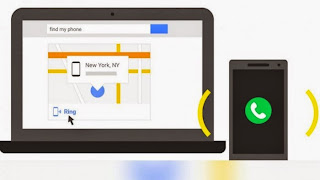
Step 1: Make sure you are using/sharing the same Google account on your PC and Android phone / tablet. (Even if you aren’t, it will prompt you once you type in ‘find my phone’ in the Google search bar.)
Step2: Now type in ‘find my phone’ in the Google Search bar.
As soon as you hit enter, Google will start locating your phone through the Google Maps.
Just letting Google Search take a little time to locate your lost phone and Yes! the Precise Location of your lost phone is found.
It even shows how far it is from your current location.
But what if your phone is under a pillow or stuck inside a bed?
Well, for that, there’s an option called ‘Ring’ which will make your phone ring at maximum volume for over 5 minutes. #LOL...
Hope this info helps? Feel free to share this post with your friends using the Share/Like buttons. Never miss any of my future post CLICK HERE TO SUBSCRIBE Once entered, you will have to check your inbox for a confirmation email containing a confirmation link. Once you VERIFY your email by clicking on the confirmation link in the message, you will never miss any future articles.
Dont Forget To Add your View, Comments on this Post.
Always Like and Share Posts, You can Make use of the Share Buttons below.....
Dont Forget To Add your View, Comments on this Post.
Always Like and Share Posts, You can Make use of the Share Buttons below.....
Go to link Download
Wednesday, September 21, 2016
How To Notify Search Engine Each Time You Make a Post
How To Notify Search Engine Each Time You Make a Post
 One of the ways to generate traffic and also make your blog or website contents appear regularly on major search engines is by pinging your website, blog or feed with ping services. A ping is a mechanism by which a blog notifies a server that its content has changed. A signal is sent to one or more “ping servers,” which can then create a list of new material. Aggregators use results from ping servers to tell subscribers which items on their subscription lists have fresh material.
Pinging also lets the search engines know that you have updated your content. Search engines such as Google and Bing like fresh updated content and will give it higher ranking in the search results.
The bigger your ping list the higher the chances of receiving traffic from those sources,
Simply submit your your site or feed to these ping services when you update or add new content. You can submit your site by by copying your URL (The address at the top of the page that begins http:www.mywebsite.com.) and pasting it in the box the pinging service indicates.
If you use WordPress blog you can modify your ping list on the Control Panel, then Options, then Writing).
NOTE: In other to achieve maximum result it is highly advised you choose at least one pinging service, and be using it for all your pings, multiple submission of your blog or site URL may be seen as spamming.
List of some popular Ping Services
- Ping-o-Matic!
- Ping-O-Matic is a service to update different search engines that your blog has updated.
- Blog Ping for Squidoo Lenses
- A ping tool especially optimised for Squidoo Lenses, and and is for notifying the blogosphere when a lens is updated.
- My Page Rank
- Submit Free lets you submit your URL to 20 popular search engines from one MyPagerank.Net Google PageRank Checker – Check Google page rank Webmasters, monitor your webpage pagerank
- Pingoat
- Ping over fifty blog services instantly. Pingoat also has an XML-RPC server. Ping services like Technorati, newsgator,feedster..
- Pingler.com
- Blog and Ping Tool – Use Pingler.com to Drive Traffic your Blogs and Websites Use Pingler.com to Ping your Blogs and Websites in the best way possible!
- PingMyBlog.com
- PingMyBlog.com is a service which does the hard work for you. We notify all the major blog directories in one go so that everyone knows about your latest blogs. It will not work for some reason if you use the RSS field provided. It does work just fine if you only use the Name and URL fields only.
- Autopinger
- Automates Ping Blog and Podcast for Free
- Feed Shark
- Ping your blog, feed, or podcast for free!
- Pingates
- Blog pinger – Blog ping service Pingates is a service that pings or notifies a number of services that keep track of weblogs and publish them.
- PING.IN
- Blog and ping , Blog ping , ping , Blog Search , Speed Test , Rank
- Feed Ping
- Free Website and Blog Multiple Submission Service – FEED PING Website and Blog Multiple Feed Service
- King Ping Your Blog
- Update pinging services to get the best results from all the important search engines. It is all automatic, so set it up and forget about it.
- Ping 4 Free: Free Blog Ping Service
- This site offers a blog ping service that pings well over 100 tested and functioning blog directories (actually 133 at last update). You must register, but registration is totally free.
- Syncr Ping Service
- Syncr is a Service to Update Different Search Engines That Your Blog or Web Site Has Updated.
http://blogsearch.google.com/ping/RPC2
http://1470.net/api/ping
http://api.feedster.com/ping
http://api.moreover.com/RPC2
http://api.moreover.com/ping
http://api.my.yahoo.com/RPC2
http://api.my.yahoo.com/rss/ping
http://bblog.com/ping.php
http://bitacoras.net/ping
http://blog.goo.ne.jp/XMLRPC
http://blogdb.jp/xmlrpc
http://blogmatcher.com/u.php
http://bulkfeeds.net/rpc
http://coreblog.org/ping/
http://mod-pubsub.org/kn_apps/blogchatt
http://www.lasermemory.com/lsrpc/
http://ping.amagle.com/
http://ping.bitacoras.com
http://ping.blo.gs/
http://ping.bloggers.jp/rpc/
http://ping.cocolog-nifty.com/xmlrpc
http://ping.blogmura.jp/rpc/
http://ping.exblog.jp/xmlrpc
http://ping.feedburner.com
http://ping.rootblog.com/rpc.php
http://ping.syndic8.com/xmlrpc.php
http://ping.weblogalot.com/rpc.php
http://ping.weblogs.se/
http://rcs.datashed.net/RPC2/
http://rpc.blogbuzzmachine.com/RPC2
http://rpc.blogrolling.com/pinger/
http://rpc.icerocket.com:10080/
http://rpc.newsgator.com/
http://rpc.technorati.com/rpc/ping
http://rpc.weblogs.com/RPC2
http://topicexchange.com/RPC2
http://trackback.bakeinu.jp/bakeping.php
http://www.a2b.cc/setloc/bp.a2b
http://www.bitacoles.net/ping.php
http://www.blogdigger.com/RPC2
http://www.blogoole.com/ping/
http://www.blogoon.net/ping/
http://www.blogpeople.net/servlet/weblogUpdates
http://www.blogroots.com/tb_populi.blog?id=1
http://www.blogshares.com/rpc.php
http://www.blogsnow.com/ping
http://www.blogstreet.com/xrbin/xmlrpc.cgi
http://www.mod-pubsub.org/kn_apps/blogchatter/ping.php
http://www.newsisfree.com/RPCCloud
http://www.newsisfree.com/xmlrpctest.php
http://www.popdex.com/addsite.php
http://www.snipsnap.org/RPC2
http://www.weblogues.com/RPC/
http://xmlrpc.blogg.de
http://xping.pubsub.com/ping/
Cheers!
Go to link Download
Subscribe to:
Posts (Atom)