Showing posts with label if. Show all posts
Showing posts with label if. Show all posts
Friday, November 25, 2016
How To Open ClickBank Account Even If Your Country Was Banned
How To Open ClickBank Account Even If Your Country Was Banned

For sometime now, Nigerians have been using the services of Graphcard to acquire a USA virtual address. With recent changes, most USA companies like ClickBank, now asks for Tax Identification before they can process your payments.
What information will you give them? This is why it is safe to use a UK address that does not require those necessary verification and validation.
Registering for a ClickBank affiliate account is very easy and can be done in less than 5 minutes. Unfortunately Nigeria is among the list of countries banned in the list of accepted countries that can do business with ClickBank but there is way to go around it, if your country is banned, even though you are not Nigerian with this pieces of report you are reading now, you will open an account with them without any problem.
WARNING: Do not buy any information product claiming to show you how to register an account with ClickBank as a Nigerian! The information below is the exact the same thing you will get from them.Save the money and use it for other
thing.
There are two ways of successfully registering an account with ClickBank as a Nigerian or Non-Nigerian but your country is among the banned country to do business with ClickBank.
Option Number One
Get a virtual address from UKPostBox and use it to sign up for a ClickBank affiliate account. You can get a UK address for free through their PAY AS YOU GO account. However, do note that you must get your government issued ID, Utility Bill and other necessary documents scanned to them before you will get a UK address as required by most all the UK Virtual address providers.
Option Number Two
This is simple and straight forward. Get a trusted friend or family that lives in a ClickBank accepted country to open an account for you. Also make sure, he or she has a Tax Payer ID number.
Personally, I prefer the option Number one and here is why.
Option Number Two mainly foreign friend or relative may not send you your hard earning money and many will do, so for that reason I shut down any third party involvement, so that I will get my pay check here in Nigeria and using Fast, Reliable, Personal Mail Forwarding company is good for me because their know their job and is their business.
ATTENTION: You can always change your payee name and country ANYTIME you wish and general accepted by ClickBank Company Policy.
That’s all you need to know about getting a ClickBank account as a Nigerian or Non-Nigerian.
Go to link Download

Wednesday, November 9, 2016
How to Check if your Mac Malware Definitions List is Updated
How to Check if your Mac Malware Definitions List is Updated
Are you wondering how to check your Mac Malware definitions list is updated or not? Well, Apple has released Mac OS X Security Update to protect Mac from malware. Mac OS X security update automatically download and update it’s malware definitions list from Apple. If you want to know how to manually check if the list is updated or not then simply follow the steps posted below using which you can manually check whether the list is updated or not.
STEP 2. Now you have to paste the command given below in the Terminal of Mac OS X:

The integer tag shows which version the definitions list is and the date listed shows when the file was last modified. In this way you can manually check whether the Malware definitions list of your Mac is updated or not.
How to Check if your Mac Malware Definitions List is Updated
STEP 1. First you have to launch the Terminal of Mac OS X.STEP 2. Now you have to paste the command given below in the Terminal of Mac OS X:
cat /System/Library/CoreServices/CoreTypes.bundle/Contents/Resourses/XProtect.meta.plistSTEP 3. Now simply look at the data entry between the string tags, as shown in the image below:
The integer tag shows which version the definitions list is and the date listed shows when the file was last modified. In this way you can manually check whether the Malware definitions list of your Mac is updated or not.
Go to link Download
Thursday, October 13, 2016
How To Answer Your Calls From Another Persons Phone if Your Battery Is Low Or Your Phone Is Off
How To Answer Your Calls From Another Persons Phone if Your Battery Is Low Or Your Phone Is Off

Before you totally run out of battery dial **21* phone number of the person you want to receive your calls from # send.
From then, if somebody call you it will ring on the persons phone.
You can cancel it anytime from your own SIM card by dialing ##21# and send. Remember if you dont have battery on your phone at all, you can also remove your SIM card and put it into another persons phone then put the code stated above {**21*} in any case remember to dial ##21# from your own SIM to cancel.
Go to link Download
Sunday, October 9, 2016
How can I unlock my iPhone if I forgot the passcode
How can I unlock my iPhone if I forgot the passcode
How can I unlock my iPhone if I forgot the passcode?
Apple explains how to unlock the iPhone if you have forgotten the passcode or password in the manual for each model. For the iPhone 5c, for example, it is provided on page 155 as well as on the company support site. However, as this is a very frequently asked question, the official answers and additional help are below for your convenience. 
Image Credit: EveryiPhone.com (iPhone Passcode Screens - iOS 6, Left; iOS 7, Right)
About iPhone Passcodes
The exact behavior of the iPhone depends on its configuration when one forgets the passcode. By default, there is not a passcode at all. However, Apple notes the following regarding forgotten passcodes:If you repeatedly enter the wrong passcode, your iPhone will be disabled for longer intervals before you can try again. After too many unsuccessful attempts, you wont be able to try again until you connect it to the computer with which you last synced it [if it has been synced to a computer].
Note: You can configure your device to erase itself after ten consecutive incorrect password attempts. This setting is off by default. It can be turned on by tapping Settings > General > Passcode Lock.
If you cannot remember the passcode, you will need to restore your device using the computer with which you last synced it [or iCloud]. This allows you to reset your passcode and resync the data from the device (or restore from a backup). If you restore on a different computer that was never synced with the device, you will be able to unlock the device for use and remove the passcode, but your data will not be present.Please also note that Apple representatives cant unlock an iPhone for you without restoring the iPhone, either. The restore process will erase everything on it.
How to Unlock iPhone Passcodes
If you have forgotten the passcode on your iPhone, you will have to restore the device. To restore your iPhone -- which, again, deletes all of your data (songs, photos, videos, apps, and so on) on the iPhone use the following directions. Be absolutely sure that you have backed up the content on your iPhone before restoring it.
iPhone Previously Synchronized with a Mac or PC
If you have previously synchronized your iPhone with iTunes on a Mac or Windows computer, you typically still can backup recent additions to your iPhone by connecting it to the same computer you have used before without having to enter the passcode.After the backup, you just need to "restore" your iPhone and have the backup copied onto the iPhone with iTunes.
Apples official instructions to restore an iPhone with iTunes are:
- Connect your iPhone to your computer [that you have previously used to sync the device].
- In iTunes, select the iPhone in the "Devices" list, then "Summary" at the top of the screen.
- If iTunes doesnt automatically synchronize your iPhone, do so manually [and confirm that the sync and backup were successful.]
- Click “Check for Update.” iTunes tells you if there is a newer version of the iPhone software available.
- Click Restore. Follow the onscreen instructions to complete the restore process. When restoring, it is recommended that you [again] backup the iPhone when prompted.
- When iOS Setup Assistant asks to set up your iPhone, choose "Restore from iTunes backup."
- Select your device in iTunes and choose the most recent backup of your iPhone.
iPhone Previously Backed Up with iCloud
Apple explains that "if you have Find My iPhone enabled, you can use Remote Wipe to erase the contents of your device." Likewise, "if you have been using iCloud to backup, you may be able to restore the most recent backup to reset the passcode after the device has been erased."Apple separately explains the simple iCloud process to erase an iPhone. This is mostly intended for an iPhone that has been lost or stolen, but the portion relevant for a forgotten password is:
- Sign in to iCloud with your Apple ID (the one you use with iCloud [rather than your iPhone passcode that you do not remember]), then click "Find My iPhone."
- Click "All Devices," then select the iPhone you want to erase.
- In the Info window, click "Erase iPhone."
- Enter your Apple ID password [for confirmation]. If the device youre erasing has iOS 7 or later, enter a phone number and message. [This is intended to be displayed to anyone who may have found your iPhone if it is lost or stolen. To just erase the iPhone, it is not necessary.]
- [Now] you can restore the information on the device using iCloud Backup (if backup was turned on before you erased it).
iPhone Never Synchronized or Backed Up
If you never synchronized your iPhone with iTunes on a computer or backed up using iCloud, the only option is to restore the iPhone as new, which will delete all of your personal information. A passcode that can be bypassed by anyone would not be of much use, so this is as intended for security purposes.If you find yourself in this situation try not to panic. Take a deep breath. Leave your iPhone behind, go for a walk, and try not to think about the passcode per se. Separating yourself from the frustration may help jog your subconscious to release the information you have forgotten.
If you still do not remember your passcode when you return, hold the iPhone in your hand and ideally sit or stand somewhere where you know you have entered your passcode before.
If that is not an option, try to face a direction that you were facing when you successfully entered your passcode previously. Relax. Close your eyes. Open your eyes again. Enter the passcode without a conscious effort to remember the numbers or letters but instead "feel" it. You may be able to essentially trigger "muscle memory" of the motion pattern you have used before to enter the code.
If none of that works, sadly, you will have to start over as if you just got a new iPhone. If you have only had the iPhone for a few days (which is when people tend to forget the passcode the most, perhaps it is not a major problem).
If you recently set a passcode on an iPhone with a lot of personal information that is not synchronized using iTunes or backed up using iCloud and this information is really important to you, you could consider buying a new iPhone without restoring the old one. The hope would be that you might remember the passcode at some point in the future. Perhaps buying an expensive new phone will allow you to remember the passcode the next day. Doh!
Nevertheless, next time, either (1) do not use a passcode, (2) use the fingerprint enabled Touch ID on the iPhone 5s instead, or (3) be sure to sync your lesser iPhone with iTunes and/or iCloud.
Go to link Download
Saturday, September 24, 2016
How To Know If Your Gmail may have been hacked
How To Know If Your Gmail may have been hacked
How To Know If Your Gmail may have been compromised ? - Gmail is an email service that is changing the way the world on the use of electronic mail . As one of the largest , of course, more interrupts are directed to Gmail as well as users. One is about five million emails burglary that had just occurred . Are you one of the victims ?
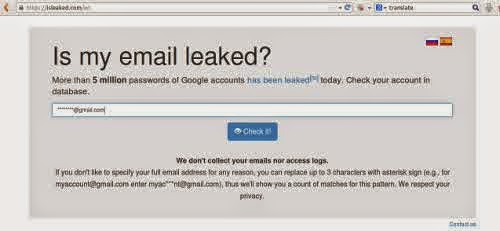
Heres how you know that your Gmail account has been hacked and the next steps to secure your email .
First and foremost , visit this website :
https://isleaked.com
Enter your Gmail address in the space provided and you will be notified when your account is hacked , including burglary while ago . As proof that your email has been compromised , this site will tell you the first two characters of your password when your account was never touched by people who are not responsible .
What if it turns out your account has been hacked ?
Immediately do a security measure to access this address :
https://www.google.com/settings/personalinfo
Click on the Security tab on this page and you will be allowed to change the password . Immediately do before its too late .
Its good , even if your Gmail account is not or has not been hacked , immediately do the two-step verification on your Google account .
The trick ? On the same page from the link above , there is a " two- step verification " on the Security tab . Click " Settings " next to it and then you will be guided to complete the process. During the process , Gmail will send a security code on your mobile phone via sms . Enter the code Google shipments consisting of a few characters into the field provided. The code will be required when you log in to your Gmail account via a mobile phone or another computer .
When you connect the smartphone to the Gmail and have verified two steps via a computer , a warning may appear on your smartphone that can not be accessed Gmail account and asks you to enter a code . Do not worry because Google will include sms containing the security code to your smartphone . Use the code to activate two- step verification on your smartphone Gmail .
Heres how you know that your Gmail account has been hacked and the next steps to secure your email .
First and foremost , visit this website :
https://isleaked.com
Enter your Gmail address in the space provided and you will be notified when your account is hacked , including burglary while ago . As proof that your email has been compromised , this site will tell you the first two characters of your password when your account was never touched by people who are not responsible .
What if it turns out your account has been hacked ?
Immediately do a security measure to access this address :
https://www.google.com/settings/personalinfo
Click on the Security tab on this page and you will be allowed to change the password . Immediately do before its too late .
Its good , even if your Gmail account is not or has not been hacked , immediately do the two-step verification on your Google account .
The trick ? On the same page from the link above , there is a " two- step verification " on the Security tab . Click " Settings " next to it and then you will be guided to complete the process. During the process , Gmail will send a security code on your mobile phone via sms . Enter the code Google shipments consisting of a few characters into the field provided. The code will be required when you log in to your Gmail account via a mobile phone or another computer .
When you connect the smartphone to the Gmail and have verified two steps via a computer , a warning may appear on your smartphone that can not be accessed Gmail account and asks you to enter a code . Do not worry because Google will include sms containing the security code to your smartphone . Use the code to activate two- step verification on your smartphone Gmail .
Go to link Download
Tuesday, September 20, 2016
How to receive Google Adsense Payment If you are not 18
How to receive Google Adsense Payment If you are not 18
After creating blog, first question is how to earn money. There are too much online sources which allows you to earn money online.Google adsense is best service which provide you to earn handsome amount of money by placing ads.Google adsense is based upon some rules and regulations. If you have adsense on your blog then question is how to receive payments. Adsense has rules that you will not get payment if you are not under 18. If you are below 18,and want to withdraw money from adsense then this article will help you.I am sharing with you two possible methods by which you able to get adsense payment.

Receive Payments on your Father/Mother Name:
First method is that receive adsense payments by using your Father/Mother or your Guardian name to receive money . Make a Google adsense account by your Father/Mother or your Guardian name. When you eligible to get payment, withdraw amount from Nearest Western Union with your Father/Mother or Guardian with CNIC.
Receive Adsense Payment Using Passport
If you are living in away to your home, or not find first method reliable then get adsense payment by using passport. In University Hostel or if you are not agree to the first method I recommend i.e to use Father/Mother or Guardian name to receive Payment than there is also a solution for you.The most popular way by which Adsense Publishers are receiving payments is through Western Union.
Western Union allows you multiple ways to withdraw amount which are follow.
- By copy of CNIC
- By copy of driving license
- By copy of passport
If you are under 18 first two options are not valid for you.As you not have CNIC and driving license till you reach 18.Option which is valid is receiving paymnets via Passposrt by western union.There is no age limit of passport, so if you have passport then you can get payments via Western Union.
If you have not passport you can apply for Passport in nearest Passport Office in your city.You have to pay some fee bt after that you will enable to get your Google Adsense payment via Western Union.
Go to link Download
Saturday, September 17, 2016
HOW TO KNOW IF YOUR LAPTOP IS A REFURBISH COMPUTER
HOW TO KNOW IF YOUR LAPTOP IS A REFURBISH COMPUTER

While a fairly used laptop are the types of quality laptops that are already used by someone who bought it from the manufacturers before selling it out. When a laptop computer did not pass the quality standard after manufacturing or if returned as a result of malfunctioning, they are refurbished (i.e. repaired) before selling at discount price.
Also ,How to Identify Refurbish Laptop Computers include d,
This means they undergo repairs either mechanical or aesthetically to fix the failing unit before selling them out usually at lower price than the original. Most refurbished laptops usually carry a 30 day store warranty and 90 days warranty with the manufacturers.
So How Do I Know If a Laptop computer is Brand New or Refurbished?
A refurbish product usually have an additional R at the end of the product number or product ID. For example a product number with NB232UAR#ABA is a refurbish notebook while NB232UA#ABA is a brand new notebook. If you want to know the type of laptop you are about to buy whether it is a refurbish laptop or a brand new one from a vendor, they are two ways to identify it.
1. Check for a sticker at the back of your laptop or battery pack to see the product number.
2. Click on the Start menu of your computer, Right-click on Computer,
then scroll down to check the product ID. Or hold Window key + R and type MSinfo32 in run, then hit enter to reveal the product number
We love comments. Please do not leave without giving us one. We will appreciate it. Thank you
Go to link Download
Subscribe to:
Posts (Atom)