Sunday, November 27, 2016
How to check whether a game will run on your computer or not
How to check whether a game will run on your computer or not

First you need to visit this site, see the left side that says "Find out if you can run that game on your PC"? click the button underneath it that says "Can YOU run it?"
Now to test your computer for compatibility. From the drop-down list, select the game that you wish to run. After you selected your game, click the "Can you RUN it" button. This will take you to a new page.
This next page will analyze the data, if you are a Windows Vista user then UAC(User Account Control) will pop up and ask for permission, click yes as this is not harmful. Now your results will appear...It appears that I failed...:(
Well now you know how to check to see if you can run your game without having to drive all the way to the Local Generic Superstore near you, buy the game, wait 45 minutes to install it, find out that it wont run, and then run back to the store to return it. So I hope that I helped, and saved you the hassle of the return.
Go to link Download

Monday, November 21, 2016
How To Fix “This Copy of Windows Is Not Genuine” Notification in Windows 7
How To Fix “This Copy of Windows Is Not Genuine” Notification in Windows 7
Have you ever experienced the pop-up message “This Copy of Windows Is Not Genuine” which shows up once the copy of widows 7 you are running expires? Aside from the Windows OS expiring, another thing that causes this notification to show up is when you are running a pirated copy of the windows software.

What are the effects of not fixing this message?
There are couple of things which can happen to your computer when your Windows OS expires or reads not genuine, some of them which are:
- Your wall paper will disappear, and you won’t be able to put any either, your desktop screen will just go black
- Frequent and irritating 5 minutes pop up message reminding you that you are using a Windows OS that is not genuine
- Your system if after 30 days you did not fix the issue will go critical
Ordinarily, some folks will tell you that your computer needs to be formatted to be able to fix the problem (and you are charged heavily for that) while others will advice using some named softwares to resolve the problem. But in this post, I will be sharing with you two (2) simple steps I used to fix this problem for my friend.
To fix this problem with few minutes follow these instructions which I have divided into two (2) parts.
Note: You must complete the two parts to be able to get this problem fixed
PART I: Search and Uninstall Windows Update KB971033
PART II: Rearm Windows
Here are the procedures
PART I: Search and Uninstall Windows Update KB971033
Step 1: Go to "Control Panel" and click on Windows Update
Step 2: Look to the bottom left corner of the page and click on "Installed Updates" If the link isn’t there, hit “View Update History” and hit then “Installed Updates” link at the top.
Step 3: Scroll down to the section titled “Microsoft Windows” and look for update KB971033.
Step 4: Right click it and hit “uninstall”. Hit okay. (Note: There are many updates with KBxxxxxxxx, make sure you select KB971033)
Step 5: Restart your computer and head on to PART II
PART II: Rearm Windows
Step 1: Click the Start Menu and type COMMAND PR in the start menu search box.
Step 2: Right click COMMAND PROMPT and select RUN AS ADMINISTRATOR.
Step 3: In the command prompt window type:
and press enter. (Note: There is a space between slmgr.vbs and -rearm, so make sure you type it with the space)

Be sure to turn off windows update or else you will face the same problem again. Alternatively, you can hide Windows Update: KB971033 in your windows update history.
The method I have provided in this post is 100% safe and guaranteed more than that of using a software. If you follow the step by step guide correctly, you should have the problem fixed.
What you should have in mind
There is however, one thing you should know, this post is not an encouragement to be using a pirated copy of Windows, it would be very nice you buy a genuine software that way you are guarantied.This post is only a temporary help to fix the problem while you work on getting a genuine copy of Windows OS.
Go to link Download
Tuesday, November 15, 2016
How to fix Windows 10 brightness control not working issue
How to fix Windows 10 brightness control not working issue
However, the Windows 10 free upgrade from Windows 7 or 8.1 also brings its own share of bugs and installation issues including problems with adjusting display brightness on some PCs.
Redmond Pie reports that the problem manifests itself by not allowing users to increase or decrease the brightness of the connected display on Windows 10 machines.
In other words, it means laptop and notebook users cannot reduce the screen brightness when a low battery situation arises.
Nevertheless, folks at Redmond Pie have shared a simple step-by-step guide to fix this problem easily:
Steps to fix Windows 10 brightness control not working issue
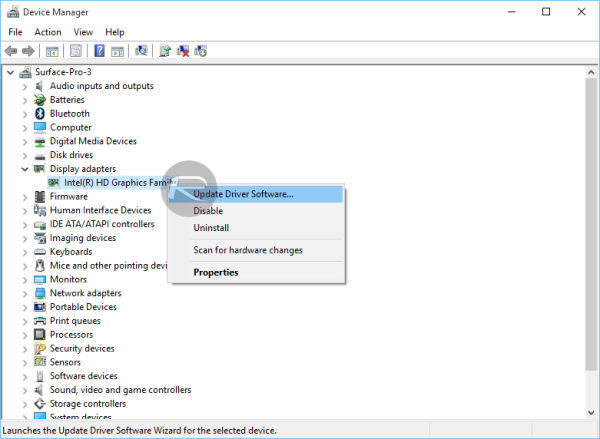
- Go to Start Menu > Search and type Device Manager.
- Then launch the Device Manager app and navigate to the Display adapters section.
- Just expand this option and right-click on the installed display driver.
- Then select Update Driver Software from the ensuing context menu.
- Select Search automatically for updated driver software in the resulting interface menu.
- Windows 10 should automatically download and install the necessary display or video card drivers via the detected internet connection.
- Once the drivers are installed successfully, you will see a notification message confirming the same along with the hardware details pertaining to the driver.
- Go to Start Menu > Search and type "Device Manager" and then launch the Device Manager app
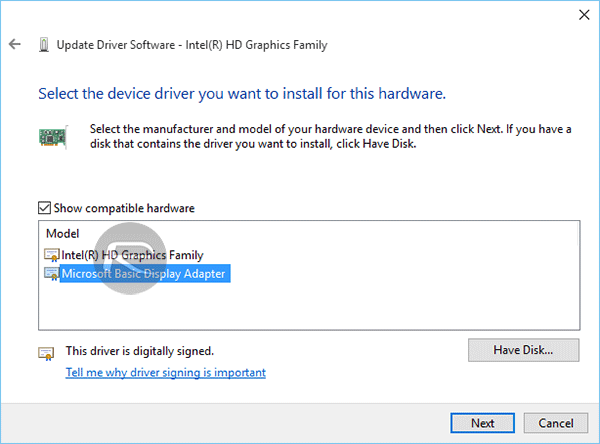
- Scroll down to the Display Adapters entry in the device list and expand the option. Right-click on the installed display drivers, and choose Update Driver Software from the context menu.
- In the ensuing interface menu, choose Browse my computer for driver software.
- Then choose the option "Let me pick from a list of drivers on my computer"
- In the next screen, select Microsoft Basic Display Adapter from the list under Show compatible hardware section. Then hit Next to continue.
- Windows should now install the selected driver and the display driver issue should no longer affect your screen brightness feature. You should now be able to increase or decrease display brightness without any hassles.
Go to link Download
Tuesday, November 1, 2016
HOW TO FIX LG V10 NOT CHARGING PROBLEM
HOW TO FIX LG V10 NOT CHARGING PROBLEM

Bent, broken or pushed in connectors on the device or battery.
Phone is flawed.
Damaged battery.
Defective charging unit or cable.
Temporary phone downside.
Phone is flawed.
Changing Cables
The first issue to visualize once the LG V10 not charging properly is that the charging cable. Typically the charger cable has been broken or lost the right affiliation to charge the LG V10. Before getting a brand new cable, attempt switch it out with another USB cable that works to check if the difficulty is with the cable. If the opposite USB cable charges the LG V10, then believe obtaining a brand new LG V10 cable charger here.
Clean USB Port
Another common issue with the LG V10 not charging via usb is that theres one thing interference the affiliation to the smart phone. It may well be rubble, dirt or lint that stops the affiliation. an honest thanks to fix this issue is by inserting a little needle or paper click and move it around within the USB charging port to urge everything out. the bulk of the time, this can be the most issue once the LG V10isnt charging properly. however it’s necessary to notice that once improvement the USB port, watch out to not injury something and clean it out gently.
Reset LG V10
Sometimes the explanation that the LG V10 not charging once obstructed in is as a result of the code desires a revive. This technique is also a short lived fix the matter, however will facilitate fix the charging issue on the LG V10. scan the elaborated guide here.
Get Support From licensed Technician
If none of the on top of ways work for fixing the LG V10 not charging downside, another suggestion would be to require the smart phone and find it verified by a LG technician. If for a few reason the smart phone is want of repair and that they may well be ready to offer a replacement underneath the assurance.
Go to link Download
Thursday, October 6, 2016
How install Android Marshmallow on your AT T branded Priv when not using an AT T SIM
How install Android Marshmallow on your AT T branded Priv when not using an AT T SIM
Now that AT&T has officially released Android Marshmallow for the BlackBerry Priv, Im sure many of you out there who took advantage of those unlocked AT&T branded Priv deals but not actually using the device on AT&T are wondering how you can get in on the Marshmallow action as well. Heres how it can be done.

Now that AT&T has officially released Android Marshmallow for the BlackBerry Priv, Im sure many of you out there who took advantage of those unlocked AT&T branded Priv deals but not actually using the device on AT&T are wondering how you can get in on the Marshmallow action as well.
Previously, it was noted that BlackBerry was working on a solution but, there have been no status changes in that area yet. Luckily, though, you dont really have to wait for BlackBerry. Along with the official AT&T release, an autoloader file was released, which in this case can be used to install Android Marshmallow on your AT&T branded Priv when not using an AT&T SIM.
Read More »

Read more>> Source Link http://ift.tt/29EnK6j via CrackBerry.com - The #1 Site for BlackBerry Users (and Abusers!)
Go to link Download
Tuesday, September 20, 2016
How to receive Google Adsense Payment If you are not 18
How to receive Google Adsense Payment If you are not 18
After creating blog, first question is how to earn money. There are too much online sources which allows you to earn money online.Google adsense is best service which provide you to earn handsome amount of money by placing ads.Google adsense is based upon some rules and regulations. If you have adsense on your blog then question is how to receive payments. Adsense has rules that you will not get payment if you are not under 18. If you are below 18,and want to withdraw money from adsense then this article will help you.I am sharing with you two possible methods by which you able to get adsense payment.

Receive Payments on your Father/Mother Name:
First method is that receive adsense payments by using your Father/Mother or your Guardian name to receive money . Make a Google adsense account by your Father/Mother or your Guardian name. When you eligible to get payment, withdraw amount from Nearest Western Union with your Father/Mother or Guardian with CNIC.
Receive Adsense Payment Using Passport
If you are living in away to your home, or not find first method reliable then get adsense payment by using passport. In University Hostel or if you are not agree to the first method I recommend i.e to use Father/Mother or Guardian name to receive Payment than there is also a solution for you.The most popular way by which Adsense Publishers are receiving payments is through Western Union.
Western Union allows you multiple ways to withdraw amount which are follow.
- By copy of CNIC
- By copy of driving license
- By copy of passport
If you are under 18 first two options are not valid for you.As you not have CNIC and driving license till you reach 18.Option which is valid is receiving paymnets via Passposrt by western union.There is no age limit of passport, so if you have passport then you can get payments via Western Union.
If you have not passport you can apply for Passport in nearest Passport Office in your city.You have to pay some fee bt after that you will enable to get your Google Adsense payment via Western Union.
Go to link Download
Thursday, September 15, 2016
How to Repair App Not Installed on Android Smartphone
How to Repair App Not Installed on Android Smartphone
To be frank with you, this has been my issue with my Android Smartphone for the past couple of days but I later discovered Who I am really. Then with this below steps, I made whole again.
It is obvious that you out there can also use this simple tutorials with encountering any other further stress. There are indeed three main causes of "app not installed" are; out of storage space i.e no
Go to link Download
Wednesday, September 7, 2016
How To Solve Problem Of Internet Not Working On Android Turn On Data
How To Solve Problem Of Internet Not Working On Android Turn On Data

Is your internet not working on your Android phone? Or your money is deducted when browsing while you still have an active data plan? if so, there is a good chance that your phone is not connected to the data network. Just follow the below procedure to get it done.
From The Settings Menu:
1. From the home screen, press the Menu Key and then go to Settings.
2. From the Settings Menu, scroll and find Wireless & Networks or something similar (same place where you turn on bluetooth and wifi).
3. From the Wireless & Networks menu, look for Mobile Networks or something similar.
4. From there, look for an option that says Packet Data or something similar and check the box if it is unchecked.
If the method above did not work, or was not available, try the below:
From The Power Menu:
1. From the Home Screen, press and hold the Power Button.
2. A pop up box should come up with a few option.
3. Look for Data Network Mode or something along those lines.
4. Click the Data Network Mode option, which will either toggle on or off the data network {depending on where it was}.
This happens to most people by accident for one reason or another (they tend to claim the phone did it by itself). But there is a hidden benefit to doing this on PURPOSE. Foe example, say somebody needs to borrow your phone but you are worried that they will go on your facebook and post something stupid. No problem! Just turn the data network off and they wont even be able to connect but they will still be able to make phone call and text people.
Dont forget to always use the comment below to ask question and you will receive answers immediately. Also feel free to share/like this post with your friend and family. You can also Subcribe via email to get regular updates.
Go to link Download