Showing posts with label id. Show all posts
Showing posts with label id. Show all posts
Thursday, November 3, 2016
How to hide your Caller ID on your Smartphone Android
How to hide your Caller ID on your Smartphone Android
How to hide your Caller ID on your Smartphone Android - Want to call friends but dont want your identity known? If you recently switched to Android maybe you still havent learned how to hide Caller ID when calling using the Android smartphone. Basically hide your Caller ID is pretty easy to do using the Android smartphone.

Whatever the reason youre doing it, you can hide your Caller ID when calling using the Android smartphone. The following are the steps that you must do if you want to hide your Caller ID when calling using the Android smartphone.
1. open the Settings in Android smartphone
2. open the Call menu Settings
3. open the Additional settings
4. open the Caller ID
5. switch to Hide number
Easy, isnt it? By following these steps then Caller ID will not be visible when you make a phone call. Good luck:)
Whatever the reason youre doing it, you can hide your Caller ID when calling using the Android smartphone. The following are the steps that you must do if you want to hide your Caller ID when calling using the Android smartphone.
1. open the Settings in Android smartphone
2. open the Call menu Settings
3. open the Additional settings
4. open the Caller ID
5. switch to Hide number
Easy, isnt it? By following these steps then Caller ID will not be visible when you make a phone call. Good luck:)
Go to link Download

Monday, October 31, 2016
How To Setup And Use iPhone 5s Touch ID Fingerprint Sensor video
How To Setup And Use iPhone 5s Touch ID Fingerprint Sensor video
Little over a week ago at their September media event, Apple announced the new iPhone 5s. Along with an impressive upgrade list to it’s predecessor, the iPhone 5, the 5s came with a feature many people had bookmarked as too outlandish for Apple to include. This feature is, of course, biometric fingerprint scanning integration, or as Apple call it: Touch ID. The premise of this new addition is simple, make unlocking and authorizing App Store & iTunes purchases as quick and easy as possible, which will result in a better experience for users. I happened to purchase the iPhone 5s earlier this morning, and I can honestly say I’m not disappointed at all with Touch ID.
I’ve been playing around with the new biometric implementation, and from what I can tell it’s fairly reliable and very secure. The software looks to be erring on the side of caution, and seems to block people if the print is slightly wrong, rather than allow people access if it’s somewhat correct. This is most definitely the right approach when we are talking about people’s data security.

When you first set up Touch ID, you’ll have to go through a rigorous setup procedure where you scan your chosen finger dozens of time to ensure the software has enough data on the finger you’re using (have no fear you can set up up to 5!). During this process, it’s important to make sure you cover every angle you think you’ll be unlocking your phone at, as it really is quite sensitive. If you’d like to see a full video walkthrough and demo of the process, one can be found below.
In the video below, you’ll have noticed that I was rejected by the Touch ID software a few times. I believe this was because when setting up the Touch ID fingerprint, I wasn’t diverse enough in the angles of my thumbprint that I supplied. After setting up the same thumbprint again, it seemed to work no problem. This particular form of security for a phone still felt slightly gimmicky to me, until I used it to authorize an application download. Now, where I used to have to continuously type out my 12-character password, I can simply scan my finger and save myself the time. It only seems like natural progression that we would get third party integration for a service like this. Just imagine being able to authorize a PayPal payment, or an NFC transaction, with simply a touch of your finger. Unfortunately Apple doesn’t play nice with the term ‘open APIs’, so we’ll have to see how far that gets.
Via
I’ve been playing around with the new biometric implementation, and from what I can tell it’s fairly reliable and very secure. The software looks to be erring on the side of caution, and seems to block people if the print is slightly wrong, rather than allow people access if it’s somewhat correct. This is most definitely the right approach when we are talking about people’s data security.
When you first set up Touch ID, you’ll have to go through a rigorous setup procedure where you scan your chosen finger dozens of time to ensure the software has enough data on the finger you’re using (have no fear you can set up up to 5!). During this process, it’s important to make sure you cover every angle you think you’ll be unlocking your phone at, as it really is quite sensitive. If you’d like to see a full video walkthrough and demo of the process, one can be found below.
In the video below, you’ll have noticed that I was rejected by the Touch ID software a few times. I believe this was because when setting up the Touch ID fingerprint, I wasn’t diverse enough in the angles of my thumbprint that I supplied. After setting up the same thumbprint again, it seemed to work no problem. This particular form of security for a phone still felt slightly gimmicky to me, until I used it to authorize an application download. Now, where I used to have to continuously type out my 12-character password, I can simply scan my finger and save myself the time. It only seems like natural progression that we would get third party integration for a service like this. Just imagine being able to authorize a PayPal payment, or an NFC transaction, with simply a touch of your finger. Unfortunately Apple doesn’t play nice with the term ‘open APIs’, so we’ll have to see how far that gets.
Via
Go to link Download
Saturday, October 8, 2016
How to change Gmail email id Hack
How to change Gmail email id Hack
I can still remember many people googling for " How to change email id in Gmail ? " . Even i googled many times and finally i have found a solution to it !
It is very easy and this hack will certainly help you :
The answer is both Yes and No !

It is not possible to change your username in gmail. The username is chosen at the time the account is created and is the permanent identifier of the account . But if you need to use a different username, it is possible. You simply need to create a new account and move your content over from the old account. For that :
Create a new account
Sign in to new account you just created and Hit the Settings link and then Accounts and Import tab.
You need to use POP3 entry. Enter the following configuration:
Username: Your old gmail email address
Password: Password for your old gmail account
POP server: gmail.com
Port: 995
Always use secure connection: check
Label incoming messages: check
This will make sure all of your old mails along with recent ones continue to land upon your new email id . You can follow the instructions
Remember that if you delete an account, you can never get it back or reuse the address.
Now , the hope for answer Yes :
If you have email id like tom@gmail and if you want to merge your surname say Clinton !
Then tell all your friends to email you @ tom+clinton@gmail but not vice versa !
Similarly you can go on like tom+clinton+is+my+name@gmail.com thus , any name you enter after your existing unchangeable gmail email id your mail will be sent on your inbox !
And if you have made tomclinton@gmail.com and want to make name and surname separate then you can go tom.clinton@gmail.com . Mail will appear in your inbox but not like plus sign where you can go tom.clinton.is.my.nam@gmail ! This wont work in this case and works only for plus symbol !
This is Because Gmail doesnt recognize dots as characters within usernames, adding or removing dots from a Gmail address wont change the actual destination address. Messages sent to yourusername@gmail.com and y.o.u.r.u.s.e.r.n.a.m.e@gmail.com are all delivered to your Inbox, and only yours.
Hope you find it useful !
Go to link Download
Friday, September 30, 2016
How To Change Nimbuzz Id Password
How To Change Nimbuzz Id Password
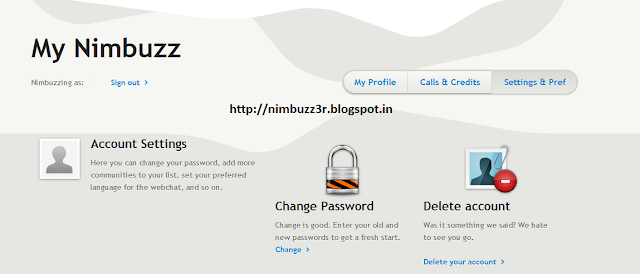
Change Nimbuzz id password using simple and easy way. Nimbuzz is not 100% secure from hacking and you may need to use strong password to avoid being hacked. You can change the Nimbuzz id password easily by follow the below steps.
1. Goto the following website Link.
1. Goto the following website Link.
2. Write your Nimbuzz User Id and Password and login to Nimbuzz.
3. Select Setting & Pref option.
4. Click on Change Password on the page.
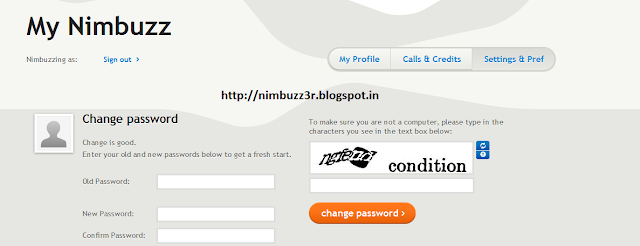
5. Write your Old Password, New Password and Confirm Password.
6. Write the Captcha and click on Change Password.
Thats it and your old Nimbuzz id password is changed to new password.
Go to link Download
Monday, September 19, 2016
How to Create LINE Login ID Account Free Download LINE App www line me
How to Create LINE Login ID Account Free Download LINE App www line me
 | |
| CASCITY.BLOGSPOT.COM |
Line is social media application which allows its users to share texts, audio, images and videos to other LINE users. Its users can also enjoy free VoIP conversations and as well video conferences. It an which was developed by members of NHN Koreans Internet search giant Naver subsidiary who numbered 15.
LINE was officially released and launched in 2011 in Japan. Initially, developed as an application for more devices Android and iOS smartphones but now available for Blackberry, Nokia Asha, Windows phone, Firefox OS, iOS tablets, Chrome Browser Application, and Mac OS powered devices.
UNIQUE FEATURES OF LINE
- LINE supports creating of messages using smartphone app or PC admin page and share them to various customers and friends which you have as friend in your account. Messages can be delayed to certain of sending it in advance.
- With LINE you can send many free messages from one person to another or to groups of friends at anywhere or anytime without hindrance.
- LINE also features free Voice and Video calls.
- It also allows sharing of voice messages , photos, videos, contacts and as well location information.
- On LINE there are many awesome stickers which are available for your use to spice up your chats and express your feelings easily. There are many free stickers and emoticons however to discover original characters of favorite celebrity you would have to visit the Sticker Shop.
- LINE offers you the ability to be updated with latest information about popular artist and various brands of your admiration by allowing you to follow their official LINE accounts.
- With the LINE timeline you can share stories with your close friends via texts, photos, videos, stickers and emoticons.
- LINE has a feature known as Keep which allows LINE users to save their favorite messages, photos and videos.
- With the shake it feature in LINE you can just find friends by just shaking.
- You can also add you friends through QR code or a LINE ID.
How to Create LINE Login ID Account And Download LINE App:
- You are required to download and install the app from the official website www.line.me.
- Launch the app after installing and select "New Users"
- Enter your country and phone number in the new screen that appeared and click on the Next button.
- A screen showing terms of agreement will appear, before a prompt will appear asking for your number verification click on the OK button. Choose "Agree with Terms and Verify".
- You will be sent SMS to your number which will automatically be registered but if does not work you can manually fill in the code window that would appear and then continue to the nex stage.
- You can automatically allow LINE app to add contacts based on the contacts phone number and email address that is stored in your contacts. You can also choose for others to automatically find you or not and then click on the OK button after making our choice.
- Now you will be required to fill in your display name which should not be more than 20 characters. After that upload your profile image, you can choose to snap a new photo or choose from your device in whichever can if the image is too large you would have to crop it to fit in, select and Click on "Register".
- Then you can now do your email Registration by entering the needed information and click on "Register now" if you want to or you can do that later, just click on "Register later"
- Your LINE account will now load, normally it takes just awhile to however the speed at which it will be completed depends on the device you are using.
- Now you LINE app account is ready, you can start chatting with your family, colleagues and increase the population of you contacts lists.

We would like to get your comments and contributions at the comment box as regards How to Create LINE Login ID Account Free And Download LINE App - www.line.me we will definitely attend to you immediately.
Go to link Download
Wednesday, August 31, 2016
How To Find Facebook Profile Page ID
How To Find Facebook Profile Page ID

Many tutorials give you an instruction by clicking right mouse on image profile to find your unique ID. Now I will tell you even easier to find your Facebook profile ID.

How To Find Facebook Profile/Page ID?
Just type at your address bar: https://graph.facebook.com/YOUR USERNAME or PAGE
Or type your username below and hint Get Facebook ID
Hope that helps.
Go to link Download
How Apples Touch ID Fingerprint Sensor Was Circumvented Video
How Apples Touch ID Fingerprint Sensor Was Circumvented Video
Starbug of the Chaos Computer Club has posted a video that demonstrates how he was able to bypass Apples Touch ID fingerprint sensor using a fake finger.
It "was way easier than expected," Starbug told ArsTechnica in an e-mail. "I thought it would take at least a week and some fancy chip/bus hacking." It didnt require either.
In an interview with Ars, Starbug told the site that figuring out how to beat the system took 30 hours; however, now that its figured out, the process would take about half an hour.
It took me nearly 30 hours from unpacking the iPhone to a [bypass] that worked reliably. With better preparation it would have taken approximately half an hour. I spent significantly more time trying to find out information on the technical specification of the sensor than I actually spent bypassing it.
I was very disappointed, as I hoped to hack on it for a week or two. There was no challenge at all; the attack was very straightforward and trivial. The Touch ID is nevertheless a very reliable fingerprint system. However, users should only consider it an increase in convenience and not security.
Starbug has won the Is Touch ID Hacked Yet competition and is donating the pledged funds to Raumfahrtagentur, a spinoff from CCC-Berlin.
Check out the video below or hit the link to read the full interview.
It "was way easier than expected," Starbug told ArsTechnica in an e-mail. "I thought it would take at least a week and some fancy chip/bus hacking." It didnt require either.
In an interview with Ars, Starbug told the site that figuring out how to beat the system took 30 hours; however, now that its figured out, the process would take about half an hour.
It took me nearly 30 hours from unpacking the iPhone to a [bypass] that worked reliably. With better preparation it would have taken approximately half an hour. I spent significantly more time trying to find out information on the technical specification of the sensor than I actually spent bypassing it.
I was very disappointed, as I hoped to hack on it for a week or two. There was no challenge at all; the attack was very straightforward and trivial. The Touch ID is nevertheless a very reliable fingerprint system. However, users should only consider it an increase in convenience and not security.
Starbug has won the Is Touch ID Hacked Yet competition and is donating the pledged funds to Raumfahrtagentur, a spinoff from CCC-Berlin.
Check out the video below or hit the link to read the full interview.
Go to link Download
Subscribe to:
Posts (Atom)