Showing posts with label logo. Show all posts
Showing posts with label logo. Show all posts
Friday, November 18, 2016
How to Change and Create a Android Logo In accordance in your own style with Androidify
How to Change and Create a Android Logo In accordance in your own style with Androidify
How to Change and Create a Android Logo In accordance in your own style with Androidify - Whats Androidify - Androidify is made google android applications that can make your avatar with andaroid logo, or in other words able to make the android logo in accordance with its own character. So far we know the logo android as a robot in green and shaped rigid, android logo google himself calls it by the name "andy". Then how about if we contumisasi the android logo in accordance with our wishes. add a variety of knick-knacks, and accessories in accordance with the latest fashion styles. Interesting is not it? see the image below.
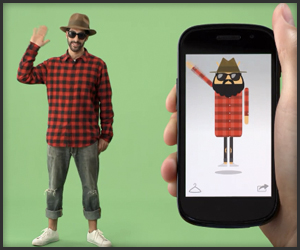
Androidify create our own android logo according to the character and fashion we
What can be done with Androidify
With Androidify we can change the android logo as we want, we can add the hair, adding to the variety Eksen fashion clothes and accessories, add glass eyes, adding pants, adding shoes, add hats, mustaches, jangut, and all things that smell fashion Style . Be logo android models themselves.
How to make own android with Androidify logo
I use it quite easy you just need to install this free app via google android play store open and make your hearts content. there is no limit we can tamper add modifiers themselves according to their own desires then we can also membagikanna our edits to various social networks such as google plus, facebook, twitter or email.
below is a screenshot application androidify

Features the latest androidify
• Currently available almost all fashion accessories that can be customized to the android logo, with the word lai we can it about with android logo at will
• make available tutorials android logo with androidify
• share feature to various social networks such as Google Plus, twitter, and facebook
Download Androidify Android apk
Official android application created by Google Inc. and is available free for download via google play for free. Androidify latest version is 1.1.3. Cdengan apk 2.1Mdan sizes can be installed for both katas android 2.1 OS smartphone / android phone and android tablet
Download Androidify Android apk app via google play store or click here
Androidify create our own android logo according to the character and fashion we
What can be done with Androidify
With Androidify we can change the android logo as we want, we can add the hair, adding to the variety Eksen fashion clothes and accessories, add glass eyes, adding pants, adding shoes, add hats, mustaches, jangut, and all things that smell fashion Style . Be logo android models themselves.
How to make own android with Androidify logo
I use it quite easy you just need to install this free app via google android play store open and make your hearts content. there is no limit we can tamper add modifiers themselves according to their own desires then we can also membagikanna our edits to various social networks such as google plus, facebook, twitter or email.
below is a screenshot application androidify
Features the latest androidify
• Currently available almost all fashion accessories that can be customized to the android logo, with the word lai we can it about with android logo at will
• make available tutorials android logo with androidify
• share feature to various social networks such as Google Plus, twitter, and facebook
Download Androidify Android apk
Official android application created by Google Inc. and is available free for download via google play for free. Androidify latest version is 1.1.3. Cdengan apk 2.1Mdan sizes can be installed for both katas android 2.1 OS smartphone / android phone and android tablet
Download Androidify Android apk app via google play store or click here
Go to link Download

Sunday, October 23, 2016
How to Change a Wordpress Logo in Login Page
How to Change a Wordpress Logo in Login Page

How to Change a Wordpress Logo in Login Page - I want to share a trick for wordpress. this trick is How to Change a Wordpress Logo in Login Page which can make your wordpress become more interesting.
You can to Change Wordpress logo, you can to put your photo or other picture in wordpress login page.. You want to try this??
This is the secret, First open the functions.php file, and copy this code:
function custom_loginlogo() {
echo ‘<style type=”text/css”>
h1 a {background-image: url(‘.get_bloginfo(‘template_directory’).’/images/login_logo.png) !important; }
</style>’;
}
add_action(‘login_head’, ‘custom_loginlogo’);
dont forget to copy logo file to image folder at your theme, and adjust the logo file name.. for example the name login_logo.png.
Ok, I hope you become more cool with the new logo..
Go to link Download
Thursday, October 6, 2016
How To Fix Recovery Mode Loop OR iTunes Logo on iPhone iPad and iPod Touch
How To Fix Recovery Mode Loop OR iTunes Logo on iPhone iPad and iPod Touch

You can put your iOS device into recovery mode, then restore it using iTunes.
Use recovery mode:
You might need to use recovery mode to restore your device in these cases:
iTunes doesnt recognize your device or says its in recovery mode. You see the Apple logo onscreen
for several minutes with no progress bar.
You see the Connect to iTunes screen. Learn what to do if you see the progress bar onscreen for several minutes. To put your device into recovery mode,
When this occurs, the progress bar might be moving very slowly or seem like it isnt moving. Let the device complete the update, restore, or erase process. The progress bar shows installation progress. The amount of time depends on the number of files on the device and whether youre erasing, updating, or upgrading your iOS. This process can take as little as a minute if your device has little or no data or if youre erasing the device. If your device contains a large number of files, the process can take from several minutes to an hour.

follow these steps:
- Turn off your device and leave it off.
- in your devices USB cable to a computer with iTunes.
- Hold down the Home button on your device as you connect the USB cable.
- Keep holding down the Home button until you see the Connect to iTunes screen.
Go to link Download
Subscribe to:
Posts (Atom)