Showing posts with label rooted. Show all posts
Showing posts with label rooted. Show all posts
Sunday, October 30, 2016
How i Rooted my Tecno N7 Root any Chinese Android running Android 4 0 ICS 4 1 JB
How i Rooted my Tecno N7 Root any Chinese Android running Android 4 0 ICS 4 1 JB
Here’s an easy to follow tutorial on how to root any Chinese Android device you got there. It uses the rooting script Root_with_Restore_by_Bin4ry, which you can find at XDA. This is confirmed working for any MediaTek MT6577 devices running Android 4.0 or up, even devices with the dual core Qualcomm S4 procie can be rooted by this as long as it is on Android 4.x.
I first tested it on rooting a Cherry Mobile Titan, and it works. On this tutorial, I had used the method on my HDC Galaxy Note 2.
First, you need to properly install the ADB drivers. To do that, you must download and install first an app called Moborobo. Link here.
After installing the app, on your phone, enable USB Debugging by going to Settings > Development.
Connect your device and open the Moborobo app. Moborobo will attempt to install the necessary drivers. Just allow it to do the changes on your computer and if it succeed, you’ll see something like this:

Moborobo can read your connected Android device
You can now exit Moborbo. Be sure to close it completely and not just minimize it on the system tray.
Download this file. Root_with_Restore_by_Bin4ry_v18_2.7z
It is the rooting script. Extract it anywhere. You’ll something like this:
 Root_with_Restore_by_Bin4ry_v18_2.7z
Execute the RunMe.bat file if you are on Windows. A command prompt will open.

Root with Restore by Bin4ry
Just enter 1 as your option. It will now do its task. You’ll now see something like this on your device. Click restore and wait for the process to finish.

Restore data, ignore that encryption password thing
While on the command prompt window, you’ll see this:

rooting….
Your device will restart, and if you see the SUPER SU icon on your apps drawer it means that you had successfully rooted the phone.

SUPER SU
Checking root access with the Root Checker App:

Rooted HDC Galaxy Note 2 PRO
It is really easy on these Android 4.x devices now. I just posted this so I can just use this as reference for the queries on how to root such Chinese-made Android smartphones. While on lower version of Android, such as 2.3.6 Gingerbread, its a bit tricky as it needs some hacking with the boot.img if the SuperOneClick or UnlockRoot doesnt works. We’ll cover that up on the next update.
As they say, rooting voids the warranty but it depends on where did you buy your Android phone. Root only when you think you really have to and already know why you need to do that. On the other note, this process isnt risky and there is nothing to fear in case you messed up with the steps. Still, do this at your own risk.
If you dont want to miss anything on Stalyfblog, please like us on Facebook. and follow us on Twitter
You can also Subscribe to our updates by email or with your favorite browser. This way, you wont miss any updates from stalyfblog. If you subscribe by email, make sure to check your email to confirm your subscription.
Posted By: Oke David Umurhohwo.
Follow me on Google+, Twitter.
Cheers!
Go to link Download

Saturday, September 17, 2016
How To Browse Unlimitedly With Mtn Bis On Rooted And Android Phone With DroidVPN
How To Browse Unlimitedly With Mtn Bis On Rooted And Android Phone With DroidVPN
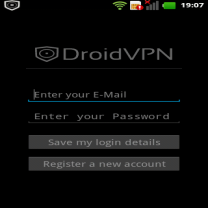
Most of us have already be familiar with DroidVPN, as it is what we are using to surf the net with MTN BIS now on the Android mobile phones. And almost every Android users are now enjoying it. I lately discovered that you dont even need to root your Android device for those running Android 4.0 and above before you can use the DroidVPN. It works even without the tun.koinstaller. Its even faster on Un-rooted than the Rooted Android Devices, without any internet potholes.
How To Use DroidVPN On Unrooted Android Device
1. Just visit Google play store and download droidVPN or CLICK HERE to download
2. Register an account at http://droidvpn.com/signup.php, you will use the account you registerd to sign in to your DroidVPN app
3. Now open the DroidVPN and go to Settings, click Connection Protocol and select UDP
4. Use Port 500
5. Make sure your MTN Blackberry plan is active with blackberry.net as your APN
6. Connect and surf with the fastest speed ever
There is something special about DroidVPN, It makes you browse unlimited. I experimented it with BISday plan and i bet, i have already downloaded more than 8GB. The job of this VPN is to make your internet surfing unlimited if you are a premium user. But it places 100MB embargo on free users.
Go to link Download
Sunday, September 11, 2016
How to Get Android N features on a rooted device
How to Get Android N features on a rooted device
Multiple Window Android N’s multiple window support was actually in Marshmallow, but it wasn’t turned on. You can activate this feature quite easily by editing the build.prop file. You’ll find that’s much easier if you’ve installed the BuildProp Editor application. Read Also How to Send Free SMS
BuildProp EditorIn build.prop, look for the line that says ro.build. type and change its user to userdebug. Save, restart and go into Settings > Developer Options. You should now see a new option to enable or disable Multi-Window Mode; all you need to to is tap it to switch it on.

Editing build.prop can bring buried features to life.
Get Android N features with Xposed module AndroidN-ify
This Xposed module offers a good set of Android N features, including quick access to the most recent application by double-tapping the multitasking button; night mode; notification, shortcuts and information on the lock screen; and Doze with the screen off.
You’ll need a device running Android 5.0 or better; in this XDA thread you’ll find information on how to install Xposed on Marshmallow or Lolli
To download the AndroidN-ify module, use the Xposed Installer and search for it by name; once you’ve installed it, activate it in the Xposed Installer and restart your device. Once your device restarts it’ll have lots of nifty new N features for you to play with.

Android N-ify is an Xpose module that offers some of Android Ns features.
How to get Android N functions without root access
This section is relevant not just to people without rooted devices, but to anybody: we’re going to discover the apps in the Google Play store that deliver the same functions that Android N will deliver in the near future. BuildProp Editor
[post_ad]
Multi-window
There are several apps that deliver a similar (but not identical) multi-window effect to Android N, with applications floating in boxes like a cross between widgets and desktop apps. The two most interesting apps are Floating Apps Free - Multitask and C Floating. Floating Apps FREE – multitask , C Floating
Notifications
With Floatify you can make notifications behave much as they do in Android N. Notifications appear on the lock screen and you can reply or access shortcuts with a quick swipe. Floatify - Quick Replies
![floatify-prop-build-android-n-Get-Android-N-features-on-a-rooted-device[3]](https://blogger.googleusercontent.com/img/b/R29vZ2xl/AVvXsEhV4ElFtzJb0qGc90DtcboQW9dUYs3ibuPJLdpzTUFudfnCj1jd8Src5JQA7aBFRvxgldwAM4ftjkF8yIWUjcyhpR_fCI3L-0qwOuDgedRpPZ-RjQzFj9uVmfj-SmHU4xMl7eZ-No_D322Y/?imgmax=800 "floatify-prop-build-android-n-Get-Android-N-features-on-a-rooted-device[3]")
Floatify makes notifications behave like they do in Android N.
Night Mode
What looks great in the daytime can be a bit too bright in the dark, so Android N’s night mode changes the screen tones to make everything a little warmer when the sun goes down. There’s some evidence that warmer screen temperatures - essentially making whites move from bluish to yellowish tints - don’t mess with our sleep as much as colder, more blue displays. Here are some of the best apps to make your Android easier on your eyes at night.
Twilight Twilight , f.lux (preview, root-only)
![twilight-prop-build-android-n-Get-Android-N-features-on-a-rooted-device[3]](https://blogger.googleusercontent.com/img/b/R29vZ2xl/AVvXsEhJm1jBI4jNcfNIqjPwrN4y91romMng7YQlFzTZSQSYBc3O_CWlnktr-kVIY2PV6RE_R_CzJ1mMxtVmYJafsQbyxsbEaZMDAcH3Nmqdu2Hq8fNFsd5DSbFpIUgBfoO-qkkiJiKY-B13LDnf/?imgmax=800 "twilight-prop-build-android-n-Get-Android-N-features-on-a-rooted-device[3]") Twilight makes your screen warmer so it wont mess with your sleep.
Twilight makes your screen warmer so it wont mess with your sleep.Bring up the last-used app
In Android N, double-tapping on the multitasking button launches the most recently used application. With Easy App Switcher a floating button does the same job. Alternatively you could install LAS: Last App Switcher. .
![easyappswitcher-prop-build-android-n-Get-Android-N-features-on-a-rooted-device[3]](https://blogger.googleusercontent.com/img/b/R29vZ2xl/AVvXsEhUo3BtBsfgCR14RYUiCHPvBUBbLHnR4r5LLSLEdci_m7XN173dncKRyOi_Gxakt6XaRyurQlcbeJZeLuPodBVaZx_OtMxhkog93_v1nmZeuhyUdrxHyZMjmv3AdKARbNUnA8zCcle1yV2V/?imgmax=800 "easyappswitcher-prop-build-android-n-Get-Android-N-features-on-a-rooted-device[3]")
Easy App Switcher offers shortcuts for commonly used tasks.
Don’t forget to Share it with your friends via Facebook & Google+ and Twitter, And if you like the article Get Android N features on a rooted device and you may even Subscribe for New post, to get directly in your mail inbox
Go to link Download
Subscribe to:
Posts (Atom)