Showing posts with label any. Show all posts
Showing posts with label any. Show all posts
Monday, November 28, 2016
HOW TO HIDE A FILE OR A DOCUMENT WITHOUT USING ANY APP IN AN ANDROID SMARTPHONE
HOW TO HIDE A FILE OR A DOCUMENT WITHOUT USING ANY APP IN AN ANDROID SMARTPHONE
1. CREATE A FOLDER USING YOUR DEFAULT FILE EXPLORER
Create a folder with a name youd like, and add "." before other characters along the file name and save.
example
file name is Document, then itd now become .Document
Your smartphone should notify you that the folder will be hidden
2. CLICK OPTION TO HIDE OR UNHIDE THE FOLDER
;
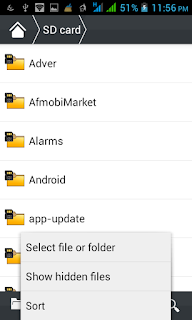
3.COPY THE FILES TO THE FOLDER YOUR CREATED
Copy the files youd want to hide to the folder you created and it will be hidden, take for instance pictures or videos you wouldnt like to be displayed in your gallery once they are moved to this folder you created it wont display there again
4. GO BACK TO STEP THREE IN ORDER NOT TO ALLOW PEOPLE ACCESS THOSE FILES FROM YOUR FILE EXPLORER
THATS ALL!!!!!!!!!!!!!!!!!!
Create a folder with a name youd like, and add "." before other characters along the file name and save.
example
file name is Document, then itd now become .Document
Your smartphone should notify you that the folder will be hidden
2. CLICK OPTION TO HIDE OR UNHIDE THE FOLDER
;
3.COPY THE FILES TO THE FOLDER YOUR CREATED
Copy the files youd want to hide to the folder you created and it will be hidden, take for instance pictures or videos you wouldnt like to be displayed in your gallery once they are moved to this folder you created it wont display there again
4. GO BACK TO STEP THREE IN ORDER NOT TO ALLOW PEOPLE ACCESS THOSE FILES FROM YOUR FILE EXPLORER
THATS ALL!!!!!!!!!!!!!!!!!!
Go to link Download

Sunday, November 27, 2016
HOW TO SET SHORTCUT KEY TO OPEN ANY APPLICATION IN START MENUE
HOW TO SET SHORTCUT KEY TO OPEN ANY APPLICATION IN START MENUE
Do you know that you can set shortcut to open any application in start menu. if not then read this post carefully. we can open any application in start menu or on desktop by pressing the shortcut key.

DONT FORGET TO SHARE WITH YOUR FRIENDS BY JUST 1 CLICK ON THE BELOW LINKS
Setting Shortcut Key To Any Application
- Now i am setting shortcut of ms office
- Click on the start menu and select the application which you want to set the shortcut. I an selecting the MS OFFICE now.
- Right click on the ms office and open its properties
- Now I want to set the shortcut as CTRL + SHIFT + P to MS office.
- In the properties window press CTRL + SHIFT + P and press apply button to save settings
- Now you can open your application by pressing your shortcut
DONT FORGET TO SHARE WITH YOUR FRIENDS BY JUST 1 CLICK ON THE BELOW LINKS
Go to link Download
Thursday, November 17, 2016
How to install any Games Apps on Chinese Mobiles
How to install any Games Apps on Chinese Mobiles
Hello everyone, this is already our third post hacerca Chinese mobile games or games like putting on a Chinese Mobile . Certainly you must have someone serve our previous post, but some not.

In the discussion that was generated in the post games for chinese phone, I found a very good contribution made by Kike RIOS, a visitor to our blog who gave us a solution that apparently it has worked for many of our users. Below step detail, the moment I do not own any catch since I have not a Chinese mobile to capture (if someone does please feel free to send screenshots to rinse the post), the steps are as follows :
1. Download the following ZIP file and unzip
 2. The SD OF CHINA FOR MOBILE folder contains the following folders, as shown in the following image:

3. Replace these folders on the SD Chinese cell, its SD memory had these folders, simply Let them create.
4. Restart the phone and type the following code: * # 66 * # , wait for a window, in that window you head out to where it says ECHO LOOP OR CYCLE ECO pressed key or turn ON (green button).
5. Out of the Ca pressing the logout button or cancel call.
6. Enter the following code: * # 220807 #. Done.
If the Chinese phone supports NES games, rest assured that the NES games appear in the SD. The games folder on the SD memory Mytrhoad / NES.
We hope this new tutorial serve them, are all supposed to learn from all this is a community, seek to have it be so, lets go! try all the tutorials, if they work do not forget to comment here so that everyone has the experience, if it did not work, lets discuss it like make and model of mobile to find out which makes you and which are not.
We expect them to behave when commenting, if I see any comments that do not benefit anyone will be deleted immediately, suffice to say that all comments have a huge folder, so are spent not writing swearing or insults, which never appear.
Remember that if this article helped you, help sharing it with friends on social networks, thanks.
In the discussion that was generated in the post games for chinese phone, I found a very good contribution made by Kike RIOS, a visitor to our blog who gave us a solution that apparently it has worked for many of our users. Below step detail, the moment I do not own any catch since I have not a Chinese mobile to capture (if someone does please feel free to send screenshots to rinse the post), the steps are as follows :
1. Download the following ZIP file and unzip
3. Replace these folders on the SD Chinese cell, its SD memory had these folders, simply Let them create.
4. Restart the phone and type the following code: * # 66 * # , wait for a window, in that window you head out to where it says ECHO LOOP OR CYCLE ECO pressed key or turn ON (green button).
5. Out of the Ca pressing the logout button or cancel call.
6. Enter the following code: * # 220807 #. Done.
If the Chinese phone supports NES games, rest assured that the NES games appear in the SD. The games folder on the SD memory Mytrhoad / NES.
We hope this new tutorial serve them, are all supposed to learn from all this is a community, seek to have it be so, lets go! try all the tutorials, if they work do not forget to comment here so that everyone has the experience, if it did not work, lets discuss it like make and model of mobile to find out which makes you and which are not.
We expect them to behave when commenting, if I see any comments that do not benefit anyone will be deleted immediately, suffice to say that all comments have a huge folder, so are spent not writing swearing or insults, which never appear.
Remember that if this article helped you, help sharing it with friends on social networks, thanks.
Go to link Download
Tuesday, November 8, 2016
How To Block Incoming Calls And SMS From Any Number
How To Block Incoming Calls And SMS From Any Number
Here at MobileTrickz.com, we all bloody hate the spam calls and text messages. Here is a way to block spam callers and stop all the spam messages on your Android device. Many Android users dont know how to block an incoming call from specific contact or number. Many time we get calls from unwanted peoples. There are many peoples who use android app to block calls. This apps are available on Google Play Store but these call block app for android devices consumes greater amount of battery, memory and RAM. So here is a way to block those calls with the help of a feature given by Android. In the next post I will explain how to block calls in Apple iPhone and other devices. List of best android call blocking app will be published in next post. So here we go!
Recommneded - Call Blocker - Best Call & SMS Blocker App For Android

How To Block Unwanted Calls
If you want to block spammers on your Android device, your best bet is to use in-built Reject List feature of Android. This trick works very well on Android devices (Gingerbread, Honeycomb, Ice cream Sandwich, Jelly Bean and Kitkat). If you own a smartphone other than Android, then you can use call blocking application. Here are the steps to block spam callers in Android.
Step 1 - First of all, unlock your device and open Contacts.
Step 2 - Find the contact which you want to block. If you want to block a number from call log, just go and open log, find that number.
Step 3 - Now tap and hold on that contact or number (long press). A small option box will be appear.
Step 4 - Tap on Add To Reject List

Recommended - Use Two Numbers Of WhatsApp In One Device
Best text message app for android - Click Here
These are the small steps which will completely block spammers from calling you. Comment below if you face any problem while using this method. As I mensioned earlier, I will suggest an app for blocking phone numbers on android. You too can ask me to suggest call block app for android! Let us know if you know any other new method. Keep visiting!
Go to link Download
Thursday, November 3, 2016
How to root any android smartphone Confirm Success QMOBILE VOICE GFIVE RIVO
How to root any android smartphone Confirm Success QMOBILE VOICE GFIVE RIVO
Rooting your Android Smartphone is now easier than ever. There are many methods available that can me applied to root your Android Smartphone easily but i found the most easiest way and most responsive way to root any android smartphone. Remember Rooting will just only void your warranty. So do if your warranty is gone. Otherwise stay away if you dont have kidneys to do that :p. Also remember you can also Unroot :D. This can be done with a USB data cable and a PC or Laptop and a software named iRoot for PC and Android.
This Software is in Chinese, but dont worry it will show you things in English while rooting.
Download VRoot for PC
iRoot apk download for Android
Download this one on your Android phone and install it. If there is a security message or apk is not parsing properly there might be compatibility issues or you have not downloaded files properly or the "Unknown sources" is not enabled from the settings. Enable it, Screen shots are below to help you. Or Go to Official iRoot/VRoot site:
Click for Official Site
How to Enable USb Debugging(Screen Shots):
How to Enable Unknown Sources:
After downloading these software on your PC/Laptop or your Android Smartphone respectively. Run the VRoot on your PC and let the things done for you. Connect your Android smartphone with your PC after enabling USB Debugging. This option can be found under developer Options in the settings app. Now run the iroot app from your android phone. After installation of VRoot on PC it will say to connect your device after enabling USB debugging. Do what it says and it will check your device. Now there will be an option of "ROOT" .Click that button and make sure your device is properly connected to the PC. This article was exclusively for GFive Bravo A2. Because i found that many users asking for rooting that phone and i have not found any tutorial for that guy. So i made it. I also rooted many others phone by this method, so dont worry about that it will not work for you. It will work :)


CAUTION:
Do not touch or disassemble the USB cable. If the Vroot stopped restart it. After clicking root let the software done everything for you. Wait and your device will restart. when it does you can see that it installed SuperSU apps on your smartphone. Congratulations you have enabled Super User permissions on your smartphone that companies block. Now do what you want to do with your Android Phone, i mean root softwares, Custom ROMS, new OS etc.
Please give a Google+ share and Facebook like. Also Tweet this if you liked. I will talk to you guys in the next article. :) Peace.
P.S: I will not be responsible if "You" have done anything wrong or if your Latest software update is not allowing or messing with your device after rooting or in process of rooting. this method is working on every device i tested and people reported. Thanks :)
This Software is in Chinese, but dont worry it will show you things in English while rooting.
Download VRoot for PC
iRoot apk download for Android
Download this one on your Android phone and install it. If there is a security message or apk is not parsing properly there might be compatibility issues or you have not downloaded files properly or the "Unknown sources" is not enabled from the settings. Enable it, Screen shots are below to help you. Or Go to Official iRoot/VRoot site:
Click for Official Site
How to Enable USb Debugging(Screen Shots):
 |
| Number 1 |
 |
| Number 2 |
 |
| Number 3 |
 |
| Number 4 |
How to Enable Unknown Sources:
 |
| Unknown Sources 1 |
 |
| Unknown sources Number 2 |
After downloading these software on your PC/Laptop or your Android Smartphone respectively. Run the VRoot on your PC and let the things done for you. Connect your Android smartphone with your PC after enabling USB Debugging. This option can be found under developer Options in the settings app. Now run the iroot app from your android phone. After installation of VRoot on PC it will say to connect your device after enabling USB debugging. Do what it says and it will check your device. Now there will be an option of "ROOT" .Click that button and make sure your device is properly connected to the PC. This article was exclusively for GFive Bravo A2. Because i found that many users asking for rooting that phone and i have not found any tutorial for that guy. So i made it. I also rooted many others phone by this method, so dont worry about that it will not work for you. It will work :)
CAUTION:
Do not touch or disassemble the USB cable. If the Vroot stopped restart it. After clicking root let the software done everything for you. Wait and your device will restart. when it does you can see that it installed SuperSU apps on your smartphone. Congratulations you have enabled Super User permissions on your smartphone that companies block. Now do what you want to do with your Android Phone, i mean root softwares, Custom ROMS, new OS etc.
Please give a Google+ share and Facebook like. Also Tweet this if you liked. I will talk to you guys in the next article. :) Peace.
P.S: I will not be responsible if "You" have done anything wrong or if your Latest software update is not allowing or messing with your device after rooting or in process of rooting. this method is working on every device i tested and people reported. Thanks :)
Go to link Download
Tuesday, November 1, 2016
How To Download Any Paid Android App For FREE
How To Download Any Paid Android App For FREE

DOWNLOAD HERE
Go to link Download
Monday, October 31, 2016
How To Can Unlock Any Modem
How To Can Unlock Any Modem

Are you interested in the Huawei Unlocking Softwares, if yes is the case,you are welcome to my blog.
If you are using 3G modem that has been locked and you will like to be using it with other SIM card of other network, such as MTN, GLO, ETISALAT etc.Well, you can easily unlock it and turn it to a Universal 3G modem.
Most 3G modems including MTN Fastlink, Glo 3G Dongle, Zain Data Card are all locked to the network of their providers.If for example you are using MTN Fastlink modem and there is network problem, You will not be able
to access the internet at all because you will not be able to use any other SIM card with your modem.
to access the internet at all because you will not be able to use any other SIM card with your modem.
There are many software out there, you can use to unlock your 3G modem and turn it to universal modem.This will help you a lot, in the sense that it will enable you to use the modem with any network you want.It will
also help you to spend less by buying modems of other network providers separate by separate.
also help you to spend less by buying modems of other network providers separate by separate.
ALERT: You can now unlock the modems with these software.
If you really want to start making money unlocking phones and modem for others, then, you can buy any of the two but if you just want to unlock your own modem, it won’t make sense because of the price tags.
How Do I Unlock Modems?
To unlock your modem, the unlocker will required the IMEI number of your modem.Your IMEI number is at the paper pack of your modem, if you bought it new or if you bought it as second hand use and don’t know the IMEI number, the software can “AUTODETECT “ if the modem is connected to the unlocking box.
Once you supply the IMEI number to the unlocking box or you connect your modem to it,it will generate your unlocking code for you.Once you have your unlocking code at hand, please kindly save it or write it down somewhere.
After that,insert Another Sim Card of the other network you will surprise for what you will see and it will provide service for you,once you have already unlock your modem and turn it to universal modem. you will also prompted with a bar to fill in the Unlocked code .Just input the Unlock code and that is it.
Please remember that software will give 10 chances to input the unlock code and if you put wrong codes within 10 times attempt, the modem will lock forever, so try to put the right code and you will successful and okay.
Thereafter, you can be inserting any SIM card of any network you want to use. All you have to do is to create a new profile and input the setting for the network and connect to internet.
There is no side effect at all, so don’t afraid of trying new things, just go ahead and you have nothing to loss but to grab more knowledge and wisdom.
If you have Huawei modem that you will like to unlock,get the IMEI number and paste it in the comment form on my blog, then I will calculate the unlock code for you and reply you using the comment form too but if
you do not use the comment form on my blog (www.just4bloggers.blogspot.com), I might keep still .So, kndly adhere to the instruction.
you do not use the comment form on my blog (www.just4bloggers.blogspot.com), I might keep still .So, kndly adhere to the instruction.
UPDATE: If you are in need of QUICK SERVICE to unlock your modem for you, just TEXT ME your IMEI number to 08091996286/07066807379 along the line with N400 airtime preferable MTN Voucher and I will reply you with your code but if you think you can’t afford the airtime, just paste it on my blog and I will reply to you at my convenient time.
Dear my follow Friends and well wishers, this is an opportunity to start making more money in your street or anywhere you are around the country.many people out there are in need of these services and will be ready to pay you to do it for them.
Please Friends, if you need the software or you want “DO IT YOURSELF KIT”. I can only charge you just N1000 only and send you the download link,so you can download, read it and digest it.Please do not hesitate to contact me,
arrangement can be made just HIT Me On 08091996286.
arrangement can be made just HIT Me On 08091996286.
How To Create Profiles For MTN, Glo, Zain and Etisalat?
After unlocking your modem, you will need to create new profiles for other networks you want to connect to via the unlocked modem..
To do this, click on “Tools” then “Options” under which you will now select “Profile Management”.
Under “Profile Management“, click on ‘New” and fill in the following for each network you want to setup as shown in the picture below
For MTN
Profile Name: MTN
APN: web.gprs.mtnnigeria.net
Username : web
Password : web
Profile Name: MTN
APN: web.gprs.mtnnigeria.net
Username : web
Password : web
For Globacom
Profile Name: Glo
APN: gloflat
Username : :flat
Password : flat
Profile Name: Glo
APN: gloflat
Username : :flat
Password : flat
For Zain
Profile Name: Zain
APN: internet.ng.zain.com
Username : internet
Password : internet
Profile Name: Zain
APN: internet.ng.zain.com
Username : internet
Password : internet
For Etisalat
Profile Name: Etisalat
APN: etisalat
Username :web (you can also leave it blank)
Password : web (you can also leave it blank)
Profile Name: Etisalat
APN: etisalat
Username :web (you can also leave it blank)
Password : web (you can also leave it blank)
Once you’re done creating the profile, click Save to save the settings, then New if you want to set up another network.
When you’re through setting up the networks, go back to the Connection page, select the network you want to browse with, from the drop down box, then click connect.
If everything was setup properly without any mistake, you should be able to get connected to the Internet unless the network is messing up at that point in time.
Hope You Find the Info Useful….
Go to link Download
Sunday, October 30, 2016
How i Rooted my Tecno N7 Root any Chinese Android running Android 4 0 ICS 4 1 JB
How i Rooted my Tecno N7 Root any Chinese Android running Android 4 0 ICS 4 1 JB
Here’s an easy to follow tutorial on how to root any Chinese Android device you got there. It uses the rooting script Root_with_Restore_by_Bin4ry, which you can find at XDA. This is confirmed working for any MediaTek MT6577 devices running Android 4.0 or up, even devices with the dual core Qualcomm S4 procie can be rooted by this as long as it is on Android 4.x.
I first tested it on rooting a Cherry Mobile Titan, and it works. On this tutorial, I had used the method on my HDC Galaxy Note 2.
First, you need to properly install the ADB drivers. To do that, you must download and install first an app called Moborobo. Link here.
After installing the app, on your phone, enable USB Debugging by going to Settings > Development.
Connect your device and open the Moborobo app. Moborobo will attempt to install the necessary drivers. Just allow it to do the changes on your computer and if it succeed, you’ll see something like this:

Moborobo can read your connected Android device
You can now exit Moborbo. Be sure to close it completely and not just minimize it on the system tray.
Download this file. Root_with_Restore_by_Bin4ry_v18_2.7z
It is the rooting script. Extract it anywhere. You’ll something like this:
 Root_with_Restore_by_Bin4ry_v18_2.7z
Execute the RunMe.bat file if you are on Windows. A command prompt will open.

Root with Restore by Bin4ry
Just enter 1 as your option. It will now do its task. You’ll now see something like this on your device. Click restore and wait for the process to finish.

Restore data, ignore that encryption password thing
While on the command prompt window, you’ll see this:

rooting….
Your device will restart, and if you see the SUPER SU icon on your apps drawer it means that you had successfully rooted the phone.

SUPER SU
Checking root access with the Root Checker App:

Rooted HDC Galaxy Note 2 PRO
It is really easy on these Android 4.x devices now. I just posted this so I can just use this as reference for the queries on how to root such Chinese-made Android smartphones. While on lower version of Android, such as 2.3.6 Gingerbread, its a bit tricky as it needs some hacking with the boot.img if the SuperOneClick or UnlockRoot doesnt works. We’ll cover that up on the next update.
As they say, rooting voids the warranty but it depends on where did you buy your Android phone. Root only when you think you really have to and already know why you need to do that. On the other note, this process isnt risky and there is nothing to fear in case you messed up with the steps. Still, do this at your own risk.
If you dont want to miss anything on Stalyfblog, please like us on Facebook. and follow us on Twitter
You can also Subscribe to our updates by email or with your favorite browser. This way, you wont miss any updates from stalyfblog. If you subscribe by email, make sure to check your email to confirm your subscription.
Posted By: Oke David Umurhohwo.
Follow me on Google+, Twitter.
Cheers!
Go to link Download
Sunday, October 23, 2016
How to make a Bootable USB to install any OS See method Here
How to make a Bootable USB to install any OS See method Here
Make Bootable USB and install any Operating System:

In order to install an OS download the software from below link. You can use both USB bootable makers, but for installing Windows 10 i recommend to use Rufus USB installer.
Download Universal Bootable USB maker
Download Rufus Bootable USB maker
Caution:
In order to make your USB Bootable to install any Operating system on it such as Linux, Android, Windows, Ubuntu or any other OS with your USB you have to save your data if it is on USB. Because making a bootable USB needs to format the Flash storage/USB. First save your data.Now after downloading software from the link above insert a USB/Flash drive with your PC/Laptop. Make sure you have downloaded desired OS files you want to install should be present on your PC/Laptop. Now run the Software, actually, there is no need to install the software it will run when you double tap the downloaded application. Now locate the downloaded files of OS on the hard drive. Choose what is your OS type, mean which OS you want to install either it is Android or it is Windows or Linux. Now start the process and it will tell you to store your data because Flash drive has to be formatted. Now start the process. It will take some time to complete. Sit and relax until the process is complete. Now there will be a message of completion. Your USB is ready now to install new OS on your PC. You can now install any OS with that method. :)
 |
| 1 |
 |
| 2 |
 |
| 3 |
 |
| 4 |
 |
| 5 |
 |
| 6 |
 |
| 7 |
Go to link Download
Tuesday, October 11, 2016
HOW TO INSTALL ANY JAR APPS GAMES ON YOUR BLACKBERRY EASILY
HOW TO INSTALL ANY JAR APPS GAMES ON YOUR BLACKBERRY EASILY
Blackberry Phones do not allow its User to Make use of their Lovely Java Applications on their Blackberry, Example is you having a lovely Game or Application on your Java Phone and you want Something like that on Java, with this Scope we are about to Unleash for you Guys, You can now Enjoy all your Java Apps on your Blackberry Phones without any Barrier.
If you are using OTA files {Downloading via Online on your PC} then there won’t be much trouble installing it as you can use your Blackberry Desktop Software for such files but if you are using non-OTA files then the procedure is little different. Follow the simple steps given below to install .jar files in your blackberry phone. This method works for all Blackberry Bold models and few other models.

1. Download the .JAR file to your PC
2. Connect your Blackberry to your PC via USB cable.
3. Copy the .jar file which you want to install on your BB.
4. Open “My Computer” >> Find your BlackBerry device in the list of drives.
5. Paste the file either into the root of Blackberry or in a subfolder
6. Remove your Blackberry from USB cable and Scroll to the “Media” icon on your BB device.
7. Click on the “Media” icon to launch it then Press the menu button and select “Explore”
8. Locate the .JAR file either on the device memory or memory card >> Click the file, and it should prompt you to download (install)
13. Click “Download” and your app will be installed, Now go to the “Downloads” folder and you can see the installed app there.
Thats All... Enjoy & Dont Forget to Click on the LIKE Button.
Thanks to Naijaloaded for this tutorial
Go to link Download
How to download Install Pokemon Go For iOS Android In Any Region
How to download Install Pokemon Go For iOS Android In Any Region
Pokémon Go is everywhere, and thats no accident! Its a fun, free game thats accessible to anyone, in any city. But getting started with the game takes a bit of setup, let us see How to download and install Pokémon
Downloading Pokémon Go is easy! Some Android phones may see different login options or icon placements depending on the type of device, but these instructions should apply to most people.
Note: If youre on a computer, you can skip steps 1-3 by downloading Pokémon Go directly from the Google Play Store in your browser.
1) Tap on Play Store icon. This will be on your home page or in your app drawer.
2) Tap the search bar. Type pokemon go.
3) Tap Install button.
4) Once download, tap Pokémon Go icon on home screen or app drawer.
5) Tap accept on four permissions (Android 6.0+ only).
6) Tap Sign up with Google. If there is more than one account, choose primary account.
7) Enter birth date (if applicable).
8) Accept terms and conditions.
9) Proceed through style selection.
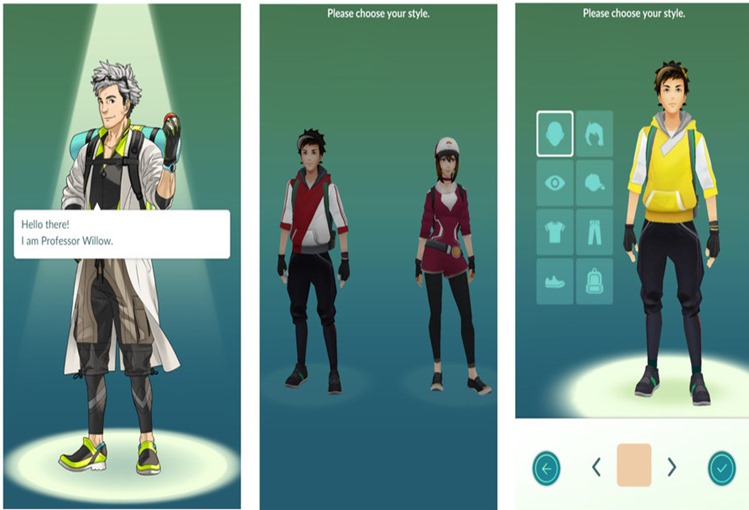
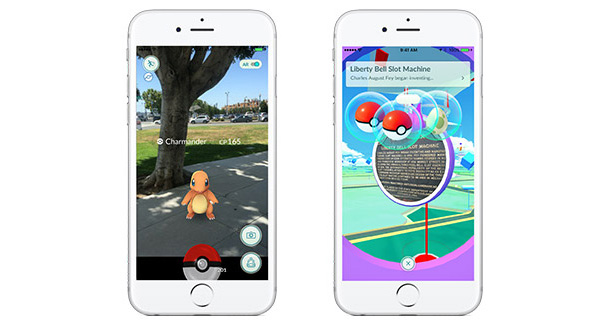
Once youve chosen your character and style, you have to choose your first Pokémon! There are three choices: Bulbasaur, Squirtle, or Charmander.
1) Tap on your starter Pokémon.
2) Enable camera for AR.
3) Flick PokéBall towards Pokémon.
3) Capture Pokemon. Celebrate!
Thats it! Now youre ready to start walking around and levelling up your character.
You can see my another post about Best offline Android application games . Have you still any question suggestion about the article or about the blog please feel free to contact us.
How to download and install Pokémon Go from the Play Store
Downloading Pokémon Go is easy! Some Android phones may see different login options or icon placements depending on the type of device, but these instructions should apply to most people.
Note: If youre on a computer, you can skip steps 1-3 by downloading Pokémon Go directly from the Google Play Store in your browser.
1) Tap on Play Store icon. This will be on your home page or in your app drawer.
2) Tap the search bar. Type pokemon go.
3) Tap Install button.
4) Once download, tap Pokémon Go icon on home screen or app drawer.
5) Tap accept on four permissions (Android 6.0+ only).
6) Tap Sign up with Google. If there is more than one account, choose primary account.
7) Enter birth date (if applicable).
8) Accept terms and conditions.
9) Proceed through style selection.
How to download and install Pokémon Go! iOS
The process for downloading Pokemon Go on iOS is very similar in that you need to create a US-based iTunes account and then connect to the US App Store.
And we’re done. Just remember, folks – you’ve gotta catch ’em all!
Update x1: Germany is now the first country in Europe to get Pokemon Go. The game is now available on German version of both Play Store and App Store.
Update x2: The game is now officially live in Canada, 26 more countries in the Europe, including Spain, Portugal and Italy, the UK, and more
How to get started playing Pokemon Go
Once youve chosen your character and style, you have to choose your first Pokémon! There are three choices: Bulbasaur, Squirtle, or Charmander.
1) Tap on your starter Pokémon.
2) Enable camera for AR.
3) Flick PokéBall towards Pokémon.
3) Capture Pokemon. Celebrate!
Thats it! Now youre ready to start walking around and levelling up your character.
> How to save your battery while playing Pokémon Go
You can see my another post about Best offline Android application games . Have you still any question suggestion about the article or about the blog please feel free to contact us.
Go to link Download
Saturday, October 1, 2016
How to Find Serial key of any software
How to Find Serial key of any software

Step 1 to Find Serial key of any software:
1.Go to google.com.2.Type 94fbr on google search and software name for which you want serial key.
3.After typing software name click enter you will get following results.

You can use this trick to get serial key of any software.
Step 2 to Find Serial key of any software:
There is a software called Universal Keygen generator which allows you to Generate serial key of almost any software and to use it.
Download Universal keygen generator
Step 3 to find serial key of any software:
We have created a list of best websites to find serial keys of any software for users so that if they still havent found what they looking for they can use the list of top websites to find serial keys to activate their softwareTop websites to find serial keys of any software
Go to link Download
Wednesday, September 28, 2016
How to Opt Out of Any MTN Annoying Subscription Deducting Your Airtime
How to Opt Out of Any MTN Annoying Subscription Deducting Your Airtime
Information is power… even if it’s just the power of a dot that you know. MTN have been deducting a lot of people’s airtime without them knowing what they subscribed for. Some people every week while some every day and you can bear me witness that this can be so annoying. Some of us even subscribed to some MTN services you don’t know anything about only to discover that anytime your recharge, N50 is been deducted from your account.

All thanks to credible information and I’m going to show you how to opt out of annoying deduction from any MTN services you’ve subscribed to.
How Can I Opt Out From All MTN subscription?
>>Dial the code *123*5*1# and reply with 2 to see your active subscriptions
>>Reply with the serial number of each active subscription shown and that you want to opt out from
>>Reply with 1 to unsubscribe
If you have multiple active subscriptions, then repeat the process and select any active subscriptions to unsubscribe from.
It’s easy and fast. Anytime you notice any unhealthy deduction from your account, quickly check to see that you’ve cancels all active subscription.
Go to link Download
Sunday, September 25, 2016
How to run Android apps on any laptop or desktop
How to run Android apps on any laptop or desktop

Android Runtime for Chrome (or ARC, for short) is a software package that lets users run Android apps inside their web browsers.
Android has a large, vibrant ecosystem of applications. From Heartstone to Plex to Twitter, Google Play is home to over 1.5 million mobile apps, according to AppBrain.
Wouldnt it be great to run all these apps on your computer, too? Now you can, thanks to Android Runtime for Chrome.
What is Android Runtime for Chrome?
Simply put, Android Runtime for Chrome (or ARC, for short) is a software package that lets users run Android apps inside their web browsers.
Google announced ARC last summer, and initially designed it with Chromebooks in mind. The idea was to bring popular Android apps to Chrome OS, which is still largely limited to running web apps. And while many popular services, like Instagram, have Android apps, not everyone offers a full-featured web-app equivalent. This fact alone made ARC a potential boon for Chromebook owners.
